---
title: "Configure a Product XML Feed: Template and Basic Options"
description: Configure a WooCommerce product XML feed template with shortcodes, and set its basic output options.
url: "https://wpfactory.com/docs/feed-1-xml-setup/"
updated: "2026-09-27"
category: How to
tags:
- Product XML Feeds for WooCommerce
---
# Configure a Product XML Feed: Template and Basic Options
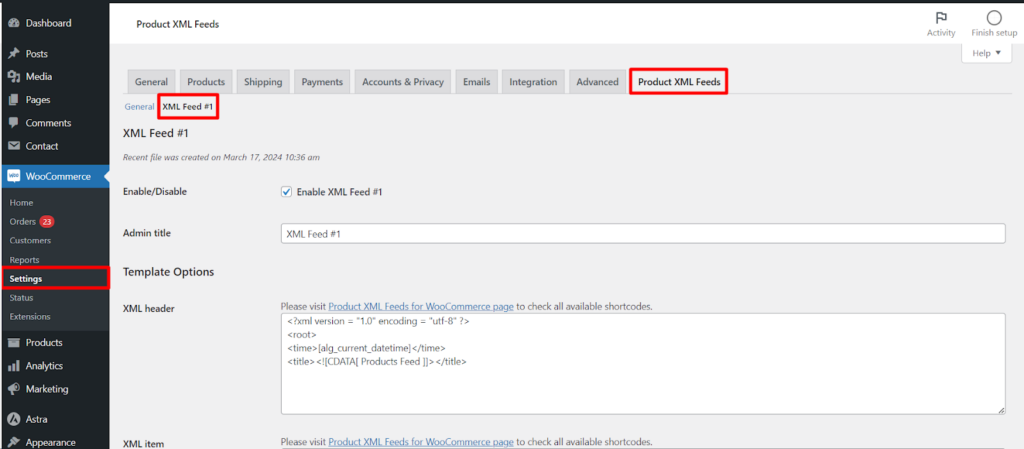
To configure a feed's template in Product XML Feeds Manager for WooCommerce, go to WPFactory > Product XML Feeds and open the feed's section, for example XML Feed #1. Turn the feed on with Enable/Disable, add an Admin title, and define the XML structure in the XML header, XML item, and XML footer fields using the shortcode picker.
Go to **WPFactory > Product XML Feeds** (also reachable at **WooCommerce > Settings > Product XML Feeds**) and open the feed's section, for example **XML Feed #1**.
[](https://wpfactory.com/wp-content/uploads/pasted-image-0-6-2.png)
### Enable/Disable and Admin title
- **Enable/Disable** (`alg_products_xml_enabled_1`, default Yes): turns this feed on or off. A disabled feed is not scheduled or generated.
- **Admin title** (`alg_products_xml_feed_title_1`): a label shown only in the admin, so you can tell feeds apart (for example "Google Shopping"). It does not appear in the feed file.
### Template Options
These four fields define the XML structure. Click inside any template field to open the built-in shortcode picker and search 50+ product shortcodes.
- **XML header** (`alg_products_xml_header_1`): the opening of the file. The default declares the XML version and a `` wrapper with a timestamp and title.
- **XML item** (`alg_products_xml_item_1`): the block repeated for every product, built from shortcodes such as `[alg_product_name]`, `[alg_product_price]` and `[alg_product_image_url]`.
- **Variation XML item** (`alg_products_xml_variation_item_1`): a separate block used for variations. It only applies when **Variable products** is set to **Both variable and variations products**.
- **XML footer** (`alg_products_xml_footer_1`): the closing of the file, by default ``.
### Hide XML tags if empty
`alg_products_xml_tags_if_empty_1` lets you drop tags that would otherwise be empty. Enter the tag names, comma separated (for example `stock, sku`). When a product has no value for that tag, the plugin removes the empty `` pair from the output so the file stays clean.
### Create text feed
**Create text feed** (`alg_products_xml_create_text_feed_1`) outputs a plain-text file alongside the XML, using the **Text item** template. This is a **Pro** feature: the checkbox is disabled on the free version.
| Setting | Option ID | Default | Free/Pro |
| --- | --- | --- | --- |
| Enable/Disable | `alg_products_xml_enabled_1` | Yes | Free |
| Admin title | `alg_products_xml_feed_title_1` | XML Feed #1 | Free |
| Template fields (header, item, variation item, footer) | `alg_products_xml_header_1` and related | Sample template | Free |
| Hide XML tags if empty | `alg_products_xml_tags_if_empty_1` | Empty | Free |
| Create text feed | `alg_products_xml_create_text_feed_1` | No | Pro |
For the full list of shortcodes you can use inside these templates, see the [Shortcodes for generating XML fields](https://wpfactory.com/docs/product-xml-feeds-manager/) reference. When you are done, click **Save changes**.
### Get more from your feeds
Building and editing feed templates is free. [Product XML Feeds Manager for WooCommerce](https://wpfactory.com/item/product-xml-feeds-woocommerce/) Pro adds unlimited feeds, text feeds, and advanced product filtering. [See what Pro unlocks](https://wpfactory.com/item/product-xml-feeds-woocommerce/).
Related articles
- [How to Add WooCommerce Brands to a Product XML Feed](https://wpfactory.com/docs/xml-feed-woocommerce-brands/)
- [How to Create a WooCommerce Product XML Feed: Getting Started](https://wpfactory.com/docs/intro-how-to-use-woocommerce-product-xml-feeds-manager/)
- [General Settings for a WooCommerce Product XML Feed](https://wpfactory.com/docs/product-xml-feed-setup/)
- [Filter Products and Schedule a Product XML Feed](https://wpfactory.com/docs/feed-1-advanced-setup/)
- [Advanced Options for Product XML Feeds](https://wpfactory.com/docs/xml-feeds-setup/)
[](https://wpfactory.com/item/product-xml-feeds-woocommerce/)