---
title: How to Format Tab Content with HTML Paragraph Tags
description: Format WooCommerce custom tab content with HTML paragraph tags so line breaks do not collapse into one block.
url: "https://wpfactory.com/docs/format-product-tab-content-paragraphs/"
updated: "2026-09-25"
category: How to
---
# How to Format Tab Content with HTML Paragraph Tags
## Keep line breaks in your tab content
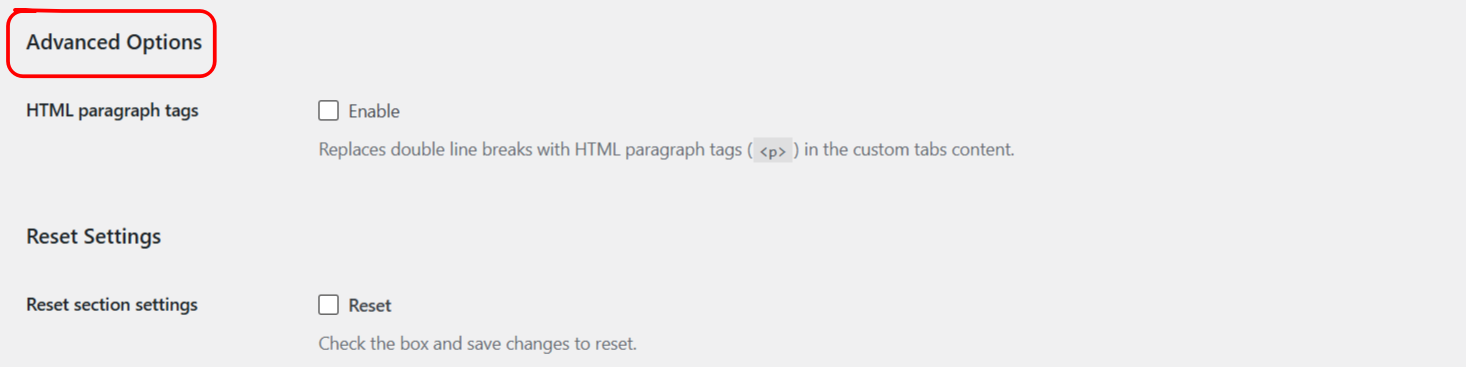
By default, custom tab content in [Additional Custom Product Tabs for WooCommerce](https://wpfactory.com/item/product-tabs-for-woocommerce-plugin/) is output exactly as you enter it, so plain line breaks can collapse into one block of text on the product page. The **HTML paragraph tags** option fixes this by wrapping paragraphs automatically. This setting is free and was added in version 1.7.2.
### Turn it on
1. Go to **WPFactory > Product Tabs** (also reachable at **WooCommerce > Settings > Product Tabs**).
2. On the **General** section, find **Advanced Options**.
3. Enable **HTML paragraph tags** and save.
### What it does
| Label | Option ID | Default |
| --- | --- | --- |
| HTML paragraph tags | `alg_wc_product_tabs_wpautop` | No |
When enabled, the plugin runs your tab content through the same WordPress formatting that post content uses, so a double line break becomes a `` paragraph and single line breaks become `
`. It applies to custom tab content across the global, per-product and variation tabs.
### When to leave it off
If you write your tab content as full HTML already, with your own `
` and `
` tags, leave this off to avoid extra paragraph wrapping around your markup.
### Get more control
This option is free. [Additional Custom Product Tabs for WooCommerce](https://wpfactory.com/item/product-tabs-for-woocommerce-plugin/) Pro adds unlimited global and per-product tabs to hold your formatted content. [See what Pro unlocks](https://wpfactory.com/item/product-tabs-for-woocommerce-plugin/).
Related articles
- [Troubleshooting Shortcodes and Content in Product Tabs](https://wpfactory.com/docs/pro-version-tips/)
- [How to Show or Hide a Product Tab by Product or Category](https://wpfactory.com/docs/show-hide-product-tabs-by-product-category/)
- [How to Reset a Product Tabs Settings Section](https://wpfactory.com/docs/reset-product-tabs-settings/)
- [How to Create Multilingual Product Tabs with WPML or Polylang](https://wpfactory.com/docs/multilingual-product-tabs-wpml-polylang/)
- [How to Display Dynamic Product Data in a Tab](https://wpfactory.com/docs/display-dynamic-product-data-in-tabs/)