---
title: Show Product Cost and Profit with Shortcodes
description: "Show WooCommerce product cost and profit anywhere with shortcodes: enable them first, then use the shortcode reference and attributes."
url: "https://wpfactory.com/docs/product-shortcodes-cost/"
updated: "2026-09-27"
category: How to
tags:
- Cost of Goods
---
# Show Product Cost and Profit with Shortcodes
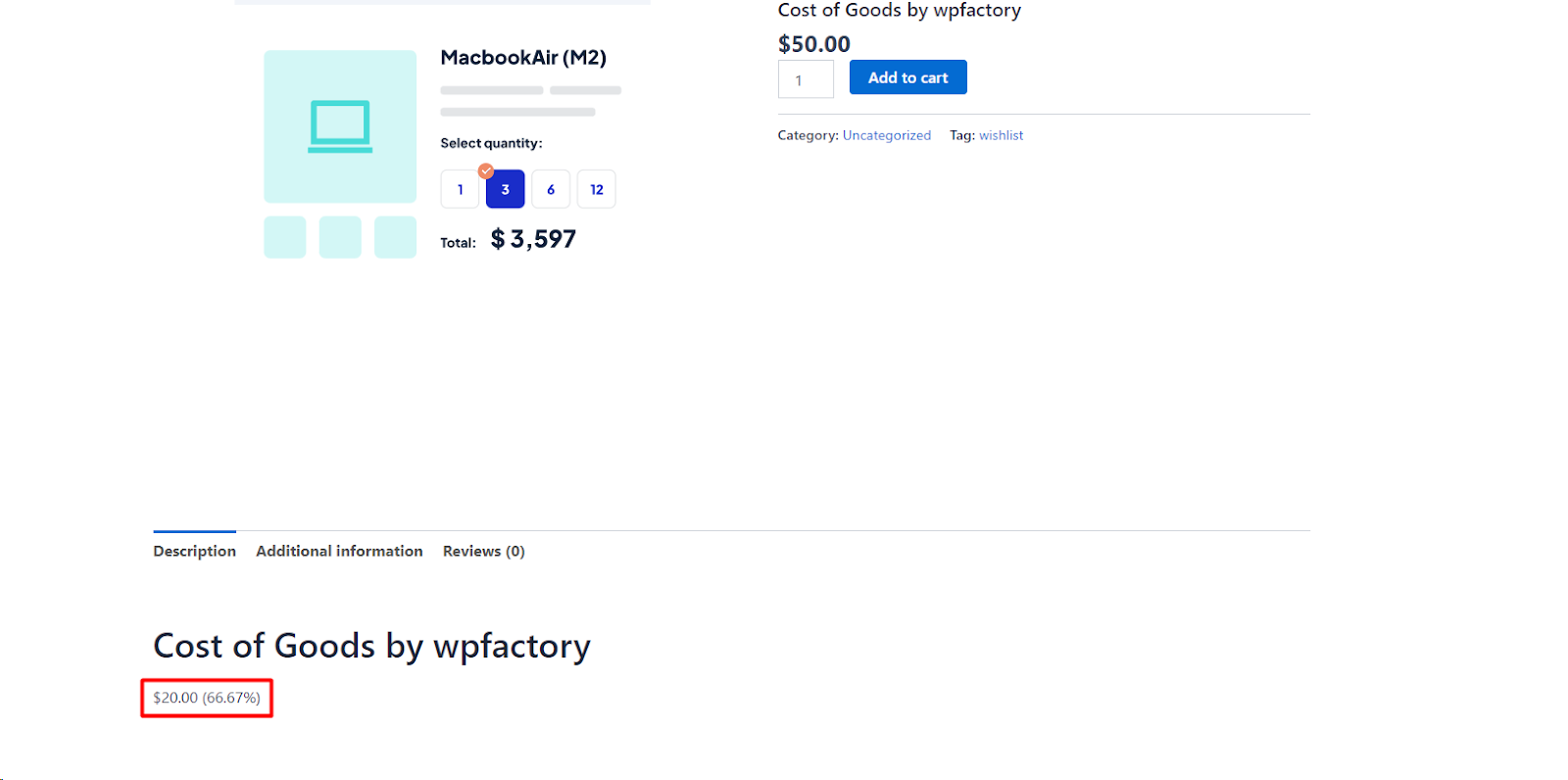
To show a product's cost or profit on any page, turn on the `[wpfcogs_product_cost]` and `[wpfcogs_product_profit]` shortcodes in [Cost of Goods: Product Cost & Profit Calculator for WooCommerce](https://wpfactory.com/item/cost-of-goods-for-woocommerce/) at **WPFactory > Cost of Goods > Shortcodes**, then paste them where the value should appear. Both shortcodes are free.
## Step 1: Enable the shortcodes first
Both shortcodes are off by default. Until you switch one on, the page prints the shortcode tag itself as plain text, for example `[wpfcogs_product_cost]`, instead of a value.
1. Go to **WPFactory > Cost of Goods** (also reachable at **WooCommerce > Settings > Cost of Goods**).
2. Open the **Shortcodes** sub-tab.
3. In the **Product shortcodes** group, tick **[wpfcogs_product_profit]** ("Displays the product profit") and/or **[wpfcogs_product_cost]** ("Displays the product cost").
4. Click **Save changes**.
## Step 2: Use the shortcodes
Place either shortcode where you want the value to appear:
```
[wpfcogs_product_cost]
[wpfcogs_product_profit]
```
With no `product_id`, each shortcode reads the current product (for example on a single product template). To target a specific product, pass its ID:
```
[wpfcogs_product_cost product_id="123"]
```
To show the profit margin instead of the markup percentage, change the profit template:
```
[wpfcogs_product_profit profit_template="%profit% (%profit_margin%)"]
```
## Shortcode reference
| Shortcode | Enable option | Default | Shows |
| --- | --- | --- | --- |
| `[wpfcogs_product_cost]` | `alg_wc_cog_shortcode_product_cost` | Off | The product cost. |
| `[wpfcogs_product_profit]` | `alg_wc_cog_shortcode_product_profit` | Off | The product profit. |
### Attributes
- `product_id`: the product to read. If empty, the current product is used.
- `html_template`: the wrapper HTML. Default for cost is `{content}`; default for profit is `{content}`. The `{content}` token is replaced by the value. Use the CSS classes to style the output.
- `profit_template` (profit only): the value format. It defaults to your **Profit HTML template** setting (Products sub-tab), which is `%profit% (%profit_percent%)` out of the box. Placeholders: `%profit%`, `%profit_percent%`, `%profit_margin%`.
## What the values mean
- **Profit** is the product price minus its cost. The price comes from **Products > Get price method**, which defaults to **Get price excluding tax**.
- `%profit_percent%` is profit divided by cost (markup). `%profit_margin%` is profit divided by price.
- The cost is formatted as a store price, using the **Cost decimals** setting in the Products sub-tab.
- For a variable product, both shortcodes show a range from the lowest to the highest variation value when the variations differ. A variation with no cost of its own uses the parent product's cost.
- The shortcodes do not check who is viewing. Anyone who can see the page sees the number, so place them only in content meant for that audience.
## If it does not work
- **The tag appears as text:** the shortcode is not enabled in the Shortcodes sub-tab.
- **Nothing appears:** the shortcode is outside a product and has no `product_id`, or the ID is not a product. On a normal page, always pass `product_id`.
- **The cost shows 0:** the product has no cost saved in its Cost field.
- **A deprecation notice appears:** you are using an old tag name (see below).
## Using the old shortcode names
The tags `[alg_wc_cog_product_cost]` and `[alg_wc_cog_product_profit]` were renamed in v4.1.6. They still work but now trigger a deprecation notice, so update any templates to the `wpfcogs_` names above.
## FAQ
### Are the cost and profit shortcodes free?
Yes. Both shortcodes and their settings are part of the free version.
### Can I show the cost of a product on a different page?
Yes. Add `product_id` with the product's ID, for example `[wpfcogs_product_cost product_id="123"]`.
### Does the profit include tax?
Only if you set **Get price method** to **Get price including tax**. By default the price used is excluding tax.
## Related guides
- [Product Cost and Profit Shortcodes Reference](https://wpfactory.com/docs/unlocking-real-profits-with-product-shortcodes/)
- [Add a Product Profit Column to the Admin Products List](https://wpfactory.com/docs/add-profit-column/)
- [Add a Product Cost Column to the Admin Products List](https://wpfactory.com/docs/add-cost-column/)
### Get more from Cost of Goods
These shortcodes are free. [Cost of Goods: Product Cost & Profit Calculator for WooCommerce](https://wpfactory.com/item/cost-of-goods-for-woocommerce/) Pro adds cost and profit across WooCommerce Analytics, order emails and more. [See what Pro unlocks](https://wpfactory.com/item/cost-of-goods-for-woocommerce/).
Need a hand? Our team answers every ticket on the [Cost of Goods support forum](https://wpfactory.com/support/item/cost-of-goods-for-woocommerce/).
Related articles
- [Show Order Cost and Profit in Admin New Order Emails](https://wpfactory.com/docs/enhance-order-emails/)
- [Cost and Profit Show Zero or Outdated on Existing Orders](https://wpfactory.com/docs/cog-not-applied-existing-orders/)
- [Track Product Cost History with the Cost Archive](https://wpfactory.com/docs/product-cost-history-archive/)
- [Import Product Costs From Another Meta Key](https://wpfactory.com/docs/import-product-costs-from-meta/)
- [Import and Export Product Costs via CSV](https://wpfactory.com/docs/import-export-product-costs-csv/)
[](https://wpfactory.com/item/cost-of-goods-for-woocommerce/)