---
title: Show Order Status History on the My Account Page
description: "Show each order's status history on the WooCommerce My Account Orders page so customers can track progress."
url: "https://wpfactory.com/docs/setting-myaccount-tab/"
updated: "2026-09-27"
category: How to
tags:
- Automated Order Status Controller for WooCommerce
---
# Show Order Status History on the My Account Page
To show each order's status history on the WooCommerce **My Account > Orders** page, use [Scheduled & Automatic Order Status Controller for WooCommerce](https://wpfactory.com/item/order-status-rules-for-woocommerce/). Go to **WPFactory > Order Status Rules > My Account**, tick **My Account > Orders**, choose a position and save. The feature is free.
Order Status Rules records every status change on the order, so shoppers can track progress themselves, and the My Account options display that history in a format you control.
## Where to find it
Go to **WPFactory > Order Status Rules** (also reachable at **WooCommerce > Settings > Order Status Rules**) and open the **My Account** section.
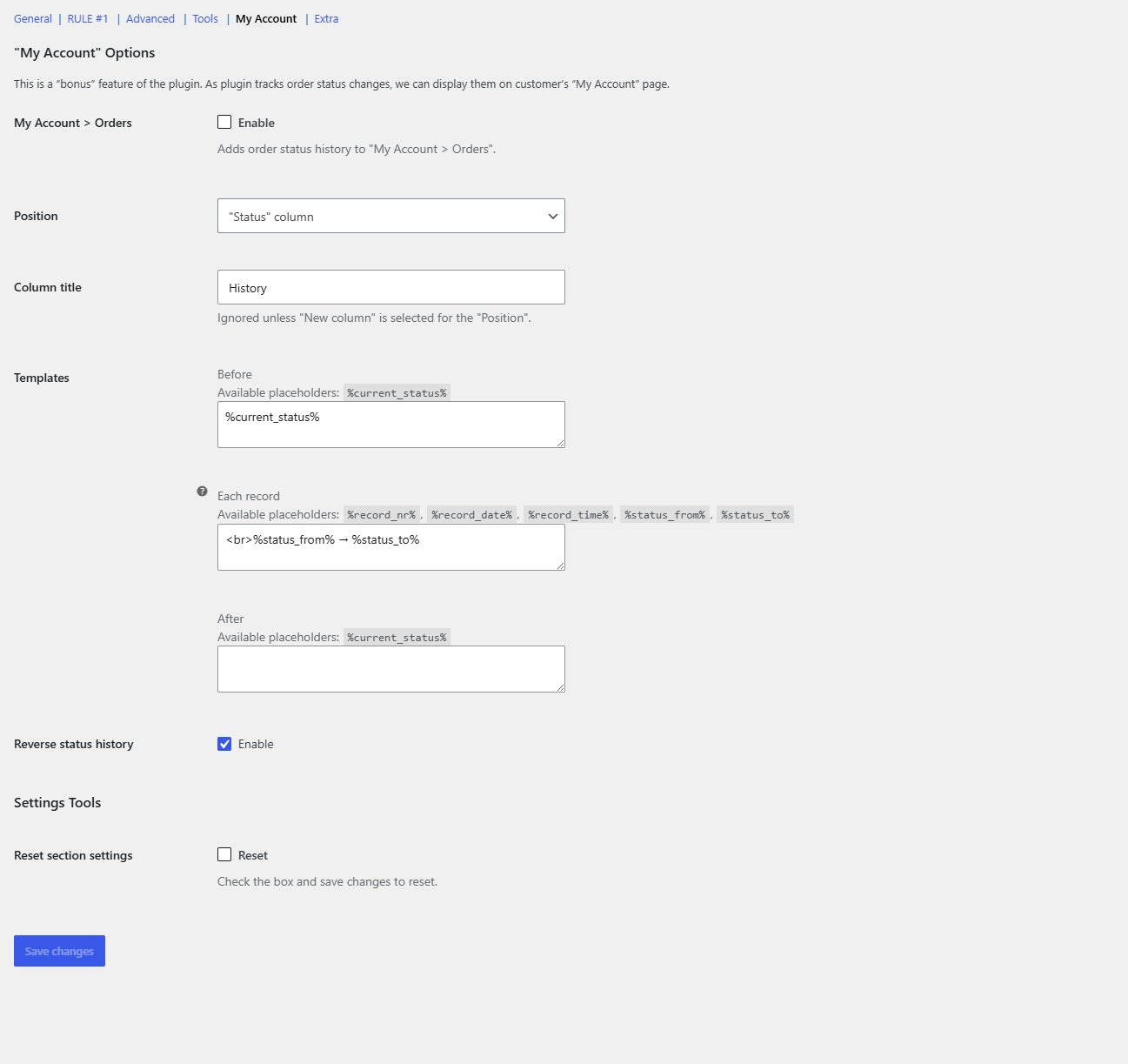
## Options
| Label | Option ID | Default |
| --- | --- | --- |
| My Account > Orders (Enable) | `alg_wc_osr_my_account_orders_status_history_enabled` | No |
| Position | `alg_wc_osr_my_account_orders_status_history_position` | "Status" column |
| Column title | `alg_wc_osr_my_account_orders_status_history_column_title` | History |
| Templates (Before / Each record / After) | `alg_wc_osr_my_account_orders_status_history_templates` | See below |
| Reverse status history | `alg_wc_osr_my_account_orders_status_history_reverse` | Yes |
All options are available in the free version.
## Set it up
1. **Enable My Account > Orders:** tick it to add the history to the orders table on the customer account page.
2. **Position:** choose where the history appears. There are two options: **"Status" column** (adds it inside the existing Status column) or **New column** (adds a separate column right after Status).
3. **Column title:** the heading for the new column. This is ignored unless **New column** is selected for Position. Default is **History**.
4. **Templates:** control the markup. There are three parts, each with its own placeholders (see below).
5. **Reverse status history:** on by default, so the most recent change is listed first.
6. Click **Save changes**, then log in as a customer and open **My Account > Orders** to check the result.
## Template placeholders
- **Before** (default `%current_status%`) and **After** accept `%current_status%`.
- **Each record** (default `
%status_from% → %status_to%`) accepts `%record_nr%`, `%record_date%`, `%record_time%`, `%status_from%` and `%status_to%`.
Dates and times use the date and time formats from **Settings > General** in WordPress. For example, set **Each record** to `
%record_date%: %status_to%` to list when each status was reached. For the full placeholder list, see the [order status history placeholders reference](https://wpfactory.com/docs/order-status-history-placeholders-reference/).
## What the customer sees
With the defaults, the Status column shows the current status followed by one line per change, newest first, for example "Completed", then "Processing → Completed", then "Pending payment → Processing". Status names are the same labels your store uses, including custom statuses.
## Orders placed before the plugin was active
History is only recorded while the plugin is enabled. For older orders, the **Empty order status history** option in the **Advanced** section decides what to show: **Use order date modified** (default), **Use order date created**, or **Do nothing**. With either date option, the order gets a single record from "N/A" to its current status. Read more in [Advanced options in Order Status Rules](https://wpfactory.com/docs/advanced-options-overview/).
## If the history does not show
- **My Account > Orders** is not ticked, or the **Enable plugin** switch in the General section is off. The My Account display only loads while the plugin is enabled.
- **Position** is set to **New column** but your theme builds its own orders table without WooCommerce's column hooks.
- The order has no recorded changes and **Empty order status history** is set to **Do nothing**, so only the current status shows.
- Status changes made by another plugin are not recorded if they bypass the **Save status change on** hooks in the Advanced section (default: **Order status changed**).
## FAQ
### Does this require a status rule?
No. The history records every status change, whether you, a payment gateway or a rule made it. You do not need any rule enabled.
### Can I hide the history for some statuses?
No. When enabled, the history shows for every order in the list.
### Where can I see the same history as an admin?
On the order edit screen, in the **Order Status History** meta box. The **Meta box** option in the Advanced section adds it to Orders by default, and optionally to Subscriptions.
To create the status changes customers will see, try [automatically completing orders](https://wpfactory.com/docs/woocommerce-auto-complete-orders/).
### Give customers clearer tracking
The My Account history is free. To power the status changes behind it with more than one rule, [Order Status Rules](https://wpfactory.com/item/order-status-rules-for-woocommerce/) Pro removes the single-rule limit. [See what Pro unlocks](https://wpfactory.com/item/order-status-rules-for-woocommerce/).
Need a hand? Our team answers every ticket on the [Order Status Rules support forum](https://wpfactory.com/support/item/order-status-rules-for-woocommerce/).
Related articles
- [How to Schedule Order Status Changes with Time Triggers](https://wpfactory.com/docs/schedule-order-status-changes-time-triggers/)
- [How to Copy and Reset Order Status Rule Settings](https://wpfactory.com/docs/copy-and-reset-order-status-rule-settings/)
- [Run Order Status Rules Automatically: Cron and Action Scheduler](https://wpfactory.com/docs/automatic-order-status-processing-cron/)
- [Order Status Rules Tools: Run All Rules Now](https://wpfactory.com/docs/overview-of-tools/)
- [How to Set Up an Order Status Rule (Worked Example)](https://wpfactory.com/docs/setting-the-rule/)
[](https://wpfactory.com/item/order-status-rules-for-woocommerce/)