---
title: "Custom Checkout Fields in Emails and Order Pages: Templates and Placeholders"
description: Add custom checkout fields to WooCommerce order emails and order pages, and control the markup with templates and placeholders.
url: "https://wpfactory.com/docs/woocommerce-checkout-fields-email-templates/"
updated: "2026-09-25"
category: References
---
# Custom Checkout Fields in Emails and Order Pages: Templates and Placeholders
## Custom checkout fields in emails and order pages
[Custom Checkout Fields for WooCommerce](https://wpfactory.com/item/custom-checkout-fields-for-woocommerce/) can add every submitted field to your WooCommerce order emails and to the customer-facing order pages, and it lets you control the surrounding markup with template textareas and placeholders. This reference lists each option, its default, and the placeholders you can use.
### Where to find these options
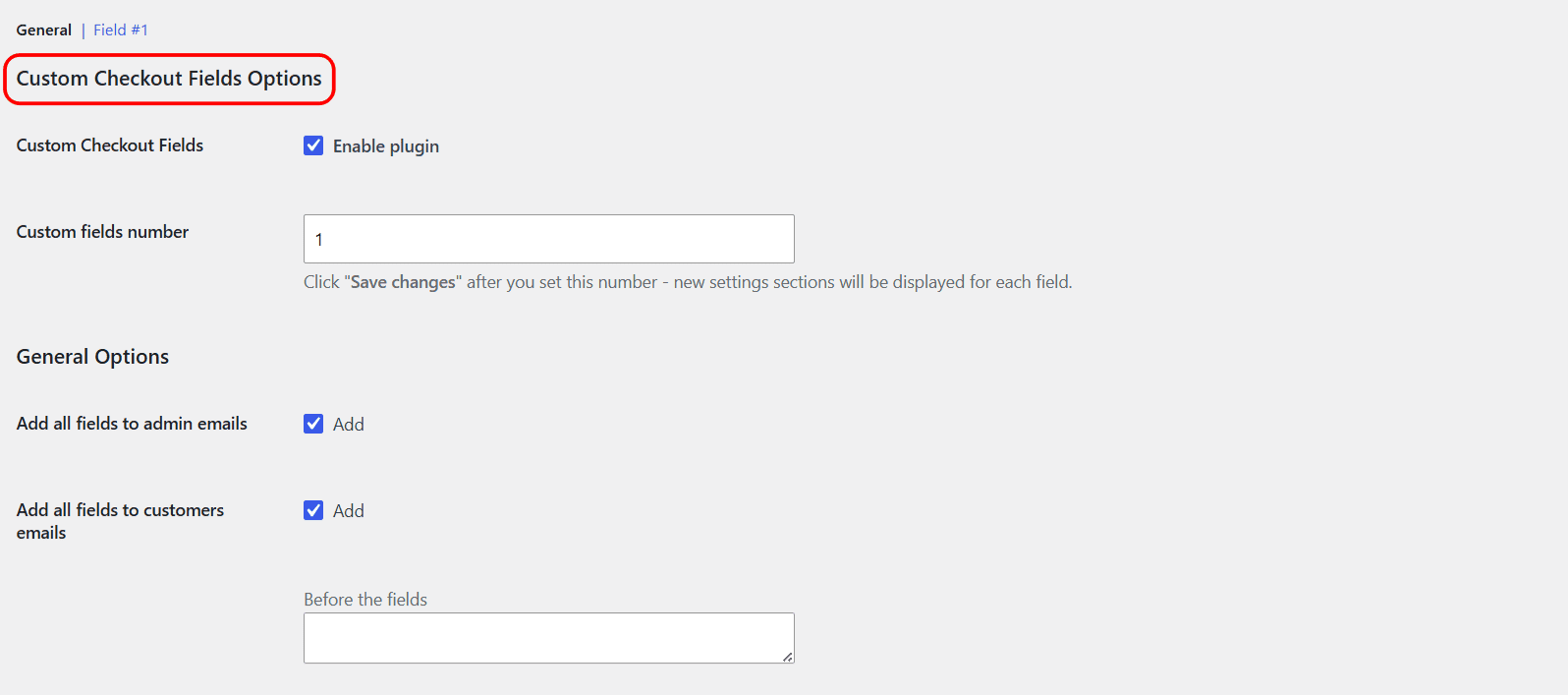
Go to **WPFactory > Custom Checkout Fields** (also reachable at **WooCommerce > Settings > Custom Checkout Fields**) and open the **General** section. The controls sit under **General Options**.
### Email options
| Label | Option ID | Default |
| --- | --- | --- |
| Add all fields to admin emails | `alg_wc_ccf_email_all_to_admin` | Yes |
| Add all fields to customers emails | `alg_wc_ccf_email_all_to_customer` | Yes |
| Before the fields | `alg_wc_ccf_emails_template_before` | Empty |
| Each field | `alg_wc_ccf_emails_template_field` | `%label%: %value%
` |
| After the fields | `alg_wc_ccf_emails_template_after` | Empty |
### Order Received and View Order options
These cover the "Order Received" (Thank You) page and the "View Order" page in the customer account.
| Label | Option ID | Default |
| --- | --- | --- |
| Add all fields to "Order Received" and "View Order" pages | `alg_wc_ccf_add_to_order_received` | Yes |
| Before the fields | `alg_wc_ccf_order_received_template_before` | Empty |
| Each field | `alg_wc_ccf_order_received_template_field` | `%label%: %value%
` |
| After the fields | `alg_wc_ccf_order_received_template_after` | Empty |
### Placeholders
The **Each field** templates run once per field, with two placeholders:
| Placeholder | Replaced with |
| --- | --- |
| `%label%` | The field label. |
| `%value%` | The submitted value. Multiselect values are joined with commas. |
The **Before the fields** and **After the fields** templates print once, wrapping the whole block, so they are the place for an opening heading or a closing tag.
### Duplicate field labels
If a field uses the **Duplicate** option to repeat per product, the label of each copy is built from a template in the plugin's Advanced Options:
| Label | Option ID | Default |
| --- | --- | --- |
| For each product in cart | `alg_wc_ccf_duplicate_label_template_each_product` | `%product_title%` |
| For each product item in cart | `alg_wc_ccf_duplicate_label_template_each_product_item` | `%product_title% (%item_nr%)` |
| Glue | `alg_wc_ccf_duplicate_label_glue` | `:` |
The Glue joins the base label and the per-product suffix, so a "Gift message" field for the product "Candle" reads "Gift message: Candle".
### Example
To render each field as a table row in emails, set **Before the fields** to ``, **Each field** to `| %label% | %value% |
`, and **After the fields** to `
`.
### Get more fields
These template controls are free. [Custom Checkout Fields for WooCommerce](https://wpfactory.com/item/custom-checkout-fields-for-woocommerce/) Pro lets you add up to 100 fields, all formatted by the same templates. [See what Pro unlocks](https://wpfactory.com/item/custom-checkout-fields-for-woocommerce/).
Related articles
- [Where Custom Checkout Field Data Is Stored (Order Meta Reference)](https://wpfactory.com/docs/woocommerce-checkout-field-order-meta/)
- [Showing Custom Fields on the Order Received and View Order Pages](https://wpfactory.com/docs/email-custom-fields/)
- [Shortcodes Available in Custom Checkout Fields](https://wpfactory.com/docs/using-the-shortcode/)
- [General Troubleshooting for Custom Checkout Fields](https://wpfactory.com/docs/general-troubleshooting-checkout/)
- [What You Get with Custom Checkout Fields Pro](https://wpfactory.com/docs/pro-feature-breakdown/)