Table of Contents
This functionality overview dives into the settings offered by the Stock & Inventory Updates Triggers for the WooCommerce plugin.
Stock Triggers #
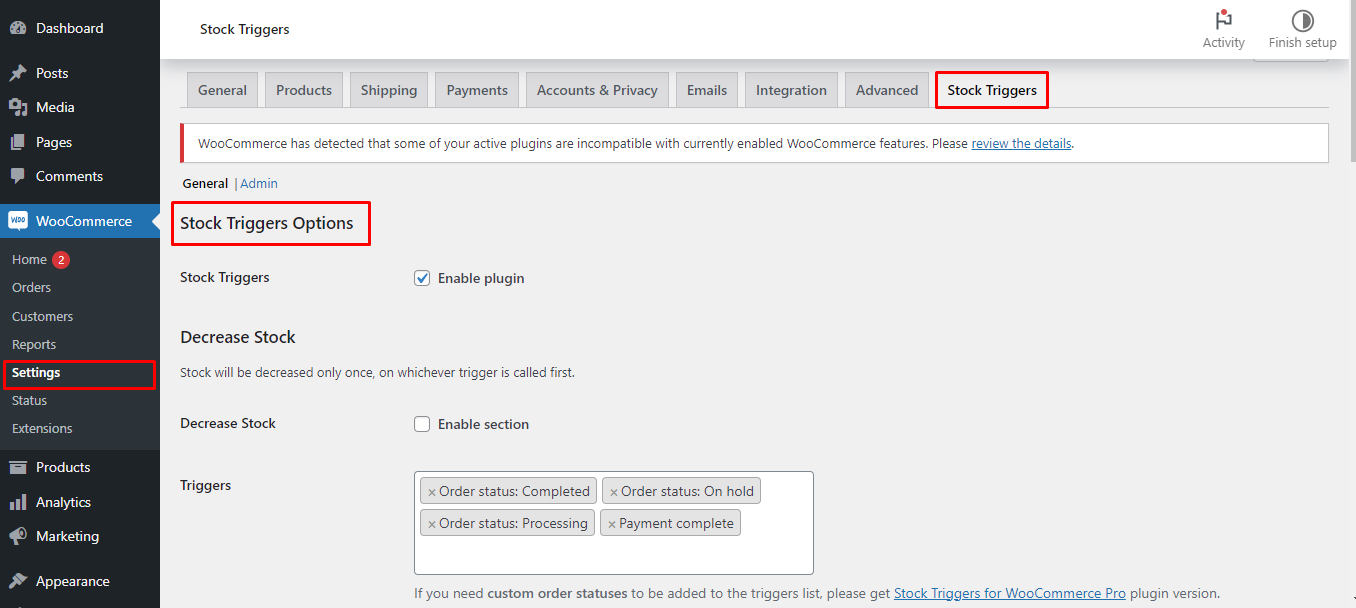
This is the core functionality of the plugin, allowing you to automate stock adjustments based on specific events.
- Enable Plugin: This activates the plugin’s features.
Stock Adjustments #
The plugin offers two options for stock adjustments #
- Decrease Stock: This lowers the stock level of a product when a trigger event occurs.
- Enable Section: Enables this functionality.
- Triggers: Select the events (e.g., order completion, payment received) that will trigger a stock decrease.
- Note: The free version only allows selecting pre-defined triggers.
- Increase Stock: This increases the stock level of a product, but only if it was previously decreased using the plugin.
- Enable Section: Enables this functionality.
- Triggers: Similar to Decrease Stock, choose the events that will trigger a stock increase.
- Note: The free version has limitations on trigger selection.
Additional Options #
- Remove Standard Triggers (Decrease/Increase): Disables WooCommerce’s default stock adjustment triggers, allowing you to rely solely on the plugin’s triggers.
- Advanced: Force Order Stock Update: Enables an option to potentially resolve issues with stock not updating correctly.
- Require Products/Categories: Lets you define specific products or product categories that will be affected by the stock triggers (not available in the free version).
Custom Triggers (Pro Version) #
The free version has limitations regarding triggers. Upgrading to the Pro version unlocks features like #
- Custom Order Statuses: Allows adding custom order statuses (created within WooCommerce) as triggers.
- Custom Triggers: Enables defining triggers based on specific WooCommerce actions (requires technical knowledge).
Reset Settings #
This button resets all plugin settings to their defaults #
By understanding these options, you can configure the Stock & Inventory Updates Triggers for the WooCommerce plugin to automate your stock management and streamline your WooCommerce store operations.