Configuring order cost and profit calculations lets you decide how WooCommerce folds shipping, fees and taxes into each order’s profit, so the numbers match your accounting. Cost of Goods: Product Cost & Profit Calculator for WooCommerce keeps all of these controls in one Calculations group, and they are free.
Step-by-step #
- Go to WPFactory > Cost of Goods (also reachable at WooCommerce > Settings > Cost of Goods).
- Open the Orders sub-tab.
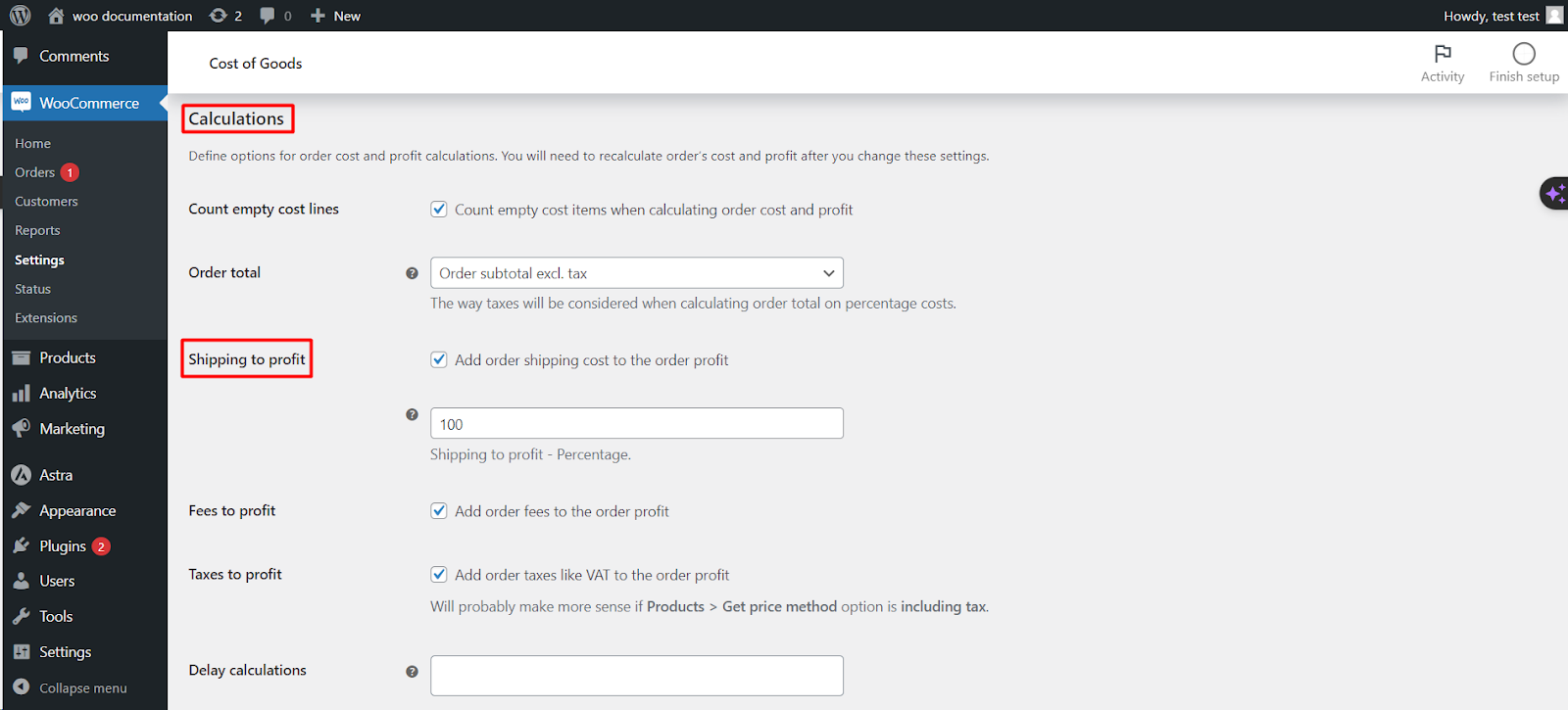
- Scroll to the Calculations group.
- Set the options below, then click Save changes.
Note: after changing these settings, existing orders keep their old figures until recalculated. Use the Tools > Orders recalculation tool (Pro) to update past orders.
Options reference #
| Label | Option ID | Default |
|---|---|---|
| Count empty cost lines | alg_wc_cog_order_count_empty_costs |
no |
| Ignore quantity | alg_wc_cog_order_calculation_ignores_quantity |
no |
| Order total (for percent costs) | alg_wc_cog_order_extra_cost_percent_total |
Order subtotal excl. tax |
| Shipping to profit | alg_wc_cog_order_shipping_to_profit |
no |
| Fees to profit | alg_wc_cog_order_fees_to_profit |
no |
| Taxes to profit | alg_wc_cog_order_taxes_to_profit |
no |
| Delay calculations (until status) | alg_wc_cog_orders_delay_calculations_status |
empty (calculate right away) |
What each option does #
- Count empty cost lines: include items that have no cost set when totaling order cost and profit.
- Ignore quantity: calculate cost and profit per line ignoring the quantity sold.
- Order total: the base that percentage extra costs are taken from. Choose Order subtotal excl. tax (default), Order total excl. tax, or Order total incl. tax.
- Shipping / Fees / Taxes to profit: each of these adds that amount into the order profit. Each has its own percentage field (default
100) so you can move all or part of it. For “Taxes to profit” to make sense, set Products > Get price method to an including-tax option. - Delay calculations: hold all cost and profit values at zero until the order reaches one of the selected statuses.
Get more from Cost of Goods #
These calculation options are free. Cost of Goods: Product Cost & Profit Calculator for WooCommerce Pro adds the orders recalculation tool to apply changed settings to historical orders, and cost and profit inside WooCommerce Analytics. See what Pro unlocks.