
How to Bulk Import and Export Users in WordPress & WooCommerce with Excel

Do you need to import or export your users or customers data from one website to another? You are doing a WordPress migration, or you just need a fast way to bulk import or export users to WooCommerce without the hassle of creating customers one by one?
Managing users in WordPress or WooCommerce can be time-consuming — especially when you’re dealing with hundreds or thousands of entries. Whether you’re migrating websites, building an email list, or simply need a quick way to manage user data, doing it manually is inefficient. The good news? There’s a faster, smarter way using the power of Excel.
Users-Customers Import Export with Excel for WordPress & WooCommerce is a premium plugin designed to simplify user management with bulk import, export, and update features — all without the hassle or risk of PHP timeouts.
Why you would need Bulk Import Export Users feature
- You are migrating your WordPress website of WooCommerce eShop –WooCommerce import customers
- You are building a mailing list, and you need to bulk export Customers details from your WooCommerce installation –WooCommerce export customers
- You need to bulk import users in WordPress
All these may be implemented with a click of a few buttons with the power of Excel and Ajax technology with no page reload and simple drag and drop features.
How does bulk import users and user export work?
- You install the plugin
- You go to its settings page: Users / Users Import-Export
1) WordPress bulk import user’s functionality:
-
- You go to Import/Update tab
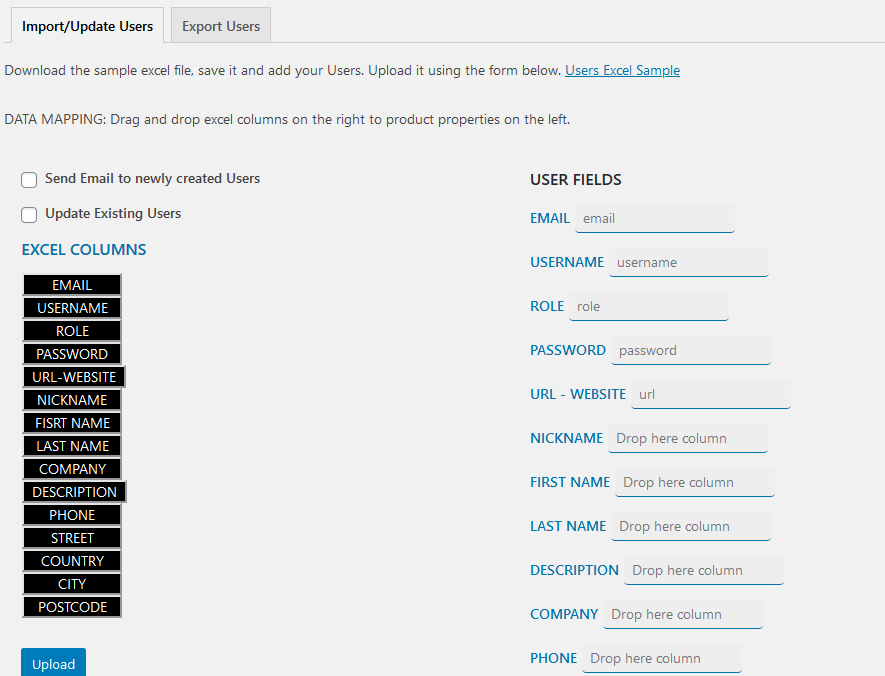
- Drag and drop an excel file where you created your WordPress Users or WooCommerce customers you need to import
- Next screen is the data mapping screen. On one side you get the Users Fields, on the other the labels of the first column of you excel file. You just need to drag and drop an excel field to user field to map the data.
- You press submit and there you go!
2) WordPress Export Users functionality
-
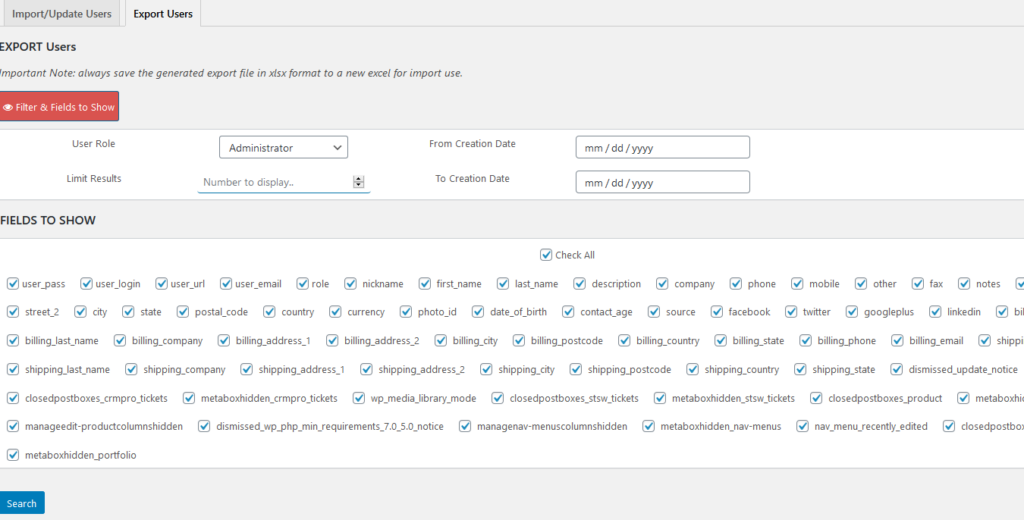
- You go to Export Tab where you have multiple criteria for exporting a user, for example you may select to Bulk Export Users with specific Role
- You may select specific WordPress Users or WooCommerce Customers fields to export
- You press search and you will instantly get you Bulk Export Users list.
This WordPress plugin works with Ajax so there is no page reload, and it is also built in such way so there won’t be any PHP timeouts, and you will be able to Bulk Import or Export Multiple Users or Customers for WordPress.
3) Update Existing WordPress or WooCommerce Users
Users-Customers Import Export with Excel for WordPress & WooCommerce will allow you to easily merge users or customers – updatre feature.
WooCommerce Import Customers or WordPress Import Users functionality of this plugin will automatically detect the users that preexist.
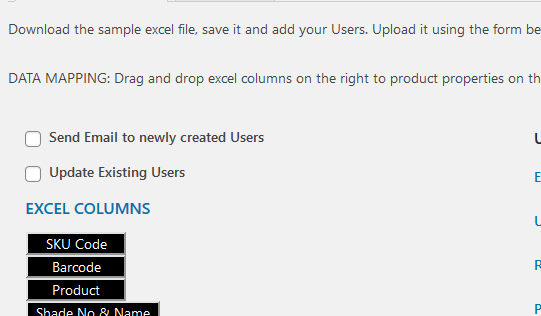
It is up to you to allow existing users to be updated. This is feasible via Import Update tab:
- once you imported you excel file
- you are redirected to the Data Mapping screen
- You select Update Existing Users checkbox.
Whether you’re launching a new WooCommerce store, migrating to a new WordPress setup, or just want to streamline your workflow, Users-Customers Import Export with Excel is your go-to solution. With drag-and-drop simplicity, fast processing via Ajax, and seamless Excel integration, managing users has never been easier.
Once you realize the power of Excel, investing a small amount of money to save so much time on Merge, Bulk Import and Export Users and Customers for WordPress and WooCommerce is the way to go.