ChatGPT Shopping: Sell Directly in Chat with Instant Checkout

ChatGPT Shopping is changing how people buy things online, not through clicking around websites, but just by chatting.
Imagine asking a question like “What’s a good gift under $50?” and getting real-time suggestions you can actually buy without leaving the conversation.
In this article:
We’ll break down how ChatGPT is becoming a shopping tool, how it works behind the scenes, and what online store owners can do to make their products show up in the chat.
You’ll also learn about instant checkout, merchant feeds, and smart ways to organize your products, all explained in a way that’s simple and useful, even if you’re not a tech expert.
This guide will help you understand what “shopping with AI” really looks like, and how you can be part of it.
What Is ChatGPT Shopping?
Imagine you’re texting a super-smart friend who knows about thousands of products from different stores. You ask, “What are the best wireless earbuds under $100?” and instead of sending you to ten different websites, your friend gives you a short list, complete with pictures, prices, and a “Buy” button, right there in the chat.
That’s what ChatGPT Shopping is all about.
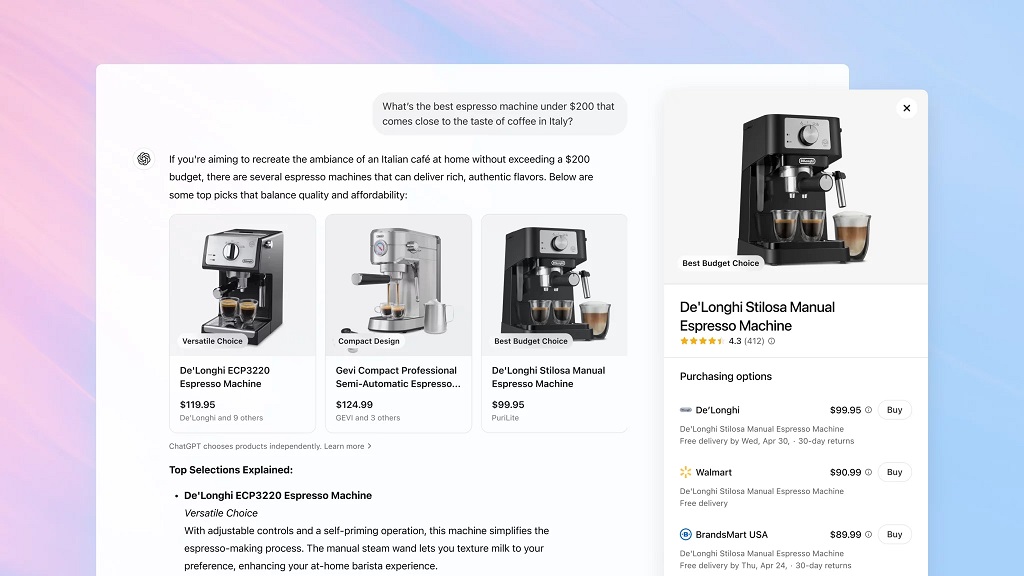
OpenAI has turned ChatGPT, the AI people already use to write emails, ask questions, and plan trips, into something even more helpful: a real-time shopping assistant.
Now, when you chat with GPT-4 (the paid version of ChatGPT), you can discover products, compare options, and even buy, without opening new tabs or getting lost in online stores.
From Chat to Checkout
Here’s how it works:
-
You ask a question like “What’s a fun board game for a family of 4?”
-
ChatGPT answers with product options, these aren’t random links, but items pulled from verified online stores.
-
You see pictures, prices, and product details right inside the chat.
-
If you like something, you can buy it directly through an instant checkout, without leaving the conversation.
So instead of searching, browsing, and clicking through ads, you’re just having a conversation, and the AI does the legwork.
Where Are These Products Coming From?
Behind the scenes, sellers (like WooCommerce stores) connect their product data to ChatGPT using something called a merchant feed, this is like a menu that tells ChatGPT what’s available, how much it costs, what it looks like, and what it’s good for. (We will explain this point in detail.)
That’s why it’s important for store owners to keep their product info clean, updated, and organized, because now, your “storefront” could be a chat window!
How It Works Behind the Scenes?
Now, You know that ChatGPT Shopping lets you ask for products and buy directly from the chat, like texting a smart personal shopper. But how does all of this actually happen?
Let’s break it down.
Step 1: Smart Chat Meets Shopping Tools
When you type something like “I need a waterproof backpack under $50” ChatGPT uses AI to understand exactly what you want, but ChatGPT doesn’t keep a catalog of every product in the world.
Instead, it looks at real-time product data coming from online stores, as we mentioned things like the name, price, image, stock, and product details.
That’s where merchant feeds come in.
Step 2: What’s a Merchant Feed?
Think of these like super-organized lists that tell ChatGPT what a store is selling.
Imagine You’re a Librarian..
Let’s say you’re running a library, now imagine someone walks in and asks, “Do you have any books about space that are less than 100 pages and easy to read?”
If your books are labeled with clear tags (like topics, page numbers, difficulty levels), you’ll find what they want in seconds.
That’s what structured product data does for AI shopping.
It helps ChatGPT understand your products the same way a librarian understands books, by looking at neat labels, prices, descriptions, and availability.
A merchant feed is a file that lists all the products in your online store. It includes details like:
-
Product name
-
Price
-
Images
-
Description
-
Stock status
-
Categories
-
And much more
It’s organized in a special format (kind of like an Excel sheet, but smarter), and it gets updated regularly.
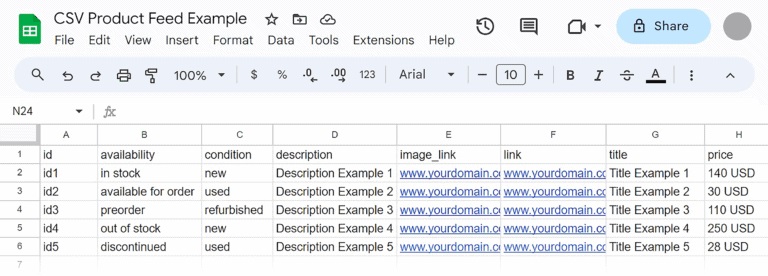
Source image: backlinko
So when ChatGPT needs to answer your shopping question, it pulls data from this feed and shows you helpful product cards inside the chat.
Step 3: Checkout Without Leaving the Chat
Once you see something you like, there’s no need to click through multiple websites, ChatGPT supports instant checkout right in the chat, It securely connects to the seller’s store and helps you complete the purchase in just a few steps, without opening extra tabs or apps.
This is what makes the experience feel so easy and smooth, It’s not just browsing, it’s shopping with AI in real time.
Bonus Tip for Store Owners
If you’re running a WooCommerce store, keeping your product feed accurate and up-to-date is crucial, especially if you want to appear in AI shopping results like ChatGPT.
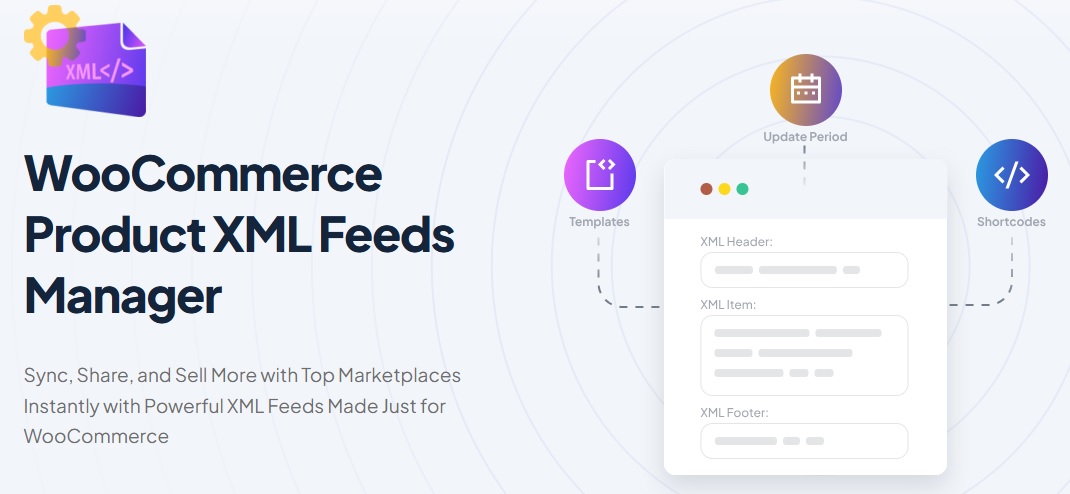
Tools like the WooCommerce Product XML Feeds Manager help merchants create and customize those feeds easily, so their products can be shown correctly inside AI-driven shopping experiences.
Why It Matters for Online Stores
Imagine you walk into a store, ask a question, and someone immediately gives you the perfect answer, not just a product, but the right product for your needs, your budget, and your preferences.
That’s what ChatGPT Shopping is doing online, this isn’t just a cool feature, it’s a big shift in how people shop.
People Decide Faster When the Chat Helps
Normally, online shoppers jump between tabs, read reviews, compare prices, and sometimes just give up, but with conversational shopping, everything happens in one place, inside the chat.
The result:
-
Shoppers find what they want faster
-
They ask more questions instead of bouncing away
-
They’re more confident about their decisions
That means fewer abandoned carts and more checkouts.
AI-Powered Help Feels Personal
When ChatGPT suggests a product, it doesn’t feel like a random ad, it feels like a helpful reply from a smart assistant.
That makes people more likely to trust the recommendation, and follow through with the purchase.
It’s kind of like asking a friend who knows all the options in every store, and they instantly show you the best one.
Fewer Clicks = More Conversions
In a traditional store website, buyers may go through 5–7 steps before they finally click “Buy” With instant checkout right in the chat, it’s often just one or two steps.
That means less room for distractions, and higher conversion rates.
The Buyer Journey Is Changing
The old way of shopping looked like this:
-
Google something
-
Click through a few ads
-
Open a few websites
-
Compare products
-
Maybe buy something later
Now, with ChatGPT Shopping, it looks like this:
-
Ask the chat
-
Get tailored suggestions
-
Buy what you need, right there
For online store owners, this is huge. It changes how people discover products and pushes them to buy sooner, with fewer doubts along the way.
Emerging Use Cases & Smart Predictions
Here’s what we do know today about where ChatGPT Shopping is headed, and how stores can get ready without betting the farm.
Verified Examples & Early Commerce Moves
-
OpenAI’s Instant Checkout currently lets U.S. users buy a single item from Etsy directly inside ChatGPT, this is live and confirmed.
-
Merchants still maintain control over payments, fulfillment, returns, and customer relationships, ChatGPT acts as the bridge.
-
If a merchant hasn’t enabled Instant Checkout, ChatGPT will provide a link to their product page instead.
-
The purchase capabilities are restricted right now:
• U.S. only
• Single‑item purchases
• Select merchants only
So, yes, conversational shopping is real now, even if still limited in scope.
So when we talk about “who’s already doing AI shopping,” it’s best to speak of pilot programs or early access, not widespread adoption.
What Growing or Small Stores Can Do Now?
-
Get your product feed ready and clean, this is the basis for showing up in AI shopping.
-
Start aligning with OpenAI’s feed spec (structured data, product variants, enable_search/enable_checkout flags).
-
Use or build tools that make feed management simple, this gives you flexibility when expansion happens.
-
Monitor announcements from OpenAI and testing programs so you can join when direct merchant access expands.
What’s Next?
-
Instant Checkout is expected to expand beyond single items and U.S. merchants.
-
We’ll probably see multi-item carts, more global support, and more store platforms integrated.
-
Merchant feed quality and timeliness will be a big differentiator, exactly how well your product data shows up might decide whether ChatGPT gives your store priority over another.
So instead of waiting for ChatGPT Shopping to “go big,” your best bet is to get ready now, with well-structured data, flexible tools, and a clear path forward.
Final Thoughts: Shopping Where People Think
Most online stores are built to show up where people search, like Google, Amazon, or marketplaces, but ChatGPT isn’t a search engine.
It’s a conversation.
When someone types, “I need a waterproof backpack for hiking” they’re not browsing pages, they’re thinking out loud. That’s your chance to show up right there, in the middle of the thought process, not just in a search result.
Think About It Like This:
If someone asked a friend “What’s a good affordable desk for small spaces?” and that friend instantly described your desk, with the price and where to buy it, you’d want that, right?
That’s exactly what ChatGPT is doing now, acting like a helpful, informed friend.
But it can only recommend your product if it knows about it, and if your info is clear, structured, and ready to be read by machines.
So, What Now?
If you’re a store owner, this isn’t about replacing your website or running ads.
It’s about preparing your product data so it fits into future conversations, the ones happening right now, in real time, inside tools like ChatGPT.
You don’t need to chase the trend, you just need to make sure you’re present when someone’s ready to decide.
That’s not just smart commerce, it’s conversational commerce.
FAQs About ChatGPT Shopping
Q1: Can anyone sell products directly inside ChatGPT today?
A1: Not yet. Right now, only U.S. users can buy single items from Etsy merchants using ChatGPT’s Instant Checkout.
Merchants outside Etsy or those selling multiple items or in other countries must wait until more integrations are live.
Q2: How does Instant Checkout in ChatGPT work?
A2: When a product supports Instant Checkout, ChatGPT shows it with a “Buy” button.
You pick shipping, payment, and confirm, all without leaving the chat. Orders still go through the merchant’s own system.
Q3: Will my WooCommerce store be able to take part?
A3: Yes, as OpenAI opens up its merchant integration, WooCommerce stores with proper product feeds (XML, CSV, JSON) could be eligible. Merchants need to prepare structured data and join the application when it’s open.
Q4: What product data does ChatGPT need to show my items?
A4: The product feed must include fields like product ID, title, price, availability, images, and more. Rich fields like reviews, attributes, and accurate descriptions help products get ranked better.
Q5: Are product recommendations in ChatGPT ads or paid placements?
A5: No. Right now, ChatGPT shows organic, unsponsored product suggestions. Listings are ranked by relevance, not because merchants pay for placement.
Q6: How should I get ready now if I want to sell via ChatGPT later?
A6:
-
Ensure your site allows OpenAI’s crawler to fetch your product pages.
-
Start using or set up a feed plugin (or system) that generates structured feeds.
-
Keep product details, prices, and stock always up to date.
-
Monitor OpenAI’s announcements and merchant signups.
Q7: Can ChatGPT Shopping handle products with variations (size, color, etc.)?
A7: Yes, the product feed spec supports variations. You group variants under a single product ID and list each variation’s attributes (color, size, etc.). ChatGPT can then let users choose the variant they want.
Q8: Does ChatGPT Shopping support international stores or multiple currencies?
A8: Not fully yet. Instant Checkout is currently limited to U.S. merchants and a single currency in some implementations.
But eventually, multi‑currency and global support are expected in future updates.
Q9: What happens if my product is out of stock? Will ChatGPT still show it?
A9: That depends on how your feed is set up.
There’s a field in the spec for availability, which tells ChatGPT whether an item is in stock or not. If you mark it as unavailable, ChatGPT should not promote it as purchasable.
Q10: Do I have to do anything special during checkout?
A10: For now, the checkout experience still uses standard merchant systems. ChatGPT hands off the purchase to the merchant’s payment, shipping, and fulfillment setup.
The key thing is that your store must support the necessary APIs (or checkout flows) that OpenAI expects.
Q11: Can I choose which products show up in ChatGPT Shopping?
A11: Yes, merchant feeds include control flags like enable_search and enable_checkout, which let you decide whether a product is visible in ChatGPT and whether it can be bought directly.