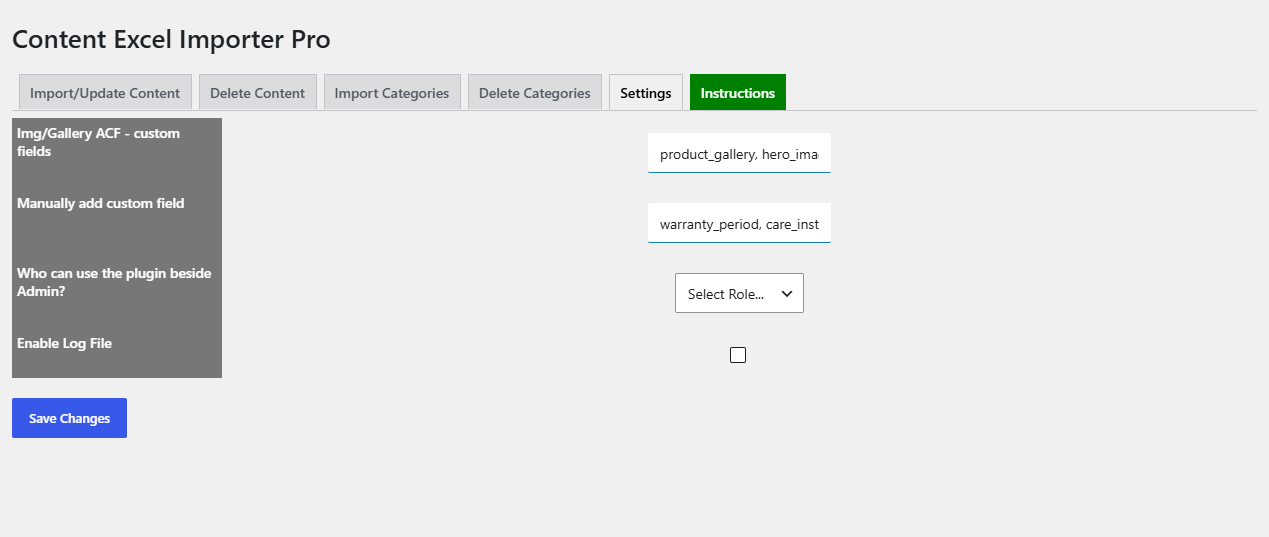
To import ACF and other custom fields from Excel with Content Importer for WordPress & WooCommerce with Excel, map your columns to the custom field names on the Import/Update Content mapping screen. For ACF image or gallery fields, first list their names in WPFactory > Content Excel Importer Pro > Settings > Img/Gallery ACF – custom fields.
Which custom fields appear #
- Every meta key already used by at least one item of the selected post type, except keys starting with an underscore or a number.
- Extra keys always offered:
_video_url,_audio_url,_wpm_gtin_code,_alg_eanand_wpm_gtin_code_label. - Keys you add in Manually add custom field.
- Yoast SEO fields (
_yoast_wpseo_title,_yoast_wpseo_metadesc,_yoast_wpseo_focuskw) when Yoast SEO is active. See How to bulk import and edit Yoast SEO meta with Excel.
Steps #
- If a field has never been saved on any item, add its name (the ACF field name, not the label) in Settings > Manually add custom field, comma separated, and click Save Changes. Alternatively, save one test item with the field filled.
- For ACF image or gallery fields, add their names in Img/Gallery ACF – custom fields, comma separated, and save.
- Go to Import/Update Content, select the post type and upload your .xlsx file.
- Drag each column onto its custom field (field names are shown in upper case with spaces).
- For image and gallery fields, put image URLs or Media Library names in the cell, comma separated for galleries.
- Click Upload.
How values are saved #
- Normal custom fields are saved as plain text with
update_post_meta. Empty cells are skipped, so existing values stay. - Fields listed in Img/Gallery ACF – custom fields are downloaded or matched in the Media Library and saved as a list of attachment IDs.
FAQ #
Why is my ACF field not on the mapping screen? #
Only meta keys that already exist on the selected post type are listed. Add the field name in Manually add custom field, or save one item with the field filled, then upload the file again.
Can I import ACF repeater or relationship fields? #
Values are saved as plain text meta, so fields that need a structured value are not converted. Simple text, number, select and URL fields import directly.
Can I import EAN or GTIN codes? #
Yes. _alg_ean and _wpm_gtin_code are always offered as fields.
Ready to set this up? #
This is part of Content Importer, a paid WPFactory plugin: every screen described here is included with your license. Get Content Importer.
Need a hand? Our team answers every ticket on the Content Importer support forum.