Advanced settings reference #
The Advanced sub-tab of Customer Email Verification for WooCommerce holds the low-level options you reach for when the default verification flow needs tuning: which authentication filter to hook, how activation codes are encoded, and when a user is logged out after registering or checking out. This reference lists every option on that sub-tab with its option id and default, verified against version 3.2.7.
Where to find it #
Go to WPFactory > Email Verification (also reachable at WooCommerce > Settings > Email Verification) and open the Advanced sub-tab.
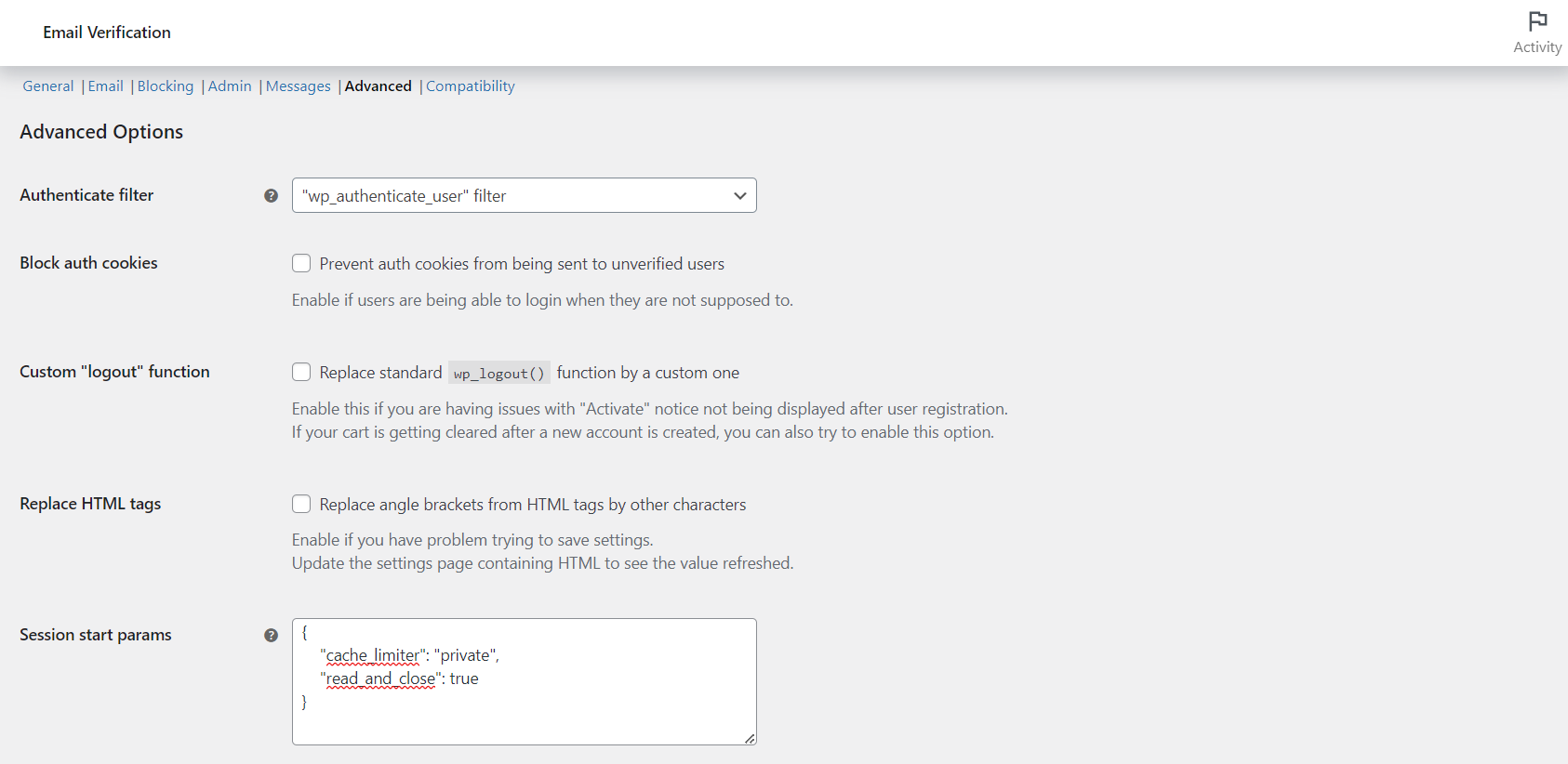
Advanced options #
| Label | Option ID | Default |
|---|---|---|
| Authenticate filter | alg_wc_ev_auth_filter |
wp_authenticate_user |
| Block auth cookies | alg_wc_ev_block_auth_cookies |
No |
| Custom “logout” function | alg_wc_ev_custom_logout_function |
No |
| Replace HTML tags | alg_wc_ev_replace_html_tags |
No |
The Authenticate filter chooses which WordPress hook the plugin uses to reject unverified logins: wp_authenticate_user, authenticate, or send_auth_cookies. Switch to authenticate to make the verification error take priority over the incorrect-password error. Block auth cookies is the option to enable if unverified users are still able to log in.
Encoding options #
| Label | Option ID | Default |
|---|---|---|
| Encoding method | alg_wc_ev_encoding_method |
base64_encode |
| Hashids salt | alg_wc_ev_hashids_salt |
Auto-generated |
| Hashids alphabet | alg_wc_ev_hashids_alphabet |
abcdefghijklmnopqrstuvwxyz1234567890 |
The encoding method controls how the activation code inside the verification link is built. If you switch to Hashids, set an unpredictable random value in the salt field: leaving it empty is flagged in red because it weakens the code.
Prevent login after register #
| Label | Option ID | Default |
|---|---|---|
| Prevent login after register | alg_wc_ev_prevent_login_after_register |
Yes |
| Login prevention method | alg_wc_ev_prevent_login_after_register_method |
logout_after_login |
| Redirect | alg_wc_ev_prevent_login_after_register_redirect |
No redirect |
| Custom redirect URL | alg_wc_ev_prevent_login_after_register_redirect_url |
Empty |
| Force redirect | alg_wc_ev_prevent_login_after_register_session_redirect |
No |
Prevent login after checkout #
| Label | Option ID | Default | Free/Pro |
|---|---|---|---|
| Prevent login after checkout | alg_wc_ev_prevent_login_after_checkout |
Yes | Free |
| Prevent login action | alg_wc_ev_prevent_login_after_checkout_action |
woocommerce_get_return_url |
Free |
| Prevent login notice | alg_wc_ev_prevent_login_after_checkout_notice |
Yes | Free |
| Block thank you page | alg_wc_ev_prevent_login_after_checkout_block_thankyou |
No | Pro |
Background processing #
| Label | Option ID | Default |
|---|---|---|
| Minimum amount | alg_wc_ev_bkg_process_min_amount |
20 |
| Send email | alg_wc_ev_bkg_process_send_email |
Yes |
| Email to | alg_wc_ev_bkg_process_email_to |
Site admin email |
Bulk actions such as verifying, unverifying or deleting many users run in the background once the result count passes the Minimum amount threshold, so the admin screen stays responsive.
REST API and delete options #
The Advanced sub-tab also holds the Verify endpoint option (alg_wc_ev_rest_api_verify_endpoint, a Pro feature) and the tools for deleting unverified users. Those are covered in their own articles: see the guides on verifying users through the REST API and on deleting unverified users.
Get the full toolkit #
Several Advanced options, including the REST API endpoint and Block thank you page, are unlocked with Customer Email Verification for WooCommerce Pro. See what Pro unlocks.