Dividing every product price by the same number is a quick way to cut prices across a WooCommerce store, for example turning a wholesale list into a discounted run. The Price Update: Bulk Pricing Editor for WooCommerce does this with its Divide all product prices by field. This guide uses 3 as the example divisor.
Before you start #
- Bulk Price Editor Pro. Divide is a Pro field; in the free version it is greyed out.
- Back up first, or rely on the preview. Applying a change cannot be undone.
Steps #
- Go to WooCommerce > Bulk Price Converter (or click Bulk price converter tool at WPFactory > Bulk Price Converter).
- Under General Options, set Price type to modify to Both so regular and sale prices are both divided.
- In the Divide all product prices by field, enter 3. Leave Direct price, Percentage, Multiply, Add, and Subtract at their defaults so only division is applied.
- Optional: under Products, pick a category, tag, or attribute to limit the change. Leave everything on Any to divide the whole catalog.
- Click Preview prices. The Results table shows each product’s original and divided price. Nothing is saved yet.
- When the preview looks right, click Change prices (the red button) and confirm the “There is no undo for this action” prompt.
There is no “Divide” radio button and no “Update Prices” button: Divide is its own numeric field, and the apply button is labeled Change prices. Preview prices is available in the free version too; only the Divide field itself requires Pro.
Watch the direction #
Dividing by a number greater than 1 lowers prices: by 2 halves them, by 3 cuts them to a third. Dividing by a number below 1 raises prices, so dividing by 0.5 doubles them. If you want a clean discount, multiply by a fraction (0.5 for half) or use the Percentage field instead.
Tidy up the result #
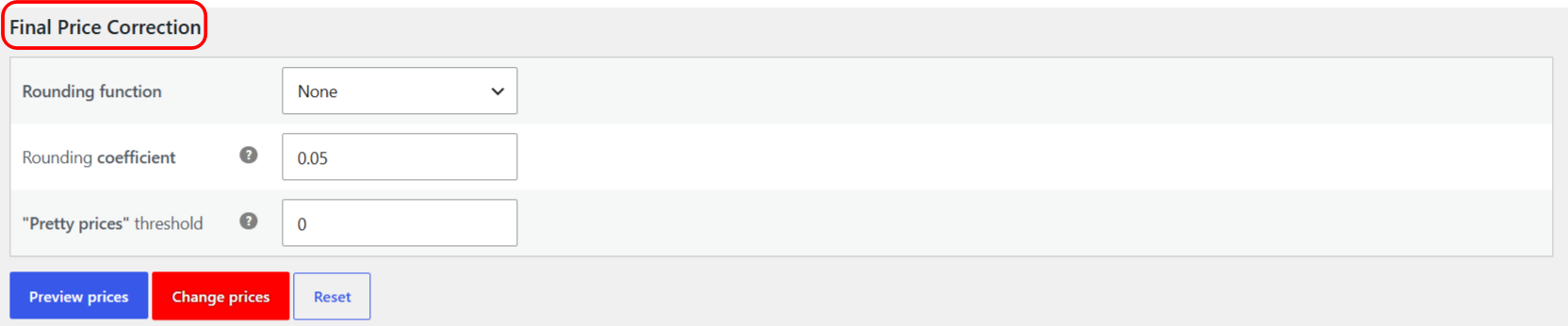
Division often produces long decimals. Use the Pro Rounding function and “Pretty prices” threshold in Final Price Correction to snap the divided prices back to clean values. See the guide on rounding and pretty prices.
Ready to set this up? #
Divide is a Pro feature of Bulk Price Editor. Get Bulk Price Editor Pro.