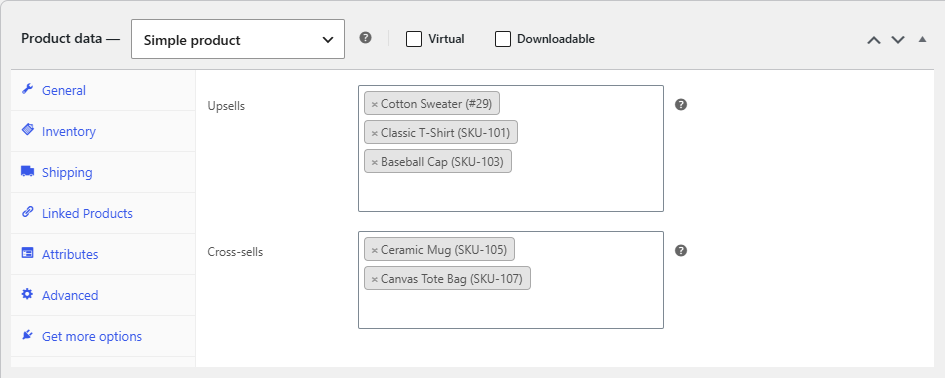
To choose which products appear in the popup, set upsells or cross-sells on each product’s Linked Products tab, then pick the source in WooCommerce Sales Bump: Upsell, Cross-sell & Related Products Popup at WPFactory > Upsell, Cross-sell & Related Products Popup Pro > General. Limit and Columns control how many shop page suggestions show.
Which products each page shows #
| Page | Setting that decides | Products shown |
|---|---|---|
| Single product page | Show related if upsells are not set | The product’s Upsells. If it has none: its related products (Yes) or no popup (No). |
| Shop and category pages | What to show | The clicked product’s Upsells, Cross-sells or Related products |
Steps #
- Go to Products > All Products and edit a product.
- In Product data > Linked Products, add products in Upsells (upgrades), Cross-sells (add-ons), or both. Click Update.
- Go to WPFactory > Upsell, Cross-sell & Related Products Popup Pro > General.
- Under Archive/Shop Page Options, choose What to show: Upsells (default), Cross-sells or Related products.
- Set Limit to the most products the shop page popup should list.
0(default) shows all of them. - Set Columns to the number of columns in the shop page popup. Default:
4. - Under Single Product Page Options, decide whether products without upsells fall back to related products.
- Click Save changes.
Things that affect the list #
- The shop page popup uses the WooCommerce products shortcode, so it follows your catalog settings: products hidden from the catalog, and out of stock products when WooCommerce hides them, are left out.
- Limit and Columns apply to shop and category pages only. On product pages, your theme’s upsells or related products section sets the count and layout.
- Linked products are set one product at a time. Sales Bump has no global, category or tag rules for picking popup products.
FAQ #
Can I set one list of popup products for the whole store? #
No. Sales Bump reads the upsells, cross-sells or related products of the product being added. Give each product its own linked products, or use Related products to cover the whole catalog without manual work.
What does a Limit of 0 mean? #
It shows every product in the chosen list. Any number above 0 caps the list at that many products.
Does Limit apply on the product page? #
No. Limit and Columns only change the shop and category page popup.
Can the product page show cross-sells? #
No. The product page popup uses upsells, with related products as the optional fallback.
Ready to set this up? #
Sales Bump is a premium plugin, and every option in this article is included with it. Get Sales Bump to turn more add-to-cart clicks into bigger orders.
Need a hand? Our team answers every ticket on the Sales Bump support forum.