The Cart section of MSRP (RRP) Pricing for WooCommerce controls how MSRP appears in the shopping cart, and can show a running total of savings. Find it under WPFactory > MSRP (also reachable at WooCommerce > Settings > MSRP), on the Cart section.
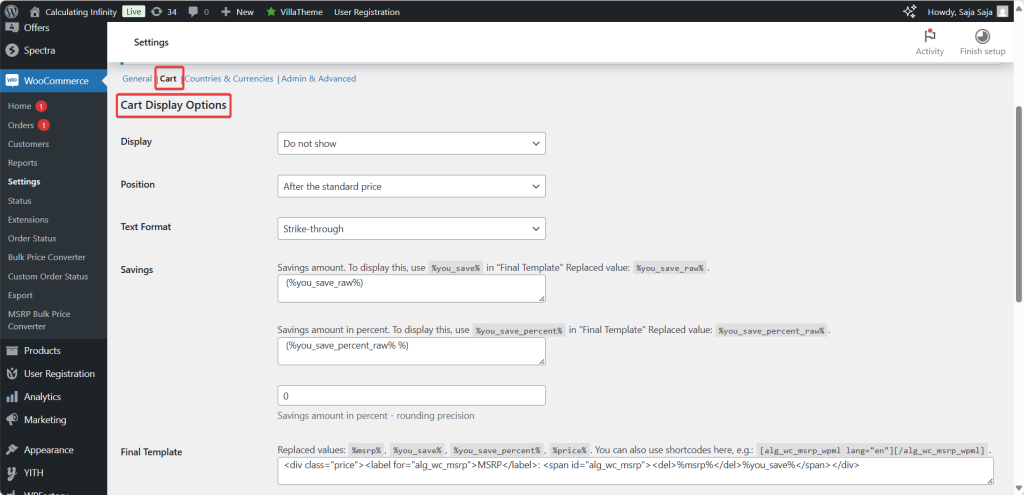
Cart display options (free) #
These mirror the product and archive options:
- Display: Show, Do not show, Only show if MSRP is higher than the standard price, or Only show if MSRP differs from the standard price. In the cart the default is Do not show.
- Position: Before, After, or Instead of the standard price.
- Text Format: No format, Bold, Italic, Strike-through, or Underlined.
- Savings and Savings percent: show per-item savings using
%you_save%and%you_save_percent%in the Final Template. - Final Template and Template if no MSRP is defined: set the wording (editing requires Pro).
Cart Total Savings display options (Pro) #
This block shows the combined savings across every item in the cart. It is a Pro feature.
- Cart total savings (Enable section): turns the summary on. Option ID
alg_wc_msrp_display_cart_total_savings_enabled, default No. Disabled in the free version. - Position(s): one or more standard WooCommerce cart hooks where the summary appears (before the cart, inside cart totals, at Proceed to checkout, around the shipping calculator, and more). Option ID
alg_wc_msrp_display_cart_total_savings_positions. - Template: the wording, using the
%total_savings%placeholder. Option IDalg_wc_msrp_display_cart_total_savings_template.
Note: the total sums each item’s (price minus MSRP) times quantity and shows it as a negative amount. Only items with an MSRP set are counted, and the message is hidden when there is nothing to save. For a full walkthrough see How to show total savings in the cart.
Ready to set this up? #
Cart-item MSRP display is free; the cart total savings summary is Pro. MSRP (RRP) Pricing for WooCommerce Pro unlocks it along with the rest of the Pro toolkit. Get MSRP Pricing Pro.