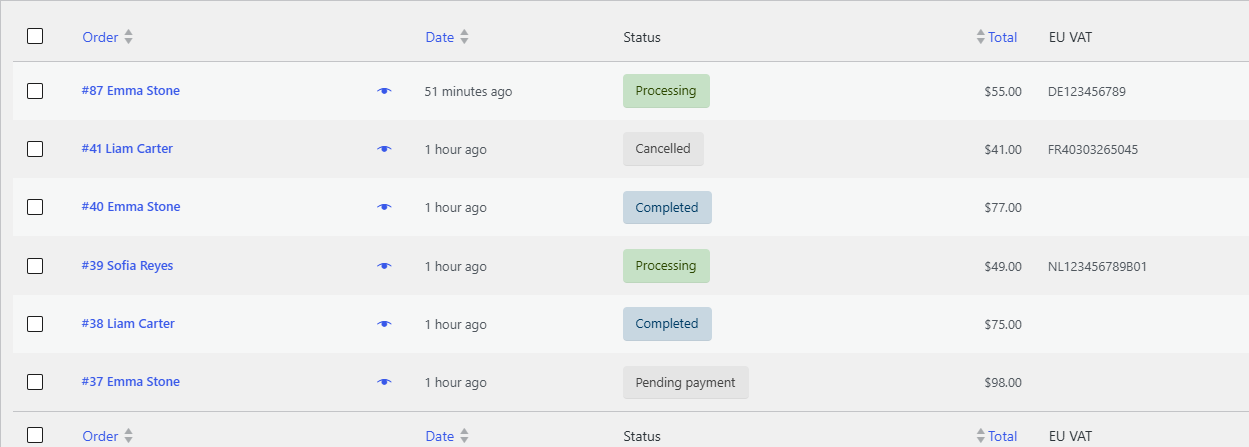
To see each order’s VAT number in the WooCommerce orders list, turn on Column in EU/UK VAT Manager for WooCommerce at WPFactory > EU VAT (also reachable at WooCommerce > Settings > EU VAT) > Admin. The same free sub-tab adds an order meta box, admin email details and an EU VAT report.
EU/UK VAT Manager can surface each order’s VAT number in the admin, add it to admin emails, and give you an EU VAT tax report. All of this is free and lives on the Admin sub-tab.
Order meta box and column #
| Label | Option ID | Default | What it adds |
|---|---|---|---|
| Meta box | alg_wc_eu_vat_add_order_edit_metabox |
No | A VAT summary box on the order edit page. |
| Column | alg_wc_eu_vat_add_order_list_column |
No | A VAT number column in the orders list. |
| Admin new order email | alg_wc_eu_vat_admin_new_order_email |
No | The VAT summary in the admin new-order email. |
| VAT validation for admin-created orders | alg_wc_eu_vat_validate_vat_admin_side |
No | Validation on orders you create by hand in the admin. |
EU VAT report #
The plugin adds an EU VAT tax report at WooCommerce > Reports > Taxes > EU VAT. Use it to review VAT collected and exempted across your orders.
Add standard EU VAT rates #
To set up the standard VAT rate for each EU country in one step, open Tools > EU country VAT Rates (the plugin links to it from the Admin sub-tab). It populates the WooCommerce tax rates so you do not have to enter each country by hand.
The stored field #
Every order and customer stores the VAT number in the meta key _billing_eu_vat_number, which is what the meta box and the column read from.
If the column or the report looks empty #
- The EU VAT column is missing from the orders list. Column is off by default, and updates do not turn it on. Enable it on the Admin sub-tab and save. It works on both the classic orders screen and the high-performance order storage (HPOS) screen. The column shows the VAT number, followed by a check mark when the order was VAT exempt.
- The filter by VAT number is gone. The Select Filter EU VAT… dropdown above the orders list, with its Orders with EU VAT numbers choice, is added together with the column. Turn on Column to get it back.
- The EU VAT report shows “No taxes found in this period”. The report only counts orders with a paid status (by default Processing and Completed) and a billing country in the EU, placed within the selected range (Year, Last month, This month, or a custom range). Pick a range that contains such orders. Developers can change the counted statuses with the
alg_wc_eu_vat_report_order_statusesfilter. - The report does not list VAT numbers. It is a per-country summary: number of orders, total sales, total sales with zero tax, and total tax. Use Export CSV on the report to download that table. To see individual VAT numbers, use the orders list column and its filter.
Get more control #
These admin tools are free. See the full feature set of EU/UK VAT Manager for WooCommerce. See what Pro unlocks.
Need a hand? Our team answers every ticket on the EU/UK VAT Manager support forum.