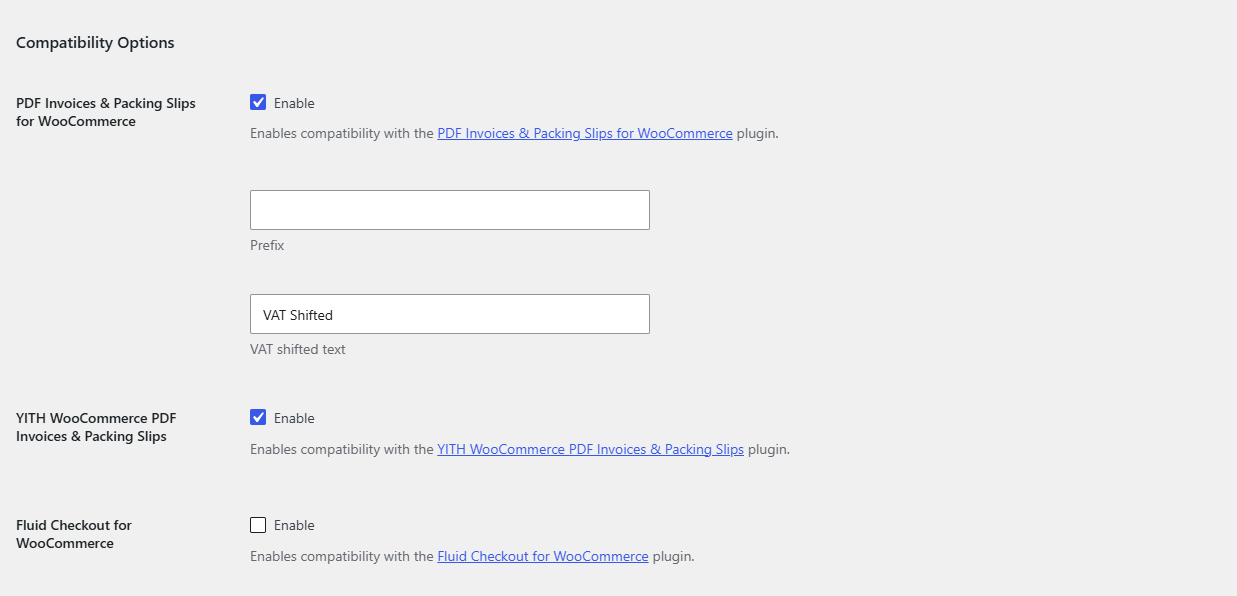
To add the VAT number to PDF invoices, go to WPFactory > EU VAT (also reachable at WooCommerce > Settings > EU VAT) and open the Compatibility sub-tab. EU/UK VAT Manager for WooCommerce supports PDF Invoices & Packing Slips for WooCommerce and YITH WooCommerce PDF Invoices & Packing Slips, both on by default. These integrations are free.
Where to find it #
Go to WPFactory > EU VAT (also reachable at WooCommerce > Settings > EU VAT) and open the Compatibility sub-tab.
Supported plugins #
| Integration | Option ID | Default |
|---|---|---|
| PDF Invoices & Packing Slips for WooCommerce | alg_wc_eu_vat_compatibility_wpo_wcpdf |
Yes |
| YITH WooCommerce PDF Invoices & Packing Slips | alg_wc_eu_vat_compatibility_yith_ywpi |
Yes |
| Fluid Checkout for WooCommerce | alg_wc_eu_vat_compatibility_fluid_checkout |
No |
Prefix and VAT shifted text #
- Prefix (
alg_wc_eu_vat_compatibility_wpo_wcpdf_prefix): text placed before the VAT number on the invoice. - VAT shifted text (
alg_wc_eu_vat_advanced_vat_shifted_text, default VAT Shifted): the reverse-charge note shown when VAT has been exempted.
Other invoice plugins #
Any invoice plugin can read the number directly from the order meta key _billing_eu_vat_number. If your invoice tool supports custom fields, point it at that key to print the VAT number.
Get more control #
These integrations are free. Discover the full toolkit in EU/UK VAT Manager for WooCommerce. See what Pro unlocks.