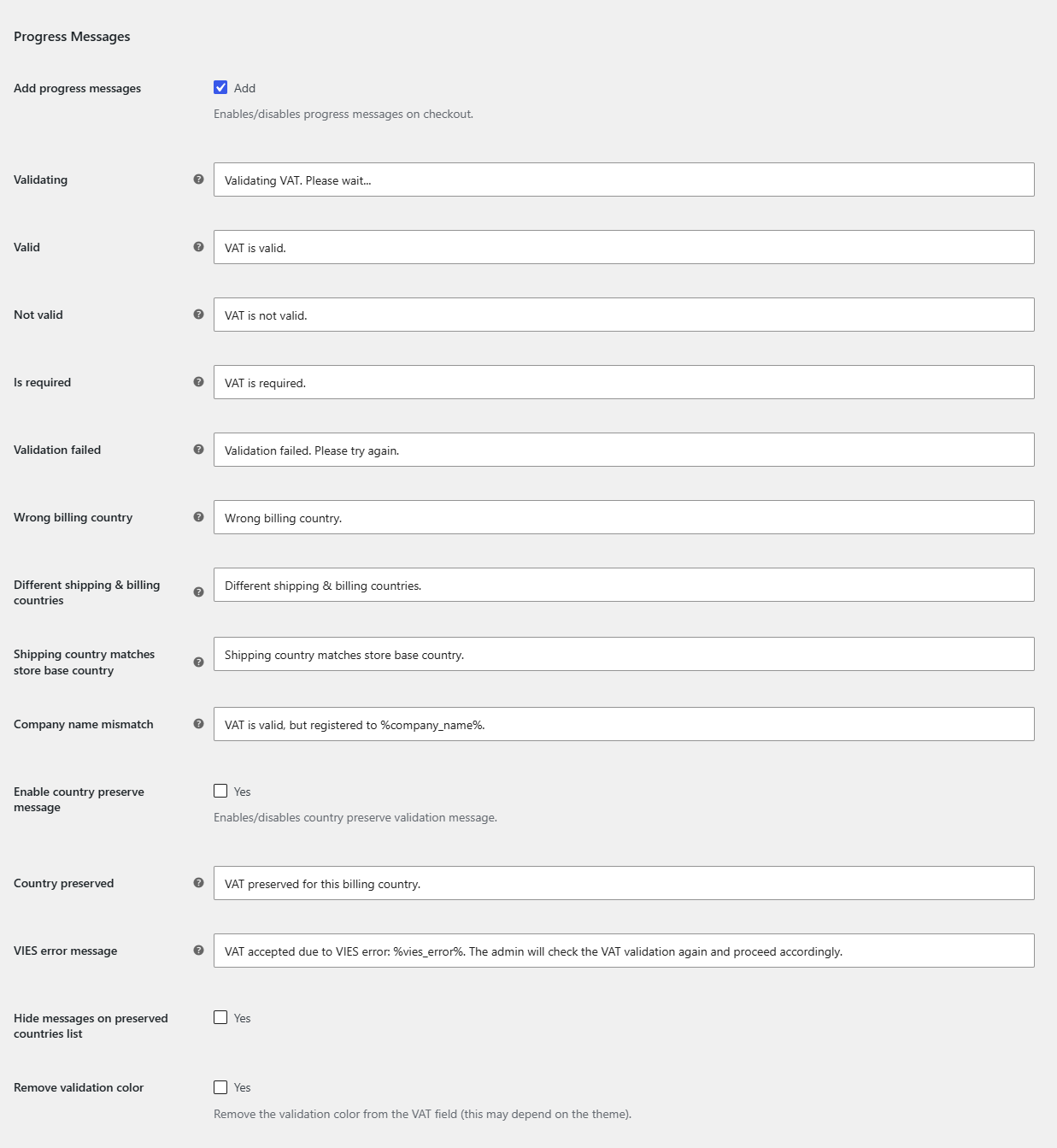
The live feedback shoppers see while their VAT number is checked is fully editable in the EU/UK VAT Manager for WooCommerce. All of these messages are free. Edit them at WPFactory > EU VAT (also reachable at WooCommerce > Settings > EU VAT) on the Messages sub-tab.
Turn messages on #
Enable Add progress messages (alg_wc_eu_vat_add_progress_text, default Yes) to show the messages during checkout.
Message options #
| Message | Option ID |
|---|---|
| Validating | alg_wc_eu_vat_progress_text_validating |
| Valid | alg_wc_eu_vat_progress_text_valid |
| Not valid | alg_wc_eu_vat_progress_text_not_valid |
| Is required | alg_wc_eu_vat_progress_text_is_required |
| Validation failed | alg_wc_eu_vat_progress_text_validation_failed |
| Wrong billing country | alg_wc_eu_vat_wrong_billing_country |
| Company name mismatch | alg_wc_eu_vat_company_name_mismatch |
| Country preserved | alg_wc_eu_vat_progress_text_validation_preserv |
| VIES error message | alg_wc_eu_vat_progress_text_validation_vies_error |
Placeholders #
Some messages accept placeholders that the plugin replaces at runtime:
| Placeholder | Replaced with | Available in |
|---|---|---|
%eu_vat_number% |
The number the customer entered | Message on not valid |
%company_name% |
The company VIES has on record | Company name mismatch |
%vies_error% |
The VIES error code returned | VIES error message |
Style the messages #
Each message state carries a CSS class you can target, for example wpfactory-wc-eu-vat-validating, wpfactory-wc-eu-vat-valid and wpfactory-wc-eu-vat-not-valid. To drop the plugin’s default coloring, enable Remove validation color (alg_wc_eu_vat_remove_validation_color).
Multilingual messages #
On WPML or Polylang stores, put the [alg_wc_eu_vat_translate] shortcode inside any message field to show language-specific text. See the Shortcodes guide.
Get more control #
These messages are free. See everything EU/UK VAT Manager for WooCommerce offers, including Pro targeting and advanced checks. See what Pro unlocks.