Table of Contents
This article covers the validation options in the EU/UK VAT Manager for WooCommerce. Real-time VIES validation and exemption are in the free version; the IP and company-name checks are Pro. Open WPFactory > EU VAT (also reachable at WooCommerce > Settings > EU VAT) and the Validation sub-tab.
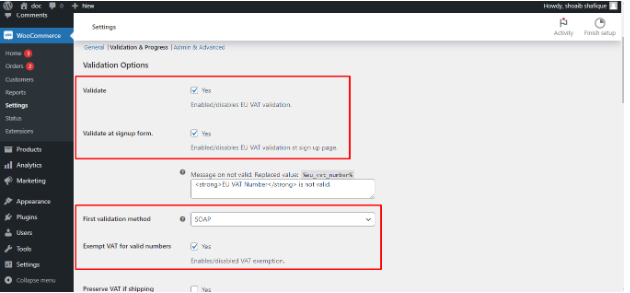
Core validation (Free) #
- Validate: turns real-time VAT number validation on.
- First validation method: SOAP, cURL or Simple. All three ship in the free version, and the plugin falls back between them automatically. This only picks which method is tried first.
Exemption and preserve rules (Free) #
- Remove VAT for validated numbers: exempts a validated B2B customer from VAT.
- Keep VAT if shipping country is different from billing country, Keep VAT if shipping country matches store base country, and Keep VAT in selected countries: preserve VAT in specific situations.
Advanced checks #
- Check country by IP (Pro): confirms the customer’s IP country matches the country in the VAT number.
- Check company name (Pro): confirms the billing company matches the VIES record.
- Check for matching billing country code (Free): confirms the VAT number’s country code matches the billing country.
Input flexibility and role exemption (Free) #
- Allow VAT number input without country code and Allow VAT number input with non-alphanumeric symbols.
- Always exempt VAT for selected user roles and Always not exempt VAT for selected user roles.
- Skip VAT validation for selected countries and Validate action trigger (On Input or On Blur).
Progress messages (Free) #
Live checkout messages (Validating, Valid, Not valid, Validation failed, and more) are configured on the Messages sub-tab and are part of the free version. See Customize VAT validation messages.
Ready to upgrade? #
The IP and company-name checks are Pro features of EU/UK VAT Manager. Get EU/UK VAT Manager Pro.