A trigger is the WooCommerce event that sends a custom email. In Additional Custom Emails & Recipients for WooCommerce you pick one or more triggers per email in the Triggers field, and the email is sent every time any selected event fires (subject to the Order Options conditions). This page lists every trigger the plugin can offer and how each one behaves.
Each custom email is configured under WooCommerce > Settings > Emails, on that email’s own settings screen. The trigger groups you see there are controlled from the plugin’s own tab at WPFactory > Custom Emails > General (also reachable at WooCommerce > Settings > Custom Emails > General).
Trigger groups #
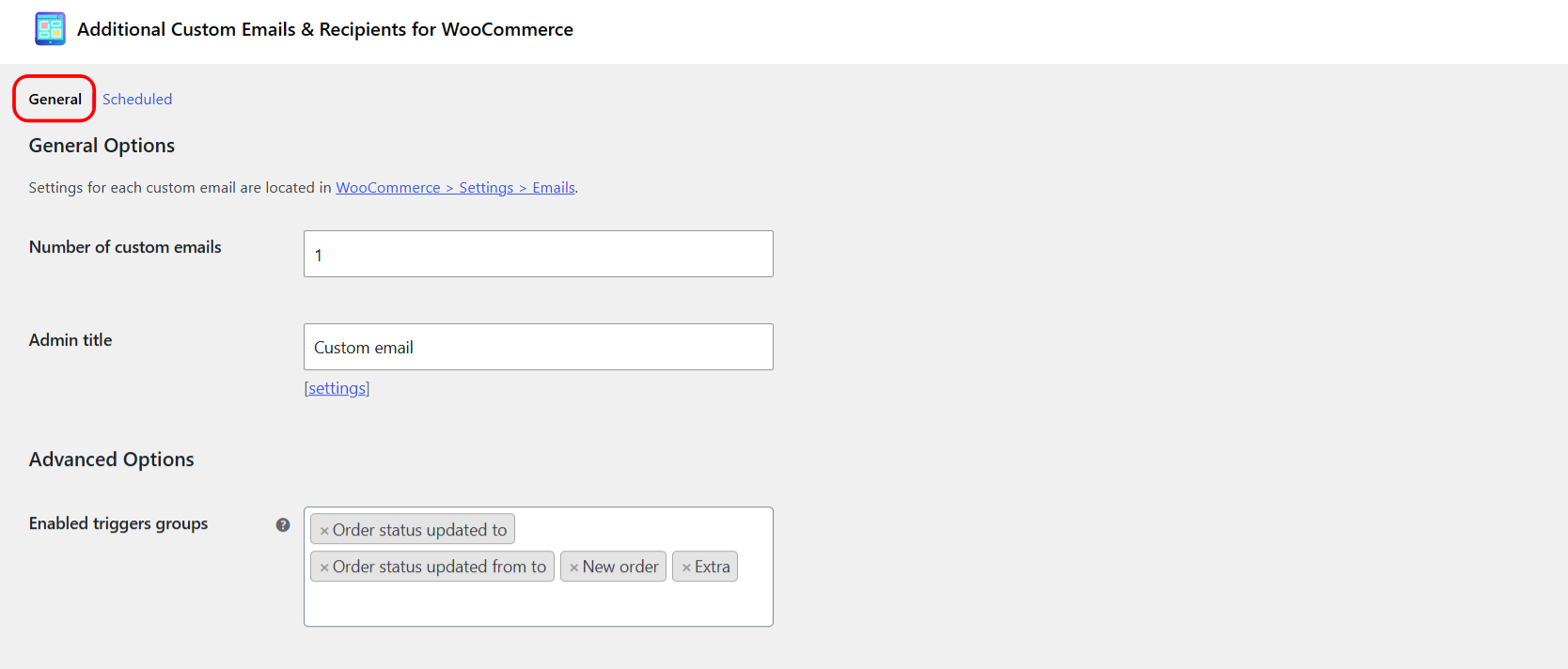
Triggers are organized into groups. The Enabled triggers groups option (General > Advanced Options, option ID alg_wc_custom_emails_enabled_trigger_groups) decides which groups appear in the per-email Triggers list. Disabling groups you never use keeps the list manageable; it does not delete anything. The default enabled groups are Order status updated to, Order status updated from to, New order, and Extra.
| Group | What it contains | Enabled by default |
|---|---|---|
| New order | “New order (Any status)” plus one “New order (Status)” entry per order status. | Yes |
| Order status updated to | “Order status updated to (Status)” for every order status. | Yes |
| Order status updated from to | “Order status (A) to (B)” for every pair of statuses. | Yes |
| Extra | Non-order events: refunds, notes, stock, customers, and more (see below). | Yes |
| Subscriptions: Subscription status updated to | Subscription status transitions. Requires WooCommerce Subscriptions. | No |
| Subscriptions: Subscription status updated from to | Subscription status from-to pairs. Requires WooCommerce Subscriptions. | No |
| Subscriptions: Renewal order status updated to | Renewal order status transitions. Requires WooCommerce Subscriptions. | No |
| Subscriptions: Renewal order status updated from to | Renewal order from-to pairs. Requires WooCommerce Subscriptions. | No |
| Subscriptions: Renewal new order | “Renewal new order (Status)” per status. Requires WooCommerce Subscriptions. | No |
New order triggers #
The New order group fires when an order is first created at checkout, including the block-based (Store API) checkout. It offers:
- New order (Any status): sends for every newly created order, whatever status it is created with.
- New order (Status): one entry per order status, for example “New order (Processing)”. This sends only when the new order is created directly with that status.
Important gotcha: nearly all new orders in WooCommerce are created with the Pending payment status, then move to Processing or Completed once payment clears. If you select “New order (Processing)” expecting it to fire on paid orders, it usually will not, because the order was Pending payment at creation time. To send an email when an order becomes paid, use the Order status updated to Processing (or Completed) trigger instead.
Order status triggers #
- Order status updated to (Status): fires whenever an order moves into the chosen status, from any previous status.
- Order status (A) to (B): fires only on that exact transition, for example “Order status On hold to Processing.” Use this when you need to react to a specific change rather than the destination status alone.
Extra triggers #
The Extra group covers events that are not tied to an order status change. The object passed to the email differs by event (order, product, or user), which affects which shortcodes resolve.
| Trigger label | Fires when | Object |
|---|---|---|
| Reset password notification | A customer requests a password reset. | User |
| Order fully refunded notification | An order is fully refunded. | Order |
| Order partially refunded notification | An order is partially refunded. | Order |
| New customer note notification | A note to the customer is added to an order. | Order |
| Low stock notification | A product hits its low-stock threshold. | Product |
| No stock notification | A product is out of stock. | Product |
| Product on backorder notification | A product is placed on backorder. | Product |
| Product published | A product transitions to the Published status. | Product |
| Product updated | A product is updated. | Product |
| Created customer notification | A new customer account is created. | User |
| Customer address saved | A customer saves an address from the account area. | User |
| Customer address changed | A saved address is actually changed (not just re-saved). | User |
For user and product triggers, order shortcodes such as [order_number] stay empty because there is no order in context. Use user-oriented shortcodes (for example [user_prop key="..."]) or product content accordingly.
Subscription triggers #
The four Subscriptions groups appear only when WooCommerce Subscriptions is active, and only after you enable the matching groups in Enabled triggers groups. They mirror the order triggers for subscriptions and their renewal orders: status “updated to”, status “from to”, and renewal new orders.
Custom triggers #
You can add your own trigger from any WordPress or WooCommerce action hook. Enter it under General > Advanced Options > Custom triggers, and it then appears in a “Custom triggers” group in every email’s Triggers list. See the how-to guide on adding custom triggers for the exact format.
How triggers combine with conditions #
Selecting a trigger only decides when the plugin attempts to send. The email still has to pass the per-email Order Options (required or excluded products, categories, amounts, gateways, users, roles, statuses, and so on) before it goes out. If an email seems not to fire, confirm both the trigger and the Order Options.
Ready to route your store’s emails? #
Additional Custom Emails & Recipients for WooCommerce lets you attach any of these triggers to unlimited custom emails, each with its own recipients, content, and conditions. Get the plugin to build the exact notification flow your store needs.