This reference lists every setting on the Slugs Manager: Delete Old Permalinks from WordPress Database admin page, with its stored option ID, default value, and whether it is free or Pro. All of it lives on one page at WPFactory > Slugs Manager.
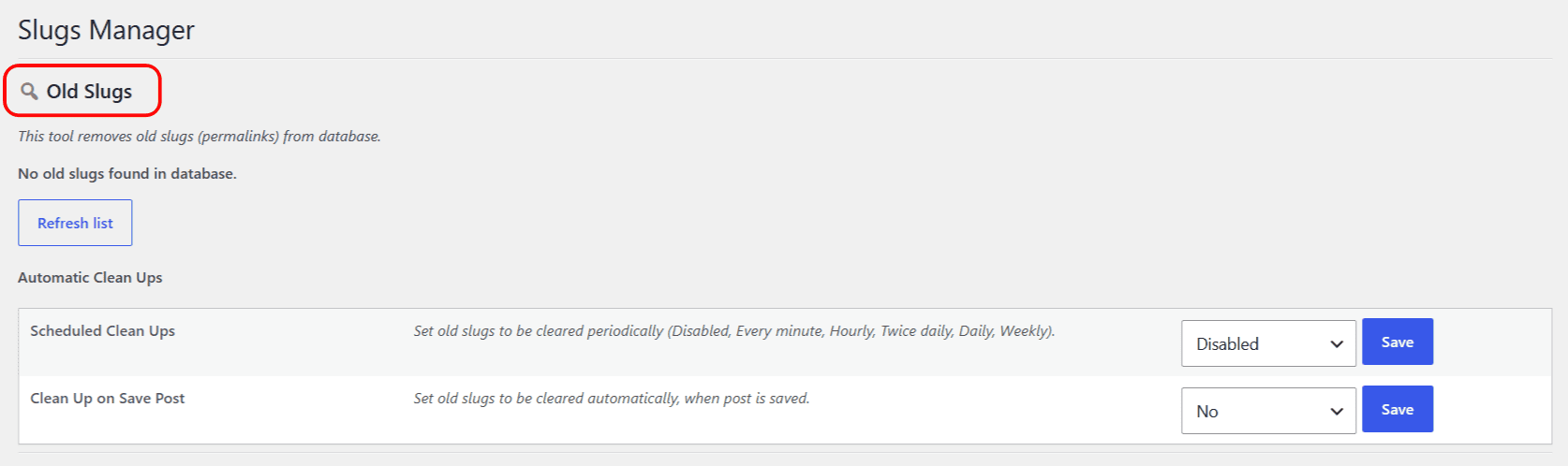
Old Slugs (free) #
The Old Slugs table lists every _wp_old_slug record in the database. There is no stored option here, just actions:
| Action | What it does | Free/Pro |
|---|---|---|
| Remove selected old slugs | Deletes the _wp_old_slug records for the rows you tick. |
Free |
| Remove all old slugs | Deletes every _wp_old_slug record in the database. |
Free |
| Refresh list | Rescans the database and reloads the table. | Free |
Automatic Clean Ups (Pro) #
| Setting | Option ID | Values | Default | Free/Pro |
|---|---|---|---|---|
| Scheduled Clean Ups | alg_remove_old_slugs_cron_interval |
Disabled, Every minute, Hourly, Twice daily, Daily, Weekly | Disabled | Pro |
| Clean Up on Save Post | alg_remove_old_slugs_on_save_post_enabled |
No, Yes | No | Pro |
Regenerate Slugs (Pro) #
| Setting | Option ID | Default | Free/Pro |
|---|---|---|---|
| Post types to regenerate | alg_sm_regenerate_slugs_post_types |
Post | Pro |
The post-type selector is built from every searchable post type on your site, so the exact options depend on what is registered (posts, pages, attachments, products, and any custom post types). Regenerate rebuilds the current slug from the post title; there is no undo.
Extra Tools (free) #
| Tool | What it does | Free/Pro |
|---|---|---|
| Flush Rewrite Rules | Removes and recreates WordPress rewrite rules. | Free |
For step-by-step guides, see the Slugs Manager documentation.
Get more control #
The Old Slugs table and Flush Rewrite Rules are free. Slugs Manager: Delete Old Permalinks from WordPress Database Pro adds automatic clean ups and slug regeneration. See what Pro unlocks.