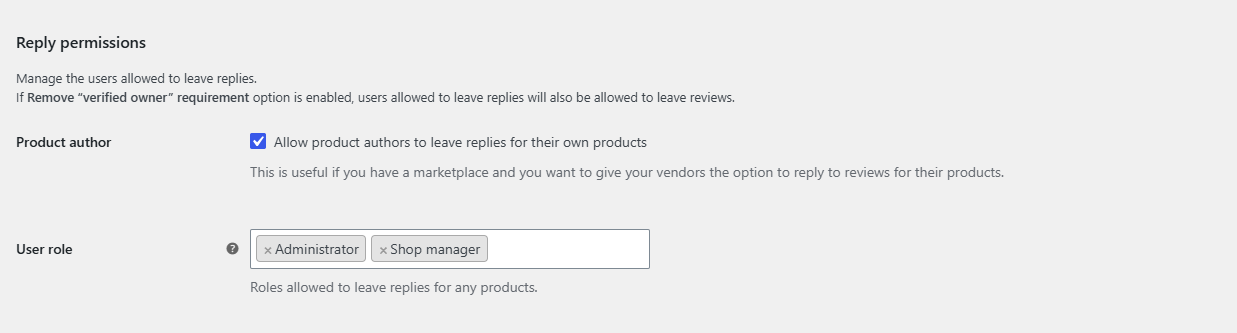
To let vendors or shop managers reply to WooCommerce reviews, go to WooCommerce > Settings > Review replies > General > Reply permissions in Easy Replies to WooCommerce Reviews. Allow product authors to answer reviews on their own products, and add any roles that may reply on every product.
How reply permissions work #
A user sees the Reply link when either rule matches:
- Product author is on and the user is the author of the product being viewed. This is the rule for marketplace vendors.
- The user has one of the roles selected in User role. These users can reply on any product.
Everyone else sees reviews as usual, with no Reply link.
Let vendors reply to reviews on their own products #
- Go to WooCommerce > Settings > Review replies and stay in the General section.
- Under Reply permissions, make sure Product author is ticked. It is on by default.
- Click Save changes.
Each vendor can now reply on products where they are set as the author, and only there. The product author is the WordPress user assigned to the product, which marketplace plugins such as Dokan usually set to the vendor who created it.
Let shop managers or other roles reply on any product #
- In the same Reply permissions group, click into User role.
- Add the roles you want, for example Shop manager. Administrator is selected by default; remove it if administrators should not reply.
- Click Save changes.
The list includes every role on your site plus Guest, which means visitors who are not logged in. Only select Guest if you really want anyone to reply.
Let repliers skip the purchase check #
If WooCommerce is set so that only verified owners can leave reviews, repliers who never bought the product would be blocked. The Verfied owner option (“Remove ‘verified owner’ requirement for users allowed to leave replies”) in General > General options lifts that rule for users allowed to reply. It is on by default.
Because replies use the review form, users allowed to reply can then also post new top-level reviews on those products.
Dokan marketplaces #
Dokan removes the review form for product authors, which hides it from the vendors you want to reply. To fix this:
- Go to WooCommerce > Settings > Review replies > Compatibility.
- Under Dokan, tick Reviews form (“Enable reviews form for product authors on product pages”).
- Click Save changes.
FAQ #
Can a vendor reply to reviews on another vendor’s products? #
Not through the Product author rule, which only matches the product’s own author. A vendor could reply everywhere only if their role is selected in User role, so keep the vendor role out of that list.
Do vendors need admin access to reply? #
No. Replies are written on the product page, so vendors only need to be logged in.
Why can a shop manager not see the Reply link? #
Shop manager is not selected by default. Add it in General > User role and save.
Can I stop product authors from replying? #
Yes. Untick Product author. Only users with a role selected in User role can then reply.
Need a hand? Our team answers every ticket on the Easy Replies support forum.