Insert Standard Text in All WordPress Posts Automatically


Quick answer: To show the same content under every post, hook a function to the the_content filter that appends your HTML when is_single() is true. Add it to your child theme’s functions.php or a code snippets plugin, and the text appears below every post automatically, so you never edit posts one by one.
Adding content after each WordPress post can be a great way to capture a user’s attention. You can use the area to display signatures, and ads, give users important updates, or affiliate disclosures. This can also come in handy when your affiliate links are changed or updated. You can easily keep all your affiliate links updated by having custom content under each post. This will save you the time of manually going into each post and updating affiliate links.
WordPress does not have a default way of adding content after each post. You can manually go into each post and add the content, this is a very tedious method though. You can either use a plugin or add some code to your WordPress website to display custom content after each post.
Plugins often have compatibility issues, and some tend to slow down your website. It is always advisable to avoid using plugins wherever possible. In this tutorial, we will look at how you can use a code snippet to add custom content after your WordPress post.
Step by Step Guide for Adding Custom Content Under Each WordPress Post
Step 1: Open the theme editor
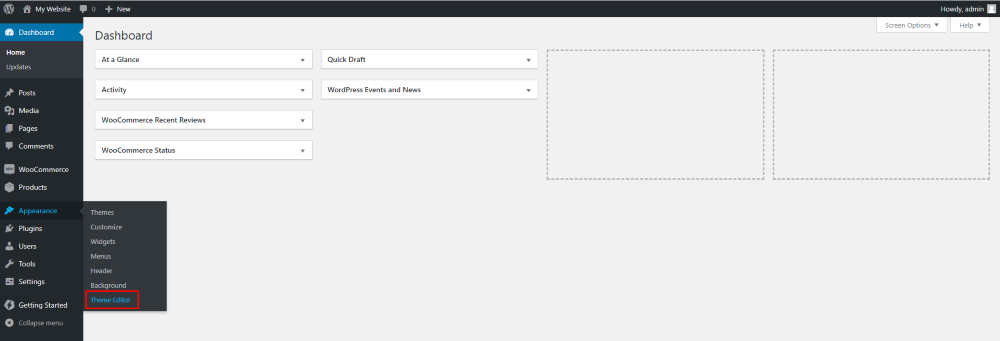
Login to your WordPress dashboard and under the “Appearance” menu click on “Theme Editor”, as shown in the screenshot below:
Step 2: Open your theme’s functions.php file
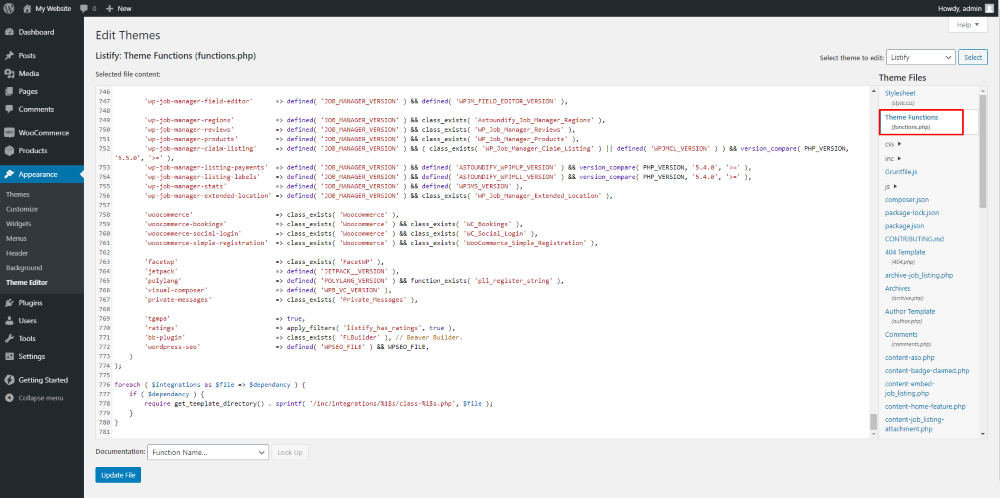
In the right-hand column search for the functions.php file and open it as shown in the screenshot below:
Step 3: Adding code to your functions.php file
If you would like to add some text to the bottom of each post, add the following code to the end of the functions.php file:
if ( ! function_exists( 'wpfactory_after_post_content' ) ) {
    /**
     * Add custom text after WordPress posts.
     */
    function wpfactory_after_post_content( $content ) {
        if ( is_single() ) {
            $content .= 'Text you want to add goes here';
        }
        return $content;
    }
}
add_filter( 'the_content', 'wpfactory_after_post_content' );
Make sure to replace “Text you want to add goes here” with your custom content.
If you want to add some ad code before each post, use the following code:
if ( ! function_exists( 'wpfactory_before_post_content' ) ) {
    /**
     * Add ad code before WordPress posts.
     */
    function wpfactory_before_post_content( $content ) {
        if ( is_single() ) {
            $content = 'Your ad code goes here' . $content;
        }
        return $content;
    }
}
add_filter( 'the_content', 'wpfactory_before_post_content' );
As you can see the code is similar – the only thing that changes is the content.
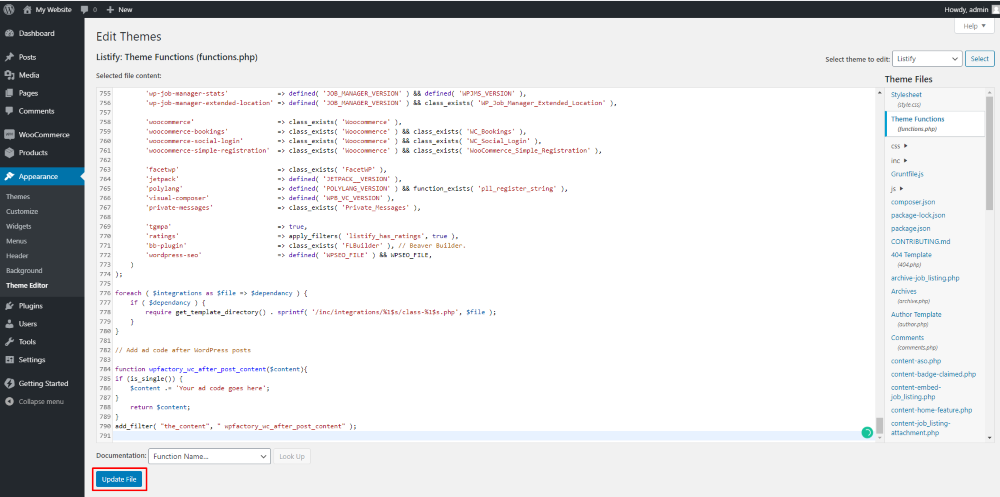
Once you are done adding the code to your functions.php file click on “Update File”:
Conclusion
We hope you are now easily able to add custom content at the end (or at the beginning) of each WordPress post. You can use this area to include a call to action, an email sign-up or links. No matter what you want to add you should easily be able to do this.
Always remember to back up your website before you make any changes to the code. Even if you are sure that nothing will go wrong, changing the code of your website can be risky. Backups are a lifesaver.


