The Admin sub-section of Automated Stock Update Triggers for WooCommerce controls stock adjustments you make from the WooCommerce admin: creating and editing orders, running bulk actions, and logging. All of these options are free. Only the use of custom order statuses in the status list requires Pro.
Go to WPFactory > Stock Triggers (also reachable at WooCommerce > Settings > Stock Triggers), then open the Admin sub-section.
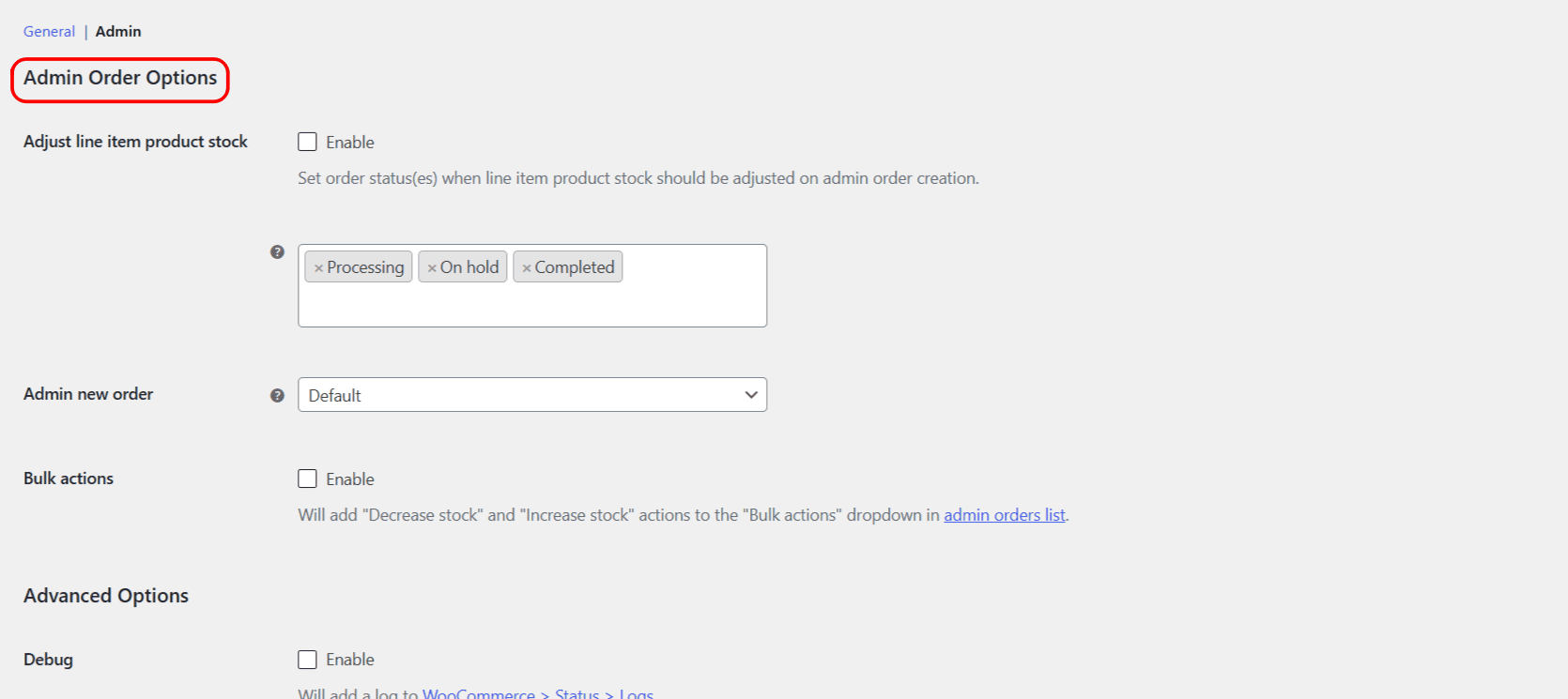
Adjust line item product stock #
When enabled (alg_wc_stock_triggers_adjust_line_item_product_stock_enabled, default No), adding or changing items on an order adjusts product stock, but only while the order is in one of the selected statuses (alg_wc_stock_triggers_adjust_line_item_product_stock_statuses, default Processing, Completed, On hold). The plugin also adds an order note recording each adjustment. In the free version the status list contains the 7 core WooCommerce statuses; Pro adds custom order statuses.
Admin new order #
The Admin new order select (alg_wc_stock_triggers_increase_on_ajax_order, default Default) sets what happens when you add products to an order in the admin with Add item(s) > Add product(s):
| Choice | Effect |
|---|---|
| Default | WooCommerce’s standard behavior (stock decreases). |
| Increase | Forces a stock increase. |
| Decrease | Forces a stock decrease. |
| Maybe increase / Maybe decrease | Adjusts only if WooCommerce’s own checks allow it (respects whether the items were already reduced). |
Bulk actions #
Turn on Bulk actions (alg_wc_stock_triggers_shop_order_bulk_actions, default No) to add Decrease stock and Increase stock to the Bulk actions dropdown on the orders list, so you can process several orders at once. A confirmation notice reports how many orders were processed. For a full walkthrough see Add decrease and increase stock bulk actions to the orders list.
Advanced: Debug #
Turn on Debug (alg_wc_stock_triggers_debug, default No) to write a log to WooCommerce > Status > Logs (source stock-triggers) whenever stock is reduced or restored. Use it to confirm which trigger fired.
Reset section settings #
The Admin sub-section ends with a Reset section settings checkbox (alg_wc_stock_triggers_admin_reset, default No) that restores the Admin options to their defaults.
Ready to set this up? #
The Admin order options are free in Automated Stock Update Triggers for WooCommerce. To use custom order statuses in the status list, the Pro version adds them.