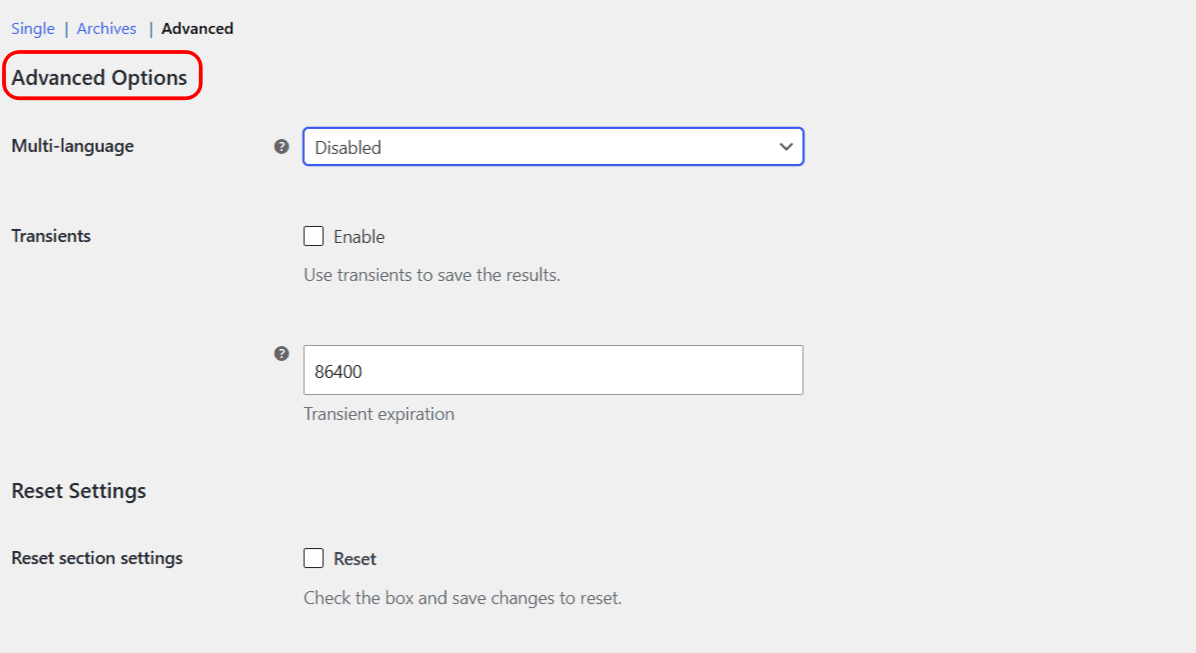
The advanced options tune how Related Categories for WooCommerce resolves translated IDs and how it caches its results. Both of these options are free. Find them at WPFactory > Related Categories (also reachable at WooCommerce > Settings > Related Categories) on the Advanced sub-tab.
Multi-language #
Multi-language is a single dropdown, not a pair of checkboxes. It tells the plugin to use the default-language product or term ID instead of the translated one when it looks up manually related categories. The choices are:
- Disabled (default).
- WPML.
- Polylang.
This setting affects the manual “Per category”, “Per tag”, “Per custom taxonomy” and “Per product” relations, so it matters most on Pro sites that assign categories by hand and run WPML or Polylang. To translate the section’s heading and labels, use the [alg_wc_related_categories_translate] shortcode inside your templates.
Transients (caching) #
- Transients: when enabled, the plugin caches each computed set of related categories in a WordPress transient, cutting down repeat database work on busy stores. Off by default.
- Transient expiration: how long, in seconds, a cached result is kept. The default is 86400 seconds, which is 24 hours (one day). Set it to 0 for no expiration.
Saved transients are cleared automatically whenever you save the Related Categories settings, so a settings change never serves stale results.
| Label | Option ID | Type | Default |
|---|---|---|---|
| Multi-language | alg_wc_related_categories_multi_language |
Select | Disabled |
| Transients | alg_wc_related_categories_use_transients |
Checkbox | No |
| Transient expiration | alg_wc_related_categories_transient_expiration |
Number (seconds) | 86400 (24 hours) |
Reset section settings #
The Reset section settings checkbox on this sub-tab resets both the multi-language and the transient options back to their defaults when you save.
Need a hand? #
These advanced options are free. If you want hand-picked related categories per product, category, tag or custom taxonomy, that is what Related Categories for WooCommerce Pro adds. See what Pro unlocks.