Managing EU VAT settings in WooCommerce #
Once EU/UK VAT Manager for WooCommerce is active, the VAT number field appears on checkout automatically; there is no master switch. To set it up, go to WPFactory > EU VAT (also reachable at WooCommerce > Settings > EU VAT), stay on the General sub-tab, and set the field label, placeholder, and whether the field is optional or required.
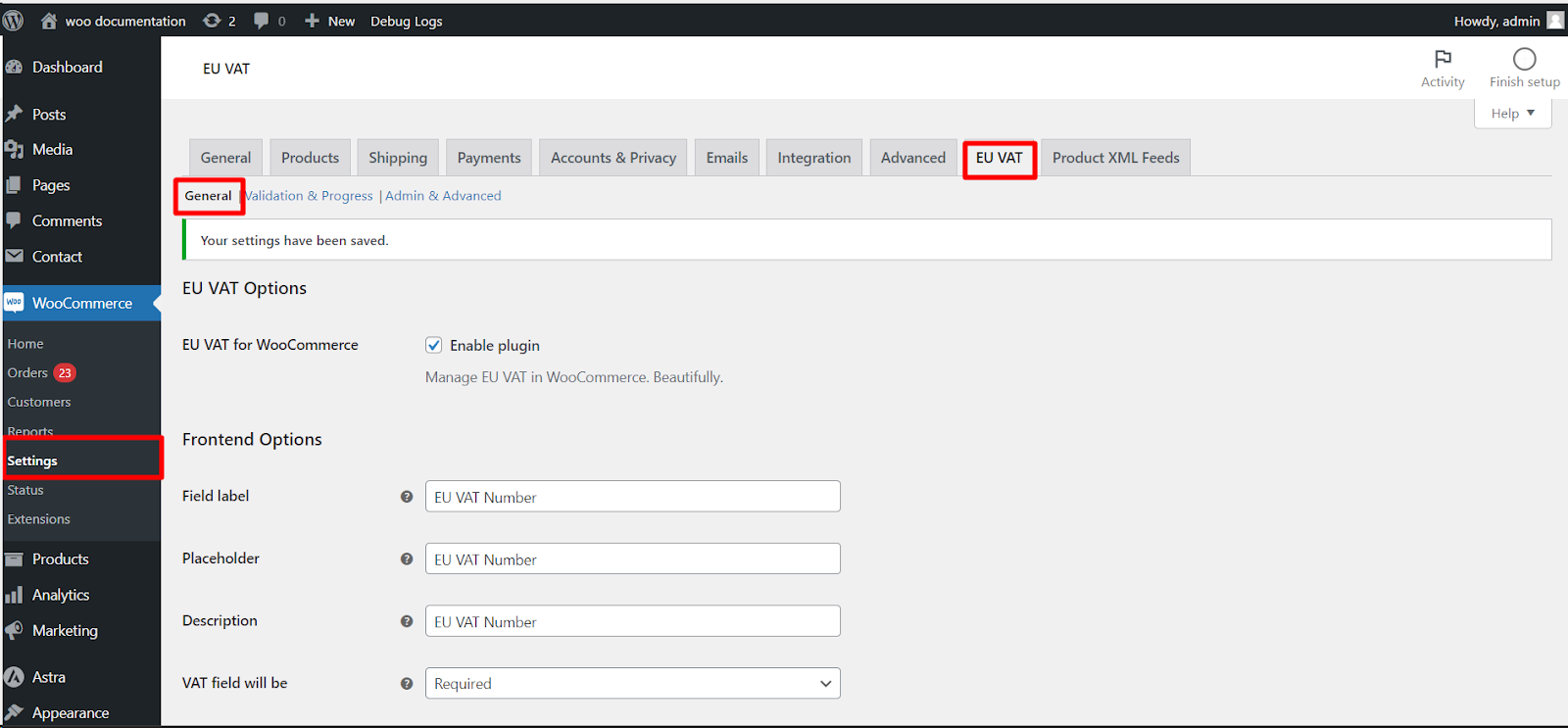
There is no master on/off switch: once the plugin is active, the VAT field appears on checkout automatically. You shape it with the options below.
Field options #
- Field label: the text shown next to the field. Default EU VAT Number.
- Placeholder: the hint text inside the field. Default EU VAT Number.
- Description: optional helper text under the field.
- VAT field will be: sets whether the field is required. See the table below.
- Priority (i.e., position): the field’s position in the billing section. Default 200 (after the standard billing fields).
- Max length, Clear, CSS class, Label CSS class: presentation options for the field.
Requirement options #
The VAT field will be selector (alg_wc_eu_vat_field_required, default Optional) offers these choices:
| Option | Effect |
|---|---|
| Optional | Customers may enter a VAT number but are not forced to. |
| Required | Every customer must enter a VAT number. |
| Required in the following countries | Mandatory only for the countries you pick below. |
| Required in all countries except following countries | Mandatory everywhere except the countries you pick. |
| Required if customer fills the company field | Mandatory only when the billing company field is filled in. |
General options #
| Label | Option ID | Default | Free/Pro |
|---|---|---|---|
| Show zero VAT | alg_wc_eu_vat_always_show_zero_vat |
No | Free |
| Confirmation notice (on empty VAT ID) | alg_wc_eu_vat_field_confirmation |
No | Free |
| Add EU VAT field to sign-up form | alg_wc_eu_vat_field_signup_form |
No | Free |
| Allow checkout on unregistered VAT numbers | alg_wc_eu_vat_field_allow_unregistered_vat_no |
No | Pro |
The Confirmation notice shows a checkout prompt when the field is left empty, which is useful when the field is optional but you still want to nudge B2B buyers. You can set its text in the field below the toggle.
Related articles #
- Configuring EU VAT validation to turn on and tune VIES checking.
- Payment methods based on EU VAT numbers (Pro) to restrict gateways.
Get more control #
EU/UK VAT Manager for WooCommerce Pro adds field targeting by country and user role plus payment-method control. See what Pro unlocks.