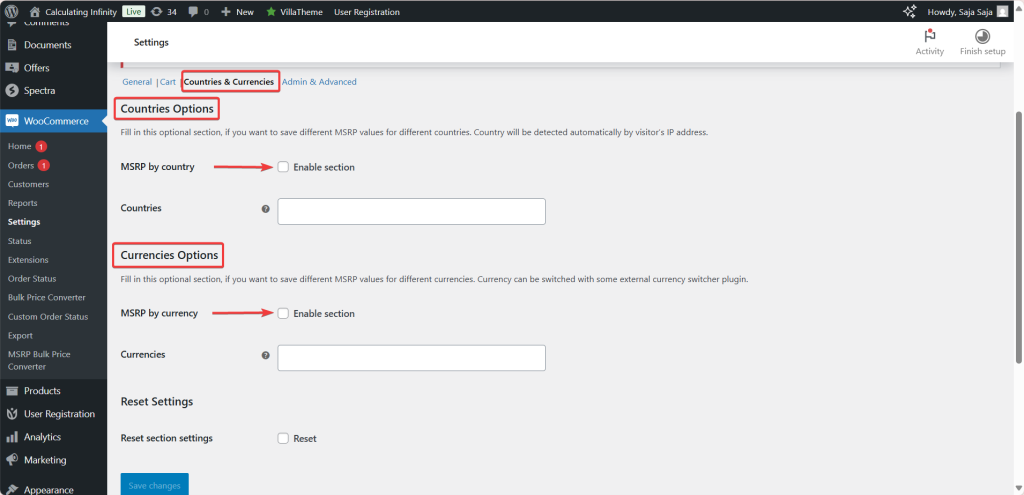
The Currencies options in MSRP (RRP) Pricing for WooCommerce let you store a different MSRP for each currency, so shoppers using a currency switcher see the right suggested price. This is a Pro feature. Find it under WPFactory > MSRP (also reachable at WooCommerce > Settings > MSRP), on the Countries & Currencies section.
How it works #
- MSRP by currency (Enable section): turns the feature on. Option ID
alg_wc_msrp_by_currency_enabled, default No. Disabled in the free version. - Currencies: select the currencies you want to price for. Option ID
alg_wc_msrp_currencies. After you save, each selected currency gets its own MSRP field on every product’s edit page. - Currency switching: the active currency is provided by an external currency switcher plugin, so you will need one installed for customers to switch currencies.
Note: per-currency MSRP is stored in the _alg_msrp_by_currency product meta. When the active currency has no value, MSRP Pricing falls back to the standard _alg_msrp value. The plugin does not convert prices by exchange rate on its own; it displays the value you enter for each currency.
Things to keep in mind #
- Upkeep: maintaining a separate MSRP per currency across a large catalog takes time.
- Dependency: the feature relies on a compatible currency switcher, so test the two plugins together.
Ready to set this up? #
This is a Pro feature of MSRP Pricing. Upgrading unlocks it along with MSRP by country, cart total savings and user-role display. Get MSRP Pricing Pro.