General settings #
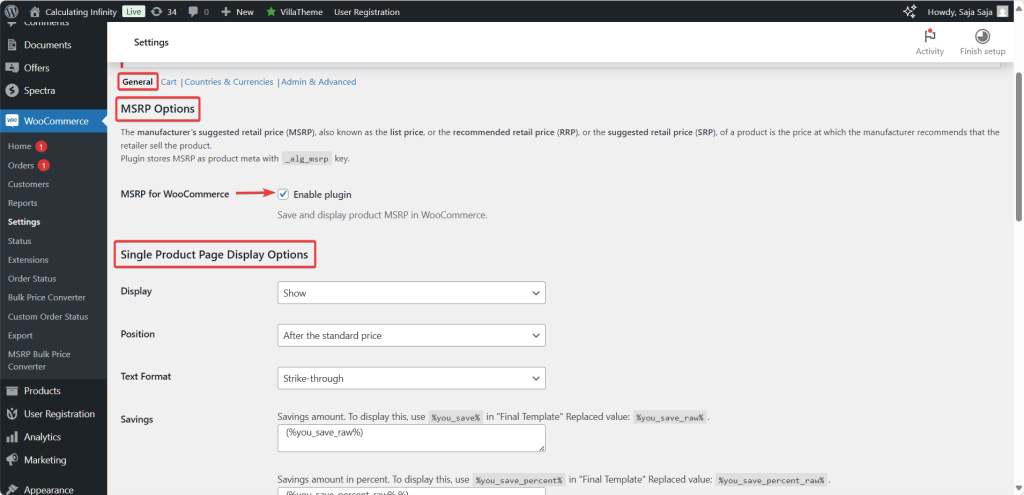
The General section is where you turn on MSRP (RRP) Pricing for WooCommerce and control how the manufacturer’s suggested price is displayed on product and archive pages. Find it under WPFactory > MSRP (also reachable at WooCommerce > Settings > MSRP), on the General section.
What is MSRP? #
MSRP (also called list price, RRP, or SRP) is the price a manufacturer recommends a retailer sell a product for. MSRP Pricing stores this value as a product meta field with the key _alg_msrp, so you can set it per product.
Enable the plugin #
Tick Enable plugin to start saving and displaying MSRP alongside your product prices. This option is on by default.
Single Product Page display options #
- Display: Show, Do not show, Only show if MSRP is higher than the standard price, or Only show if MSRP differs from the standard price.
- Position: Before, After, or Instead of the standard price.
- Text Format: No format, Bold, Italic, Strike-through (the default), or Underlined.
Savings #
- Savings: the savings amount. Reference it with
%you_save%in the Final Template; the field itself uses%you_save_raw%. - Savings percent: the savings as a percentage. Reference it with
%you_save_percent%; the field uses%you_save_percent_raw%. - Savings percent rounding: the number of decimal places for the percentage (default 0).
Final Template and Template if no MSRP is defined #
The Final Template field sets the exact HTML and wording for the MSRP line. You can use the placeholders %msrp%, %you_save%, %you_save_percent% and %price%, plus shortcodes such as [alg_wc_msrp_wpml lang="en"][/alg_wc_msrp_wpml]. A separate Template if no MSRP is defined field covers products with no MSRP set. Editing either template requires MSRP Pricing Pro; the free version uses the default template.
Archives display options #
The Archives options mirror the single-product options (Display, Position, Text Format, Savings, and both templates), so you can present MSRP consistently across the shop, category and search pages.
Note: for the full list of template placeholders and where each one belongs, see the MSRP template placeholders reference.
Get more control #
The display options are free. MSRP (RRP) Pricing for WooCommerce Pro unlocks full template editing plus MSRP by country, by currency and by user role. See what Pro unlocks.