Shortcodes reference for product tabs #
Additional Custom Product Tabs for WooCommerce provides three shortcodes you can use in any tab title or content, in the standard, global, per-product and variation tabs. They let a single global tab display data that is different for each product. All three are available in the free version.
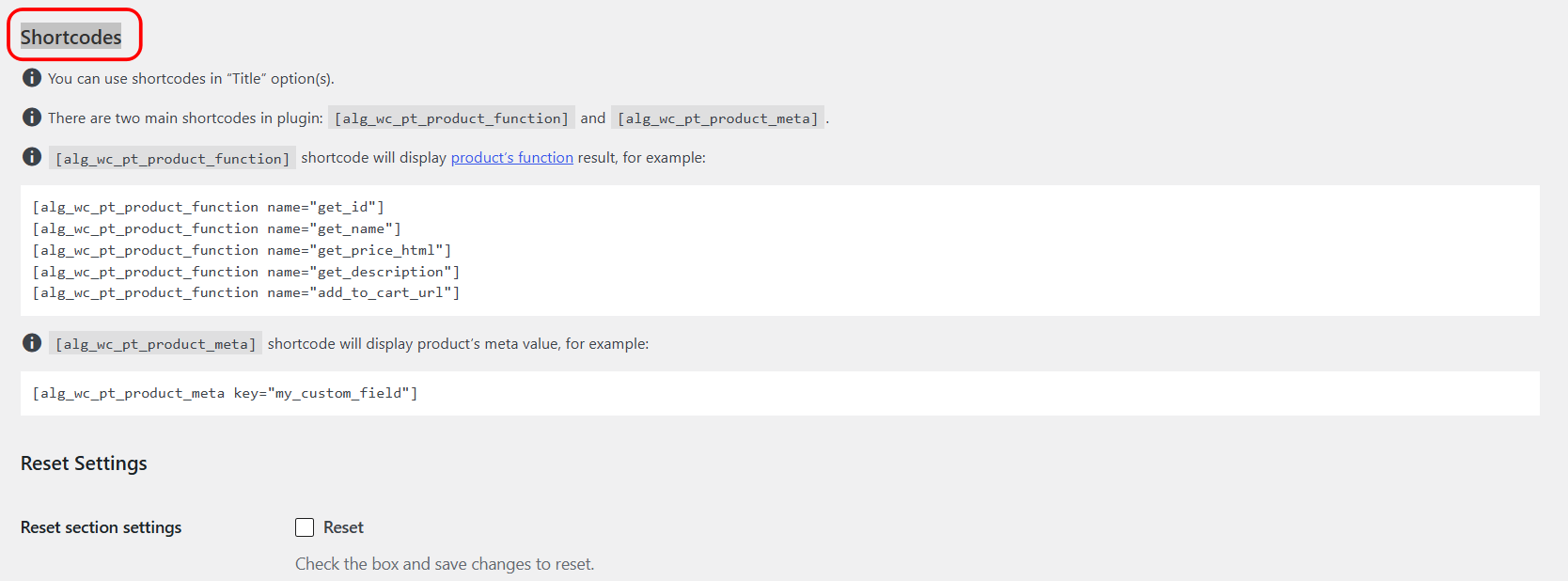
The three shortcodes #
| Shortcode | Outputs |
|---|---|
[alg_wc_pt_product_function] |
The result of a product method, for example the name, price or SKU. |
[alg_wc_pt_product_meta] |
The value of a product custom field (post meta). |
[alg_wc_pt_translate] |
Language-specific text for WPML or Polylang sites. |
[alg_wc_cpt_translate] is a deprecated alias of [alg_wc_pt_translate]. It still works, but use the current name in new content.
[alg_wc_pt_product_function] #
Displays the return value of a method on the current product. Requires a name attribute.
| Attribute | Description |
|---|---|
name |
Required. The method to call, for example get_name, get_price_html, get_sku, get_description or add_to_cart_url. |
type |
Optional. Default local, which calls the method on the product object. Set type="global" to call a global PHP function instead, passing the product to it. |
product_id |
Optional. Target a specific product instead of the current one. |
before, after |
Optional. Text placed before or after the value, only when the value is not empty. |
on_empty |
Optional. Text to show when the value is empty. |
Example: [alg_wc_pt_product_function name="get_sku" before="SKU: "]
[alg_wc_pt_product_meta] #
Displays a product custom field value. Requires a key attribute. Supports the same product_id, before, after and on_empty attributes.
Example: [alg_wc_pt_product_meta key="_my_custom_field" on_empty="Not specified"]
[alg_wc_pt_translate] #
Outputs text for the current language on multilingual sites. See the how-to on multilingual product tabs with WPML or Polylang for the two syntaxes and examples.
Where you can use them #
- Standard tab titles.
- Global tab titles and content.
- Per-product tab titles and content.
- Variation tab title and content, where they resolve per variation.
Get more from your tabs #
Shortcodes are free in Product Tabs. When you need more than one global or per-product tab to hold this content, Pro removes the limit.