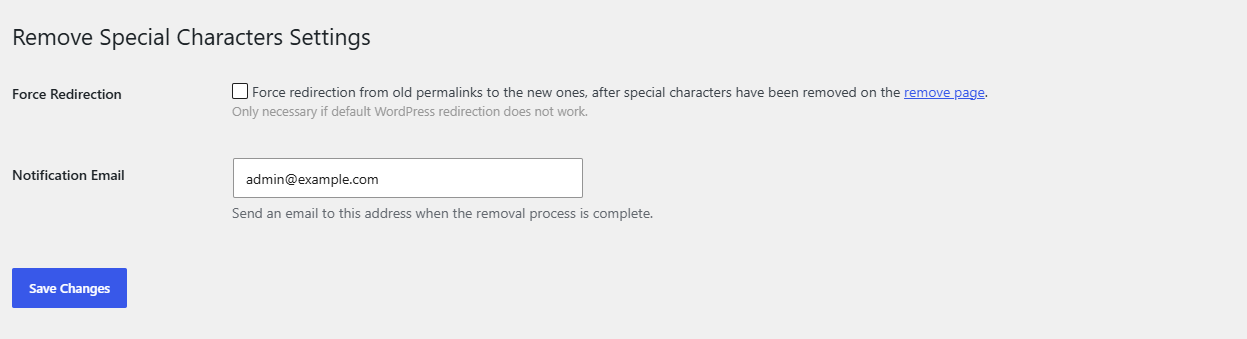
To redirect old permalinks after removing special characters, go to Settings > Special Characters in Remove Special Characters From Permalinks (URLs) for WordPress Pro, tick Force Redirection and click Save Changes. When an old URL returns a 404 error, the plugin sends the visitor to the post’s new URL with a 301 redirect.
Do you need Force Redirection? #
Often not. WordPress keeps track of changed post slugs and usually redirects old post URLs by itself. The setting’s own description says it is only necessary if default WordPress redirection does not work. Test first:
- Copy an old URL that contained special characters (from a bookmark, an old newsletter or your analytics).
- Open it in a private browser window.
- If it lands on the right post, you do not need Force Redirection. If it shows a 404 page, turn it on.
How to turn on Force Redirection #
- Go to Settings > Special Characters (or click Settings under the plugin on the Plugins screen).
- On the General tab, tick Force Redirection. It is off by default.
- Click Save Changes.
- Open one of the old URLs in a private window again. It now redirects to the cleaned URL.
How it works #
- Every time the plugin cleans a slug (at save time or with the bulk tool), it first stores the post’s previous permalink path in the post meta field
_trscfp_original_post_name. This happens in the free version too, so posts cleaned before you upgraded are covered. - With Force Redirection on, the plugin checks each front-end request that ends in a 404 error. It compares the requested path with the stored original paths of published posts.
- If it finds a match, it redirects to that post’s current permalink with HTTP status 301 (moved permanently).
- Requests that do not end in a 404 error are never touched, so the setting cannot override a page that already loads.
Limits #
- Only the most recent previous path is stored for each post. If a post’s slug was cleaned twice, only the latest old URL redirects.
- Only published posts are matched.
- Posts whose slug changed for other reasons (for example, you edited it by hand and it contained no special characters) have no stored path, so this setting does not redirect them.
FAQ #
Which redirect type does it use? #
A 301 permanent redirect, which tells search engines the page has moved.
Does it work for pages and WooCommerce products? #
Yes. It works for any published post type, as long as the old URL returns a 404 error and the plugin stored the old path when it cleaned the slug.
Will it slow down my site? #
It only runs a lookup when a request has already failed with a 404 error. Normal page views are not affected.
Ready to set this up? #
This is a Pro feature of Remove Special Characters. If you are still on the free version, upgrading takes a couple of minutes and unlocks this along with the one-click bulk cleanup. Get Remove Special Characters Pro.
Need a hand? Our team answers every ticket on the Remove Special Characters support forum.