To remove special characters from WordPress URLs, activate Remove Special Characters From Permalinks (URLs) for WordPress and publish or update the post, page or product. The plugin strips symbols, emoji and other non-ASCII characters from the slug on save. There is no settings screen for this free feature; to clean every existing URL at once, use Pro’s Tools > Remove Characters.
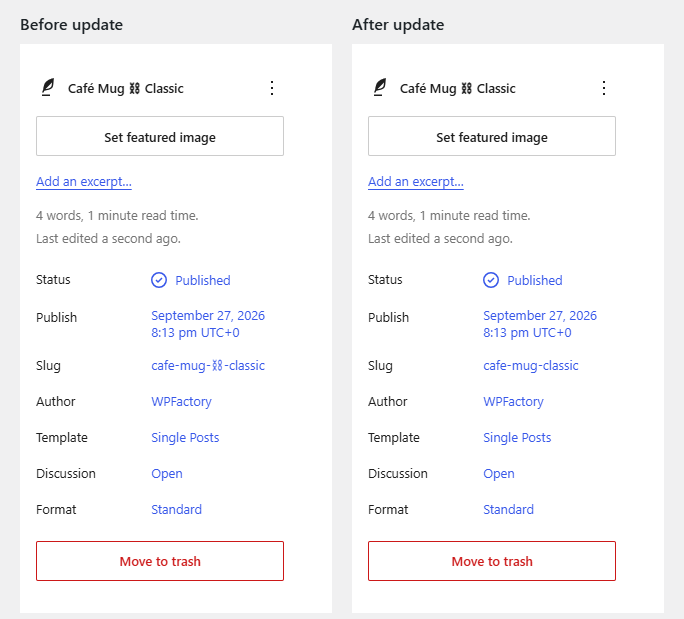
How to clean a URL #
- Make sure Remove Special Characters is active and that WooCommerce is active (the plugin does not load without it, see Getting Started).
- Open the post, page, WooCommerce product or custom post type item whose URL contains special characters.
- Click Publish or Update. You do not need to change anything else.
- Check the permalink shown in the editor. The special characters are gone.
- Repeat for other items, or clean them all at once with the Pro bulk tool: How to Bulk Clean Special Characters from All WordPress Permalinks.
What gets removed and what stays #
When a slug contains any character outside the safe set below, the plugin rebuilds it in four steps: it decodes the URL-encoded slug, converts accented Latin letters to plain letters (using WordPress’s remove_accents()), deletes every remaining character that is not in the safe set, and then runs WordPress’s standard slug formatting, which lowercases the result and tidies up hyphens.
| Character type | Example | Result |
|---|---|---|
| Letters a to z and digits 0 to 9 | deals-2026 |
Kept |
| Hyphen, underscore and dot | size_xl, v1.2 |
Kept |
| Accented Latin letters | café |
Converted: cafe |
| Symbols and emoji | ⛓, ★, emoji | Removed |
| Letters from non-Latin scripts | Arabic, Cyrillic, Chinese, Greek | Removed (not transliterated) |
Example: a product titled Café Mug ⛓ Classic gets the slug cafe-mug-classic after you save it.
If your titles are written in a non-Latin script, read How to Fix Non-English Characters in WordPress Permalinks first, because removing those letters can leave a slug empty.
Where it applies #
- Every post type that WordPress saves through its standard post functions: posts, pages, WooCommerce products and custom post types.
- Only when the item is saved and already exists (it has an ID). Posts created in one step by an importer or script keep their slug until the next update, or until you run the Pro bulk tool.
- Revisions are skipped.
- Only post slugs. Category, tag and other taxonomy term slugs are not changed.
What happens to the old URL #
Before changing a slug, the plugin records the post’s previous permalink path in the post meta field _trscfp_original_post_name. The free version does not redirect anything by itself. WordPress usually redirects old post URLs to the new slug on its own, but that does not cover every case. If old links return a 404 error, Pro’s Force Redirection setting uses the recorded path to send visitors to the new URL. See How to Redirect Old Permalinks After Removing Special Characters.
FAQ #
Does the plugin change my existing URLs automatically? #
No. Each URL changes only when that item is saved. Existing content keeps its URL until you update it, or until you run the Pro bulk tool.
Can I choose which characters to keep? #
No. The safe set (a to z, 0 to 9, hyphen, underscore, dot) is fixed in the code and there are no options in the free version.
Will it change my category or tag URLs? #
No. The plugin only filters post data, so taxonomy term slugs are left alone.
What if I type a slug by hand? #
A slug you type yourself goes through the same cleanup when you save. A slug made only of safe characters is left exactly as you typed it.
Get more control #
This feature is free. Remove Special Characters From Permalinks (URLs) for WordPress Pro cleans all existing permalinks with one click, emails you when it is done and can force redirects from old URLs. See what Pro unlocks.
Need a hand? Our team answers every ticket on the Remove Special Characters support forum.