The Pro version of Coupons & Add to Cart by URL Links for WooCommerce unlocks the settings that are greyed out in the free version. This page lists exactly what Pro adds, verified against the plugin, so you know what you are getting before you upgrade.
All of the settings below live under WPFactory > Coupons by URL (also reachable at WooCommerce > Settings > URL Coupons).
Add coupon products to the cart #
- Add products to cart: for “Fixed product discount” coupons, automatically add the coupon’s products to the cart when the URL is opened.
- Empty cart: clear the cart first, so only the promoted products remain.
Redirect after the coupon is applied #
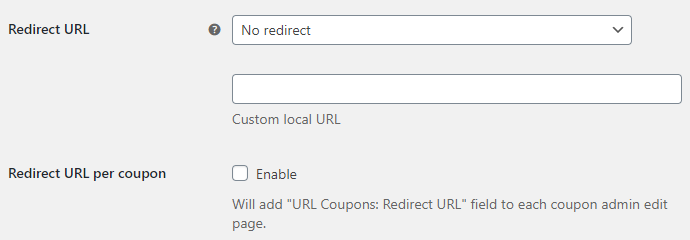
- Redirect URL: send the customer to the cart, the checkout, or a custom local URL once the coupon is applied.
- Redirect URL per coupon: add a URL Coupons: Redirect URL field to each coupon so every coupon can point to its own page.
Custom notices #
- Custom notice: replace the default “Coupon code applied successfully” message with your own wording.
- Notice per coupon: add a URL Coupons: Notice field to each coupon for a message tailored to that coupon.
- Override global and default notices, notice method, type, and glue: fine control over which message shows and how it is combined with the standard one.
[alg_wc_url_coupons_print_notices]shortcode: print WooCommerce notices on pages that do not show them by default.
Already free #
Some options are sometimes mistaken for Pro but ship in the free version, including Save on empty cart, Remove “add to cart” key, Force coupon redirect, WP Rocket: Disable empty cart caching, Payment request buttons (Stripe and WooCommerce Payments), Javascript reload, Main hook, and Data storage type. For the full breakdown, see the difference between the Pro and free versions.
Ready to upgrade? #
Upgrading takes a couple of minutes and unlocks add-to-cart coupons, redirects, and custom notices. Get URL Coupons Pro.