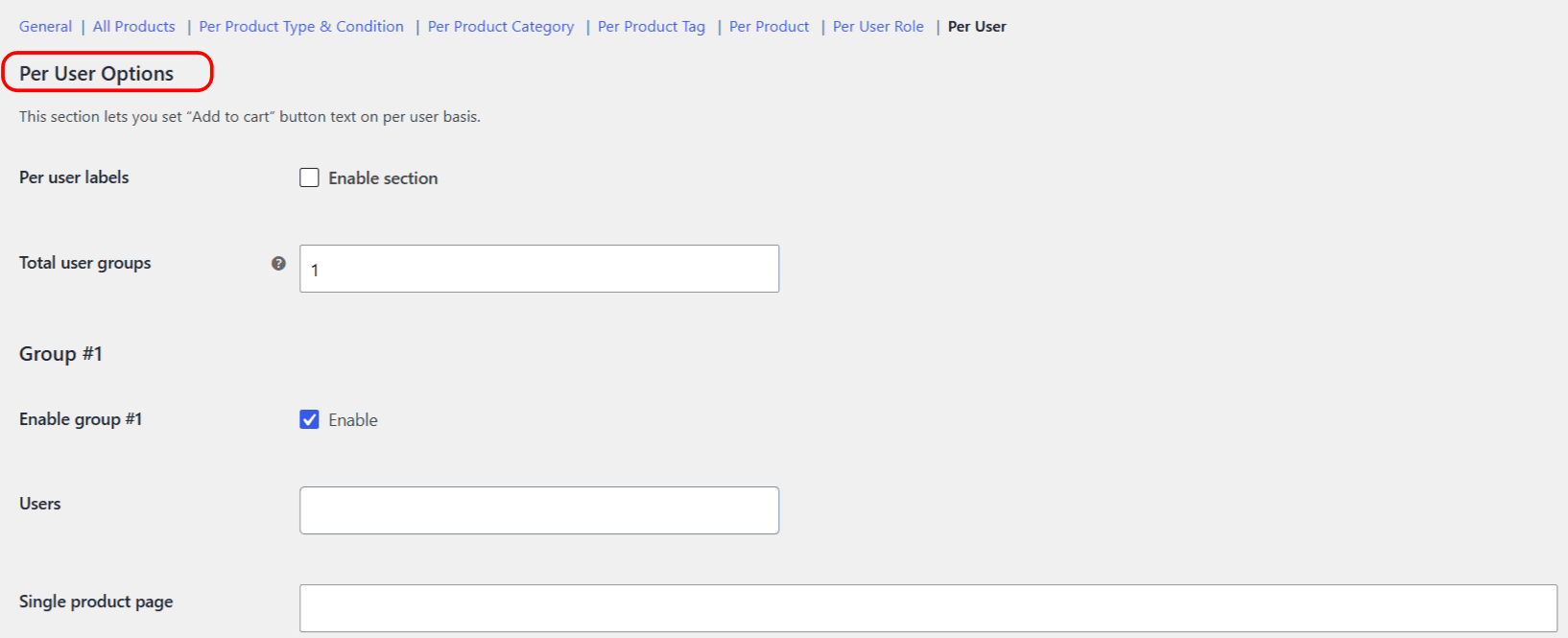
The Per User section of Change Add to Cart Button Text for WooCommerce sets the button text for named individual customers, the most specific targeting the plugin offers. One user group is free; adding more groups is a Pro feature.
When to use Per User #
Per User is for one-off, account-level wording: a personal greeting for a key wholesale account, a “Reorder your usual” prompt for a repeat buyer, or a test label shown only to your own account. For groups of people who share a role, use Per User Role instead.
Step-by-step setup #
- Go to WPFactory > Add to Cart Button Labels (also reachable at WooCommerce > Settings > Add to Cart Button Labels).
- Open Per User and tick Enable section.
- Under Group #1, pick the users in the Users field. A Guest entry is also available for logged-out visitors.
- Enter your Single product page and Shop page labels.
- Click Save changes.
Options reference #
| Label | Option ID | Free/Pro |
|---|---|---|
| Enable section | alg_wc_add_to_cart_button_labels_per_user_enabled |
Free |
| Total user groups | alg_wc_atcbl_per_user_total_number |
Free (capped at 1; Pro removes the cap) |
| Users (per group) | alg_wc_atcbl_per_user_group_users[1] |
Free |
| Single / Shop label (per group) | alg_wc_atcbl_per_user_group_label_single[1] / ..._archive[1] |
Free |
Precedence #
Per User is applied last, so it overrides every other section, including Per User Role. Use it for the handful of accounts that need bespoke wording, and let the broader sections handle everyone else.
Ready to set this up? #
One user group is free. Change Add to Cart Button Text for WooCommerce Pro unlocks unlimited user groups, plus role, category and tag groups and on-sale labels. Get the Pro version.