To show different Add to Cart button text per user role, use Change Add to Cart Button Text for WooCommerce: go to WPFactory > Add to Cart Button Labels > Per User Role, tick Enable section, pick roles in Group #1 and enter the labels. One role group is free; more groups need Pro.
The Per User Role section sets the button text based on the visitor’s WordPress role, so wholesale buyers, subscribers or logged-out guests can each see wording aimed at them.
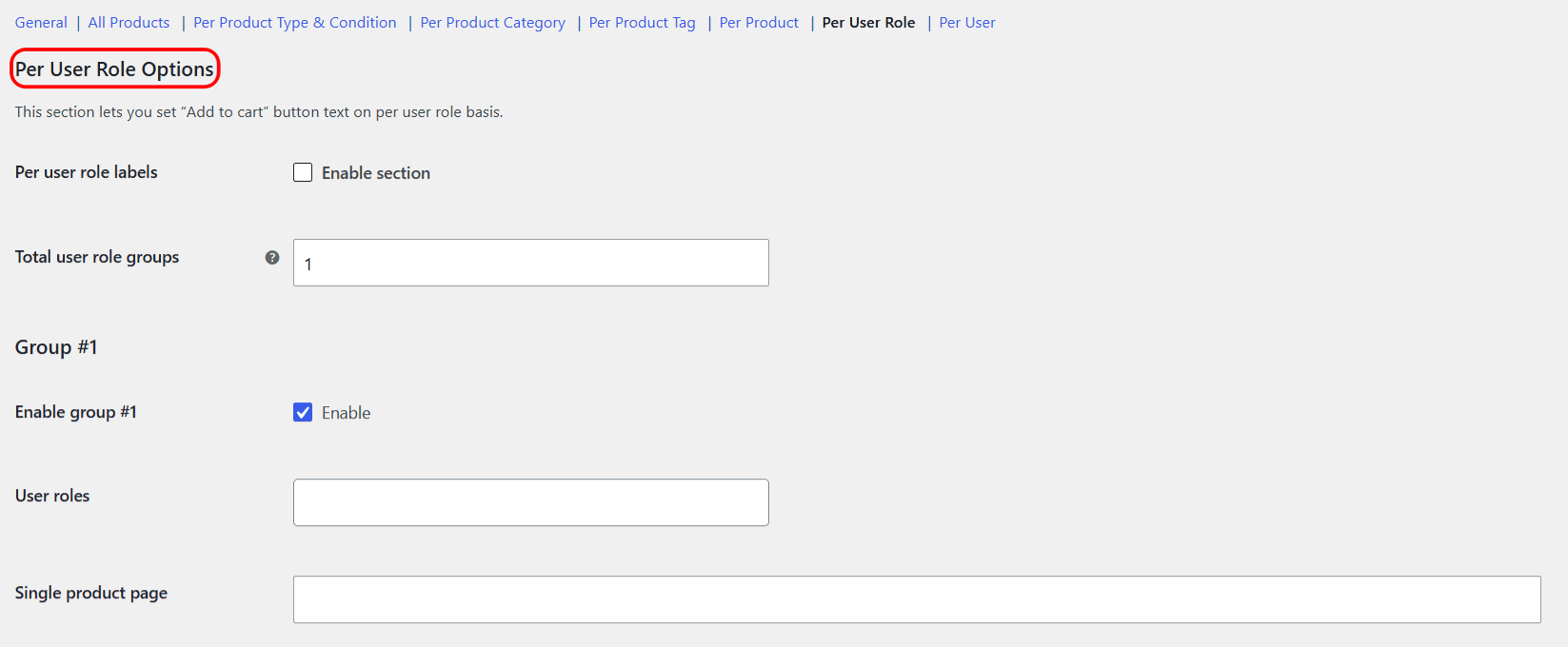
Step-by-step setup #
- Go to WPFactory > Add to Cart Button Labels (also reachable at WooCommerce > Settings > Add to Cart Button Labels).
- Open Per User Role and tick Enable section.
- Under Group #1, leave Enable group #1 ticked (it is on by default) and choose the roles in the User roles field.
- Enter your Single product page and Shop page labels. Fill in both.
- Click Save changes.
- Check the result in a private window (for guests) or by logging in as a user with that role.
Roles you can target #
The User roles list contains every role on your site (Administrator, Shop manager, Customer, Subscriber and any custom roles, such as a wholesale role added by another plugin) plus a special Guest entry for visitors who are not logged in. Add Guest to a group if you want different wording for logged-out shoppers, for example “Log in to buy”.
The check uses all of a user’s roles, not only the primary one. A user who has both Customer and a wholesale role matches any group that contains either role.
Options reference #
| Label | Option ID | Default | Free/Pro |
|---|---|---|---|
| Enable section | alg_wc_add_to_cart_button_labels_per_user_role_enabled |
Off | Free |
| Total user role groups | alg_wc_atcbl_per_user_role_total_number |
1 | Free (capped at 1; Pro removes the cap) |
| Enable group #N | alg_wc_atcbl_per_user_role_group_enabled[1] |
On | Free |
| User roles (per group) | alg_wc_atcbl_per_user_role_group_roles[1] |
None selected | Free |
| Single / Shop label (per group) | alg_wc_atcbl_per_user_role_group_label_single[1] / ..._archive[1] |
Empty | Free |
Adding more role groups (Pro) #
With Pro, raise Total user role groups, click Save changes, and new Group #2, Group #3 blocks appear, each with its own roles and labels. Groups are checked in number order and the first group that matches the visitor is used, so put your most specific role groups first.
Precedence #
Per User Role is applied after the product-based rules, so a role label overrides category, tag, product and product-type labels. Only a Per User label (for a named individual) overrides a role label. Not sure which one you need? See Per User Role vs Per User and labels for individual users.
If it does not work #
- Enable section for Per User Role, or Enable plugin on the General section, is off.
- No roles are selected in the group, or Enable group #1 was unticked.
- The button shows no text: the group matched, but one of its label fields is empty. Unlike All Products, an empty role label is not skipped, so fill in both Single product page and Shop page.
- You are testing while logged in as an administrator, so you see the Administrator result, not the Customer or Guest one.
- A Per User group that includes your account is overriding the role label.
More fixes: Add to Cart label not changing.
FAQ #
Can guests see a different label from logged-in customers? #
Yes. Put Guest in a group for logged-out visitors. In the free version you have one group, so use it for the audience that needs the special wording and let everyone else see your other labels.
Does it use only the primary user role? #
No. The plugin compares every role assigned to the user with the group’s roles, and any overlap is a match.
Can I use shortcodes in role labels? #
Yes. Role labels run shortcodes, for example Wholesale price: [alg_wc_atcbl_product_price].
Does this hide prices or block purchases for a role? #
No. It changes the button text only. The button still adds the product to the cart.
Ready to set this up? #
One user role group is free. Change Add to Cart Button Text for WooCommerce Pro unlocks unlimited role groups, plus category, tag and user groups and on-sale labels. Get the Pro version.
Need a hand? Our team answers every ticket on the Add to Cart Button Labels support forum.