The General tab is the master switchboard for Change Add to Cart Button Text for WooCommerce. It holds the plugin’s main on/off switch and a checkbox for every targeting section, so you decide which kinds of Add to Cart rules are active before you fill them in.
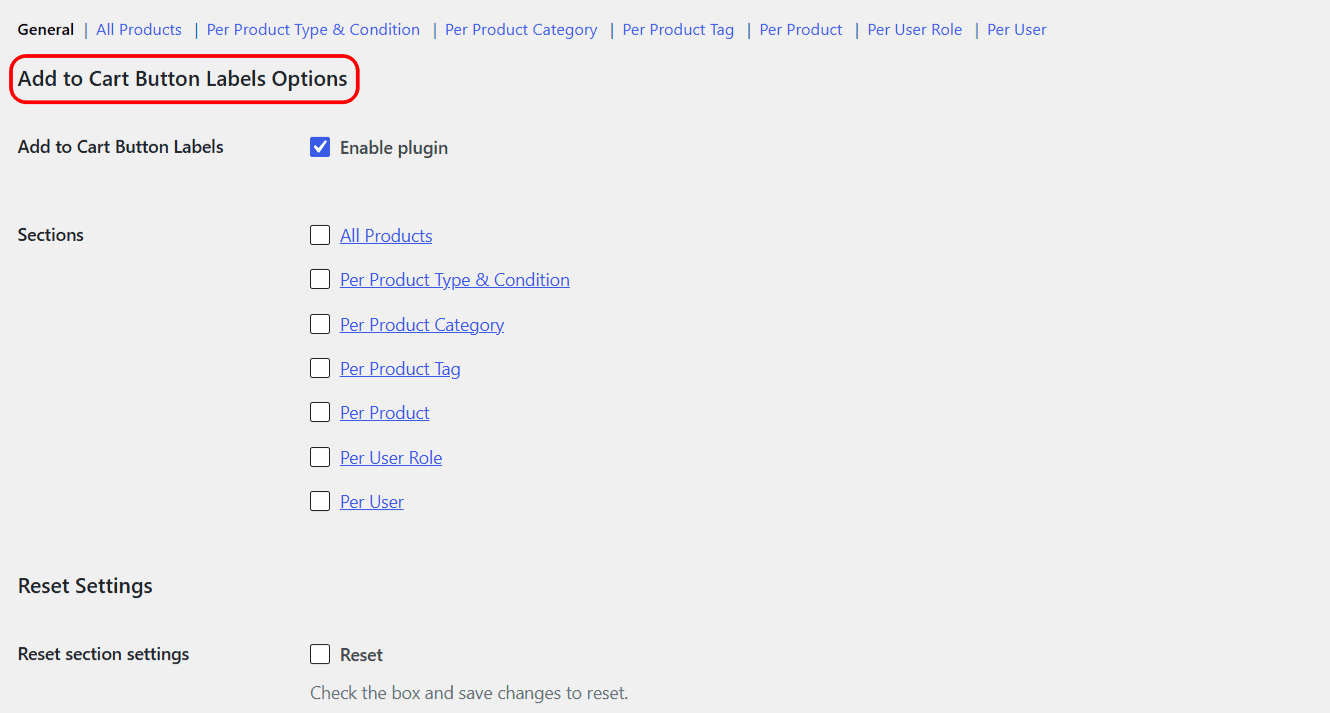
Opening the General tab #
Go to WPFactory > Add to Cart Button Labels (also reachable at WooCommerce > Settings > Add to Cart Button Labels). The General section is the one shown first.
Options on this tab #
| Label | Option ID | Type | Default |
|---|---|---|---|
| Add to Cart Button Labels (Enable plugin) | alg_wc_add_to_cart_button_labels_enabled |
Checkbox | yes |
| Enable All Products section | alg_wc_add_to_cart_button_labels_all_products_enabled |
Checkbox | no |
| Enable Per Product Type & Condition section | alg_wc_add_to_cart_button_labels_per_product_type_enabled |
Checkbox | no |
| Enable Per Product Category section | alg_wc_add_to_cart_button_labels_per_category_enabled |
Checkbox | no |
| Enable Per Product Tag section | alg_wc_add_to_cart_button_labels_per_tag_enabled |
Checkbox | no |
| Enable Per Product section | alg_wc_add_to_cart_button_labels_per_product_enabled |
Checkbox | no |
| Enable Per User Role section | alg_wc_add_to_cart_button_labels_per_user_role_enabled |
Checkbox | no |
| Enable Per User section | alg_wc_add_to_cart_button_labels_per_user_enabled |
Checkbox | no |
Note: the same enable checkbox appears both here on the General tab and at the top of each section’s own tab. They are the same setting, so you can switch a section on from either place.
How to use it #
- Leave Add to Cart Button Labels (Enable plugin) ticked. This is the plugin’s master switch and is on by default. Unticking it turns off every label rule at once without deleting your settings.
- Tick the checkbox for each section you want to use.
- Click Save changes, then open that section from the links at the top of the tab and enter your labels.
Shortcodes #
Every section tab ends with a reminder box listing the shortcodes you can use inside any label, such as [alg_wc_atcbl_product_price] and [alg_wc_atcbl_product_title].
Get more control #
The sections are free to enable. Change Add to Cart Button Text for WooCommerce Pro adds unlimited category, tag, user role and user groups, plus separate labels for on-sale products. See what Pro unlocks.