To place the selector in a custom position with Number of Products per Page – Pagination Manager for WooCommerce, go to WPFactory > Products per Page and enter a WordPress action hook name on its own line in the Custom position(s) field, optionally adding a priority such as my_theme_after_header|20. Then save changes.
Built-in positions #
Under WPFactory > Products per Page (also reachable at WooCommerce > Settings > Products per Page), the Position(s) setting lists: Before main content, In archive description, Before shop loop, After shop loop, After main content, Before pagination, and After pagination. Choose one or more of these first, as they cover most themes.
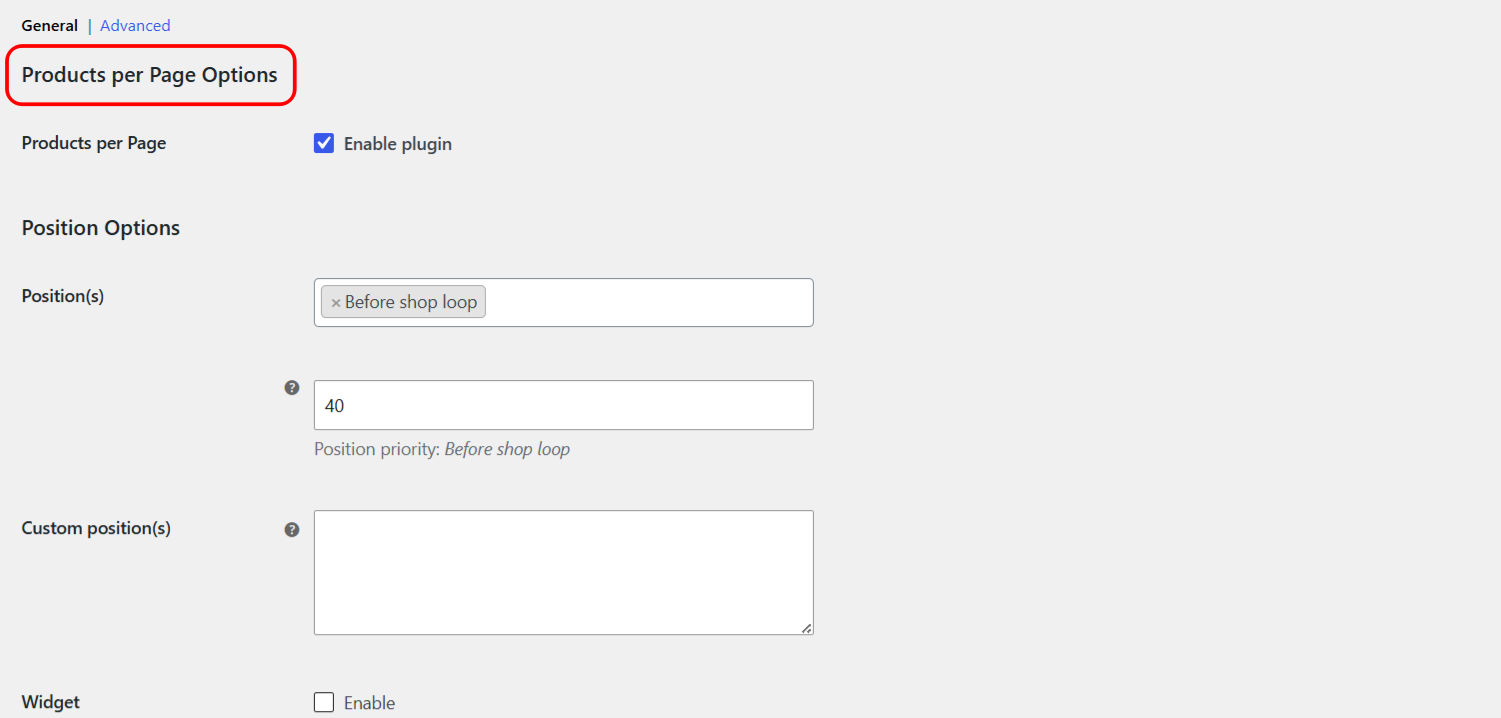
Add a custom position #
- Find the action hook you want to attach to. This is a WordPress or theme action that fires where you want the selector, for example
woocommerce_before_shop_loop_item_titleor a theme-specific hook. - In the Custom position(s) field (option id
alg_wc_products_per_page_position_custom), enter the hook name on its own line. - To set a priority for that hook, add a vertical bar and a number:
my_theme_after_header|20. - Add more hooks on separate lines if you need the selector in several places.
- Save changes.
Position priority #
For the built-in positions, the Position priority field controls the order relative to other things hooked to the same action. The default is 40. Lower numbers run earlier. Adjust this if the selector appears above or below where you expect within the same hook.
Using the pagination positions #
The Before pagination and After pagination positions fire from the plugin’s own pagination template, using the actions alg_wc_products_per_page_before_pagination and alg_wc_products_per_page_after_pagination. Selecting either one lets the plugin swap in its pagination template so the selector can render there.
Tip: if a custom hook does not render the selector, the hook may not fire on that template. Confirm the hook name with your theme author, or try a nearby WooCommerce action instead.
Get more control #
Custom positions are free. Number of Products per Page – Pagination Manager for WooCommerce Pro adds an editable options list and a Products per Page widget. See what Pro unlocks.