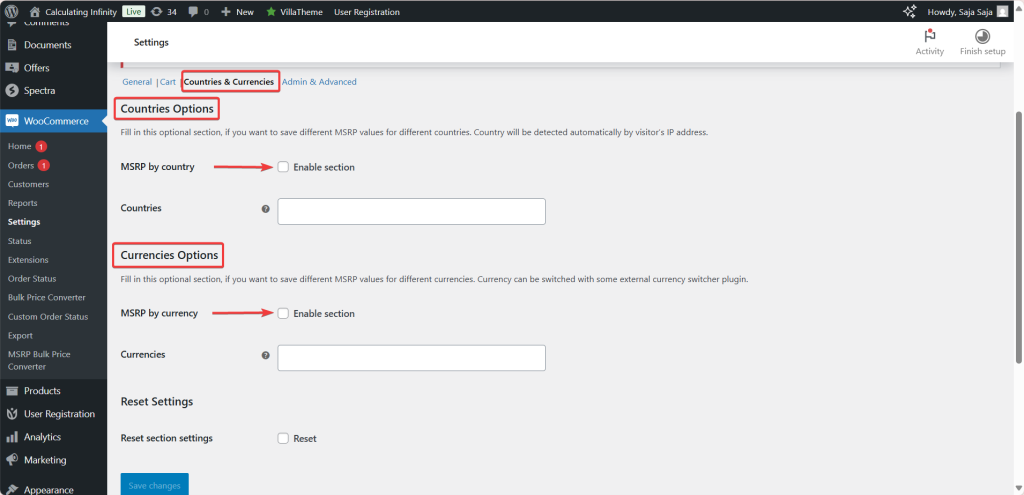
The Countries options in MSRP (RRP) Pricing for WooCommerce let you store a different MSRP for each country, so visitors see pricing tuned to their region. This is a Pro feature. Find it under WPFactory > MSRP (also reachable at WooCommerce > Settings > MSRP), on the Countries & Currencies section.
How it works #
- MSRP by country (Enable section): turns the feature on. Option ID
alg_wc_msrp_by_country_enabled, default No. Disabled in the free version. - Countries: select the countries you want to price for. Option ID
alg_wc_msrp_countries. After you save, each product’s edit page gains an MSRP field per selected country. - Automatic detection: the visitor’s country is detected from their IP address using WooCommerce geolocation, so no manual choice is needed.
Once countries are chosen and saved, you also set a currency for each country, so the country-specific MSRP is shown in the right currency.
Things to keep in mind #
- IP accuracy: geolocation is not always exact. A visitor on a VPN may see the MSRP for a different country.
- Upkeep: maintaining a separate MSRP per country across a large catalog takes time, so start with your key markets.
Note: per-country MSRP is stored in the _alg_msrp_by_country product meta. If a product has no country value, MSRP Pricing falls back to the standard _alg_msrp value.
Ready to set this up? #
This is a Pro feature of MSRP Pricing. Upgrading unlocks it along with MSRP by currency, cart total savings and user-role display. Get MSRP Pricing Pro.