To show the amount left for free shipping on the WooCommerce checkout page, open WPFactory > Left for Free Shipping > Checkout in Free Shipping Bar: Amount Left for Free Shipping for WooCommerce, tick Enable section, write the message and choose where it appears. It nudges customers to top up before paying. This section is Pro.
Before you start #
- WooCommerce, active, using the classic (shortcode) checkout page.
- Amount Left for Free Shipping Pro (the Checkout section is Pro).
- A free shipping minimum the plugin can read: the WooCommerce Free shipping method with a minimum order amount, or a manual min amount.
Step by step #
- Go to WPFactory > Left for Free Shipping (also reachable at WooCommerce > Settings > Amount Left for Free Shipping) and open the Checkout section.
- Tick Enable section.
- Edit Content, for example:
You are %amount_left_for_free_shipping% away from free shipping. %progress_bar% - Pick a Position. For a row inside the order summary table, choose Order review: Before shipping (in table) or Order review: After shipping (in table) and set Wrap method to Smart.
- Optional: tick Custom style and set the Text color and Font size.
- Save changes and open the checkout with a cart below the threshold.
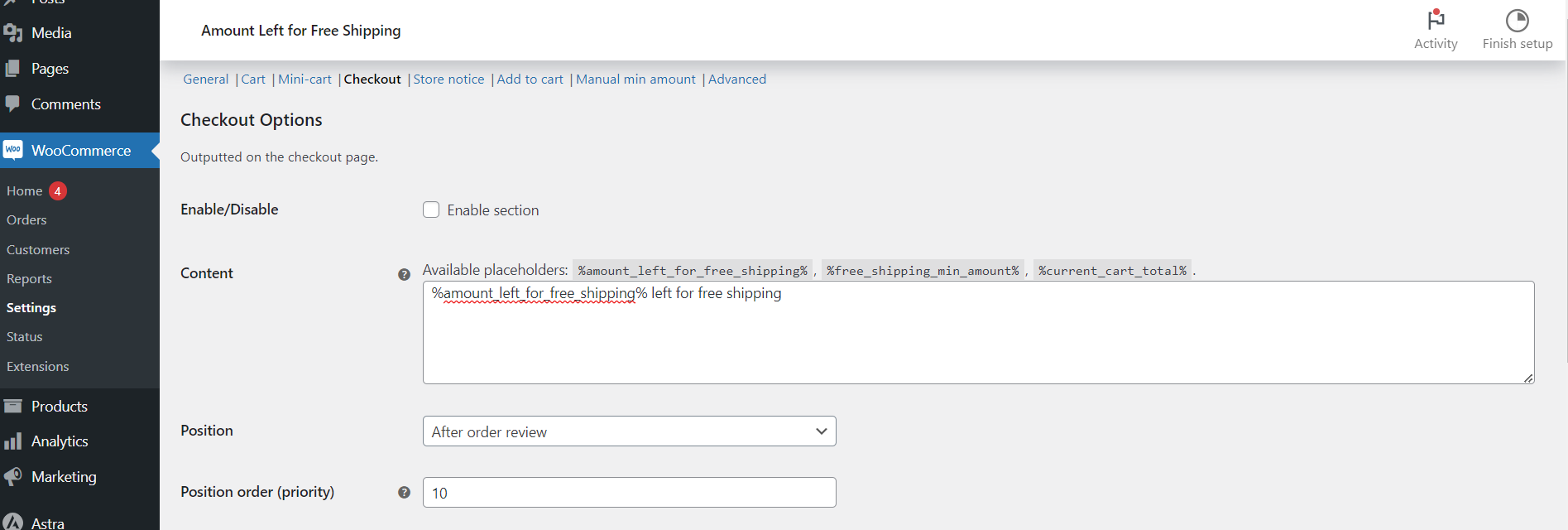
Checkout options #
| Label | Option ID | Default |
|---|---|---|
| Enable section | alg_wc_left_to_free_shipping_info_enabled_checkout |
No |
| Content | alg_wc_left_to_free_shipping_info_content_checkout |
%amount_left_for_free_shipping% left for free shipping |
| Position | alg_wc_left_to_free_shipping_info_position_checkout |
After order review |
| Position order (priority) | alg_wc_left_to_free_shipping_info_priority_checkout |
10 |
| Wrap method (Smart, Ignore, Force) | alg_wc_left_to_free_shipping_checkout_wrap_method |
Ignore |
| Wrap template | alg_wc_left_to_free_shipping_checkout_wrap_template |
<tr><th></th><td>{content}</td></tr> |
| Custom style | alg_wc_left_to_free_shipping_checkout_custom_style_enabled |
No |
| Text color | alg_wc_left_to_free_shipping_checkout_custom_color |
#000000 |
| Font size (pixels) | alg_wc_left_to_free_shipping_checkout_font_size |
16 |
The Position dropdown covers the checkout hooks: Before checkout form, Before customer details, Billing, Shipping, After customer details, Before order review, Order review, Order review: Before shipping (in table), Order review: After shipping (in table), Order review: Payment: Before submit button, Order review: Payment: After submit button, After order review, and After checkout form.
Wrapper and custom style #
The two in-table positions sit inside the order summary table, so the message needs table row markup. Smart adds the Wrap template only for those two positions, Force adds it everywhere, and Ignore never adds it. Custom style wraps the message in a span with your text color and font size. All of these are part of the Pro Checkout section.
What the customer sees #
A line such as “You are $18.00 away from free shipping” at the chosen spot, with the progress bar if you added %progress_bar%. When the cart reaches the minimum, the Free shipping reached message from General shows instead. WooCommerce redraws the order summary and payment box when the checkout updates (for example after a coupon is applied), so the four positions whose label starts with “Order review:” stay current; text placed elsewhere updates on the next page load.
If it does not work #
- The Enable section box is greyed out: the Pro version is not active.
- The message breaks the order table layout: you chose an in-table position with Wrap method set to Ignore. Switch to Smart.
- Nothing shows on a block checkout: the Checkout block does not run these classic hooks. See Plugin not working in the Cart or Checkout block.
- Nothing shows at all: no free shipping minimum was found, or a General > Hide the amount left text rule applies to this cart.
FAQ #
Is the checkout free shipping message free? #
No, the Checkout section is Pro. The free version covers the cart page, the shortcode and the widget.
How do I show free shipping info on the product page? #
Use the free [alg_wc_left_to_free_shipping] shortcode in the product description or a block, or the Pro Add to cart notice.
Can I change the text color only on checkout? #
Yes. The Checkout section has its own Custom style group, separate from the Cart section’s.
Related: Display free shipping info on the cart page and progress bar settings.
Ready to set this up? #
The Checkout section is a Pro feature of Amount Left for Free Shipping. Upgrading unlocks it along with the mini cart, store notice, and add to cart sections. Get Amount Left for Free Shipping Pro.
Need a hand? Our team answers every ticket on the Amount Left for Free Shipping support forum.