Table of Contents
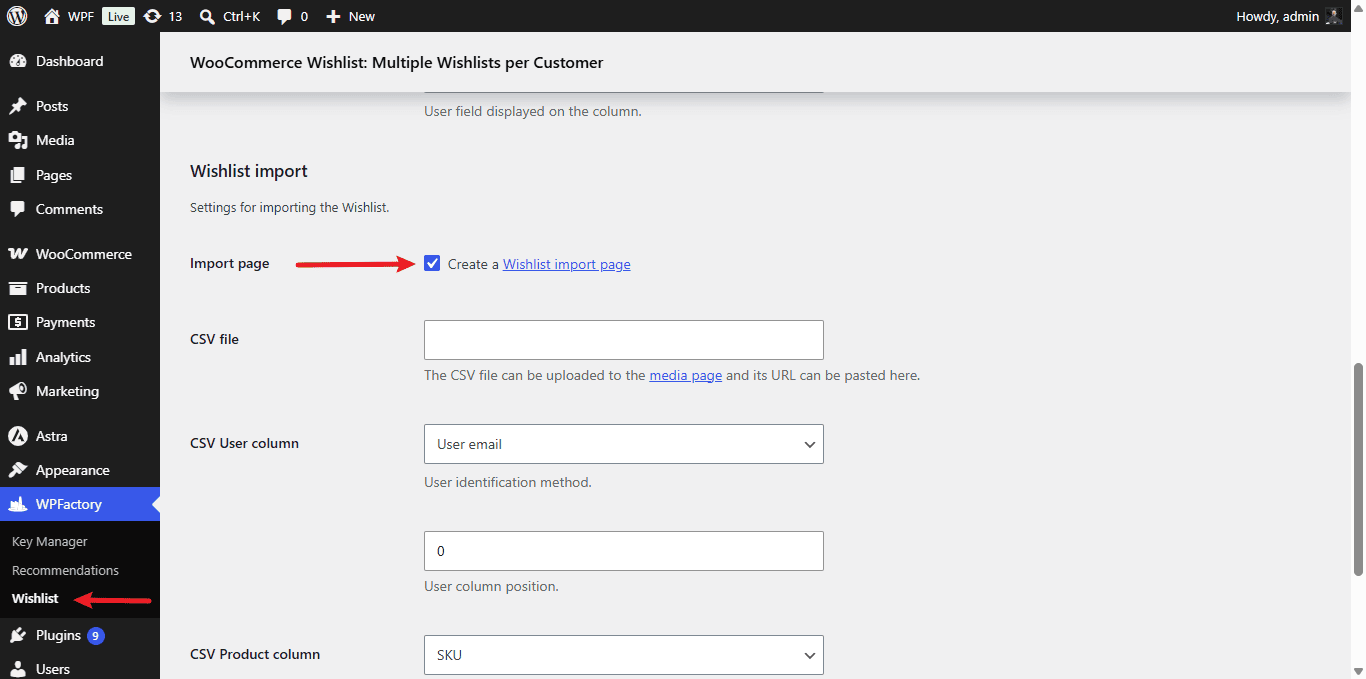
To import wishlists from a CSV file in Wishlist for WooCommerce Pro, go to WPFactory > Wishlist, open the Admin tab, and enable Import page in the Wishlist import section. Paste your uploaded CSV file URL, set the user and product column options, save, then run the import from Tools > Wishlist import.
Before you start #
- WooCommerce, active.
- Wishlist for WooCommerce Pro.
- A CSV file with one column identifying the user and one column identifying the product.
Step-by-step setup #
- Go to WPFactory > Wishlist (also reachable at WooCommerce > Settings > Wishlist) and open the Admin tab.
- In the Wishlist import section, enable Import page (
alg_wc_wl_create_wl_import_page). This creates the import tool under Tools > Wishlist import. - Upload your CSV to the media library, then paste its URL into CSV file (
alg_wc_wl_csv_import_file). - Set CSV User column (
alg_wc_wl_csv_import_user_id_method): match users by user email or user login. Set the user column position withalg_wc_wl_csv_import_user_col_pos(default 0). - Set CSV Product column (
alg_wc_wl_csv_import_product_id_method): products are matched by SKU. Set the product column position withalg_wc_wl_csv_import_product_col_pos(default 1). - Save changes, then run the import from the Tools > Wishlist import page.
Import options #
| Label | Option ID | Default |
|---|---|---|
| Import page | alg_wc_wl_create_wl_import_page |
No |
| CSV file URL | alg_wc_wl_csv_import_file |
empty |
| User identification method | alg_wc_wl_csv_import_user_id_method |
User email |
| Product identification method | alg_wc_wl_csv_import_product_id_method |
SKU |
Note: products are matched by SKU, so make sure the SKUs in your CSV match the SKUs in your store. Developers can hook alg_wc_wl_import_line and alg_wc_wl_import_complete to react to each imported row and to the finished import.
Ready to set this up? #
This is a Pro feature of Wishlist for WooCommerce. Upgrading takes a couple of minutes and unlocks import along with the rest of the Pro toolkit. Get Wishlist for WooCommerce Pro.