Real-time price by quantity updates the displayed price as a customer changes the quantity on a single product page, so shoppers see the discounted total before they add to cart. The Price by Quantity & Bulk Quantity Discounts for WooCommerce plugin does this in its Price Display by Qty section, and it is free.
Before you start #
- WooCommerce active, with Price by Quantity installed.
- At least one pricing rule set up (store-wide, per product, or another level), so there is a discount to display.
Step-by-step #
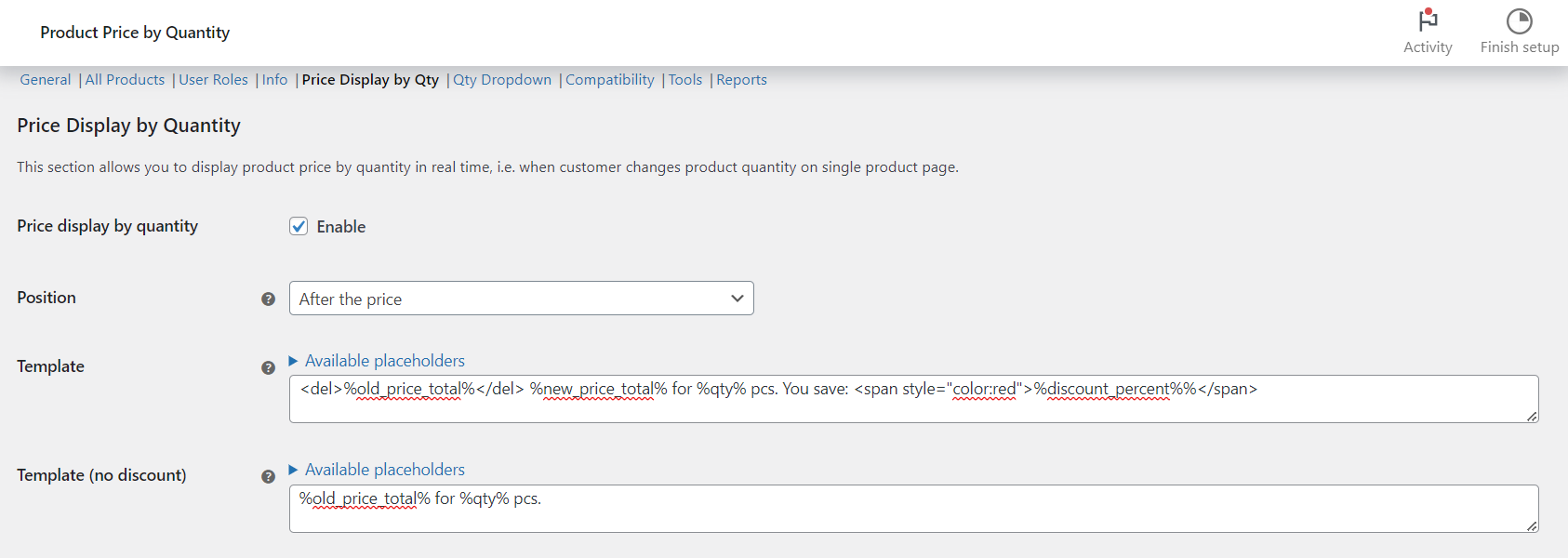
- Go to WPFactory > Product Price by Quantity (also reachable at WooCommerce > Settings > Product Price by Quantity).
- Open the Price Display by Qty sub-tab.
- Turn on Price display by quantity.
- Choose a Position: instead of, before, or after the standard price.
- Adjust the Template and Template (no discount) if you want different wording. Both accept placeholders (see below).
- Save changes, then open a product on the frontend and change the quantity to confirm the price updates.
Options reference #
| Label | Option ID | Default |
|---|---|---|
| Price display by quantity (enable) | alg_wc_wholesale_pricing_price_by_qty_display_enabled |
No |
| Position | alg_wc_wholesale_pricing_price_by_qty_display_position |
Instead of the price |
| Template | alg_wc_wholesale_pricing_price_by_qty_display_template |
<del>%old_price_total%</del> %new_price_total% for %qty% pcs. You save: %discount_percent%% |
| Template (no discount) | alg_wc_wholesale_pricing_price_by_qty_display_template_zero |
%old_price_total% for %qty% pcs. |
| Apply to all products | alg_wc_wholesale_pricing_price_by_qty_all_products |
Yes |
| Variable products (display in variation price) | alg_wc_wholesale_pricing_price_by_qty_display_in_variation |
Yes |
| Force standard quantity input | alg_wc_wholesale_pricing_price_by_qty_standard_qty_input |
No |
| Refresh interval (milliseconds) | alg_wc_wholesale_pricing_price_by_qty_display_interval_ms |
500 |
| Price identifier | alg_wc_wholesale_pricing_price_by_qty_display_id |
p.price |
| Price identifier (variations) | alg_wc_wholesale_pricing_price_by_qty_display_id_variation |
div.woocommerce-variation-price span.price |
Template placeholders #
The Template field accepts these placeholders: %qty%, %old_price_single%, %old_price_total%, %new_price_single%, %new_price_total%, %discount_value%, %discount_percent%, %discount_single%, %discount_total%, plus tax-specific variants (for example %new_price_total_incl_tax% and %old_price_total_excl_tax%). The Template (no discount) field supports only the %qty% and %old_price...% placeholders, since no discount applies. For the full list see the placeholders reference.
Note: to write a literal percent sign after %discount_percent%, add a second %, as in the default template (%discount_percent%%).
Use cases #
- Show “€180 for 20 pcs. You save 10%” as the customer types a quantity.
- Keep the standard price visible and add the quantity price below it by choosing the After the price position.
Troubleshooting #
- Price not updating with a custom theme or quantity widget? Turn on Force standard quantity input, or adjust the Price identifier so it matches your theme’s price element.
- Nothing shows on variations? Confirm Variable products is enabled and that the variations actually have different prices.
- Updates feel slow or heavy? Raise the Refresh interval value.
Get more control #
This feature is free. Price by Quantity & Bulk Quantity Discounts for WooCommerce Pro adds per-variation, per-category and per-tag pricing plus a quantity dropdown. See what Pro unlocks.