Table of Contents
Pricing by user role lets you give wholesalers, VIPs or any other role their own quantity tiers, separate from regular retail customers. The Price by Quantity & Bulk Quantity Discounts for WooCommerce plugin handles this in its User Roles section, and it is free.
Before you start #
- WooCommerce active, with Price by Quantity installed.
- The user roles you want to target already exist. You can create a custom role in the Tools section if you need one.
Step-by-step #
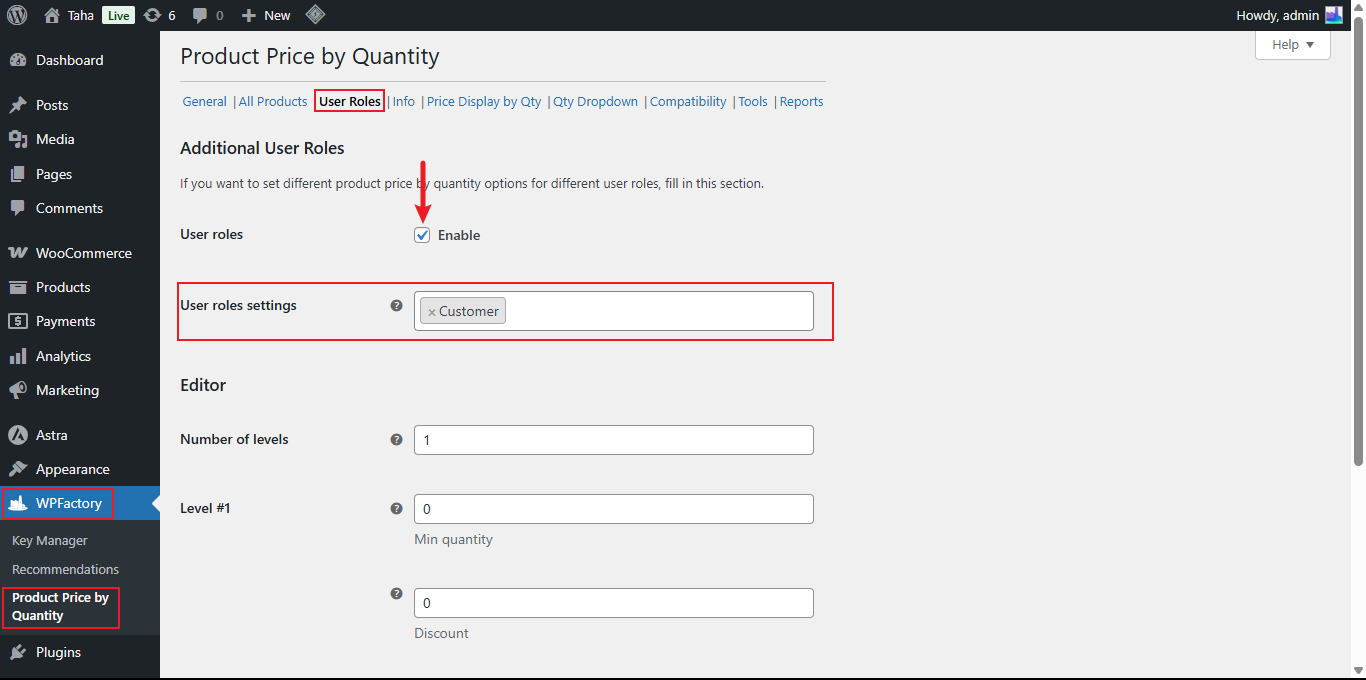
- Go to WPFactory > Product Price by Quantity (also reachable at WooCommerce > Settings > Product Price by Quantity).
- Open the User Roles sub-tab and confirm User roles is enabled.
- In User roles settings, select each role you want to price separately, then save changes.
- A settings block now appears for each selected role. Set its Number of levels, save, then fill in the Min quantity and Discount for each level.
- Save changes.
Options reference #
| Label | Option ID | Default |
|---|---|---|
| User roles (enable) | alg_wc_wholesale_pricing_by_user_role_enabled |
Yes |
| User roles settings | alg_wc_wholesale_pricing_by_user_role_roles |
empty |
| Number of levels (per role) | alg_wc_wholesale_pricing_levels_number_<role> |
1 |
| Level #X min quantity (per role) | alg_wc_wholesale_pricing_level_min_qty_<role>_X |
0 |
| Level #X discount (per role) | alg_wc_wholesale_pricing_level_discount_<role>_X |
0 |
Note: the roles you enable here also appear as separate levels blocks in the per-product and per-category / per-tag settings, so you can override role pricing at those levels too. Customers whose role has no rule fall back to the standard All Products pricing.
Use cases #
- Offer a “Wholesaler” role deeper tiers while retail customers see the standard rule.
- Reward a “VIP Member” role with an extra percentage at high quantities.
Troubleshooting #
- Level fields missing for a role? Set its Number of levels and save changes so the fields appear.
- Role pricing ignored? Check the customer is actually assigned that role and that User roles is enabled.
Get more control #
Role-based quantity pricing is free. Price by Quantity & Bulk Quantity Discounts for WooCommerce Pro adds per-variation, per-category and per-tag rules that can each carry their own role levels. See what Pro unlocks.