Table of Contents
To set quantity pricing for each variation with Price by Quantity & Bulk Quantity Discounts for WooCommerce Pro, enable Per variation at WPFactory > Product Price by Quantity > General. Then edit the variable product and, in the Product Price by Quantity box below the product data, set the discount type, number of levels, and each level’s minimum quantity and discount for each variation.
Before you start #
- Price by Quantity Pro, activated.
- Enable Per variation at WPFactory > Product Price by Quantity > General (also reachable at WooCommerce > Settings > Product Price by Quantity).
| Setting | Option ID | Default | Free/Pro |
|---|---|---|---|
| Per variation | alg_wc_wholesale_pricing_product_children |
No | Pro |
Step-by-step #
- Enable Per variation on the General tab and save.
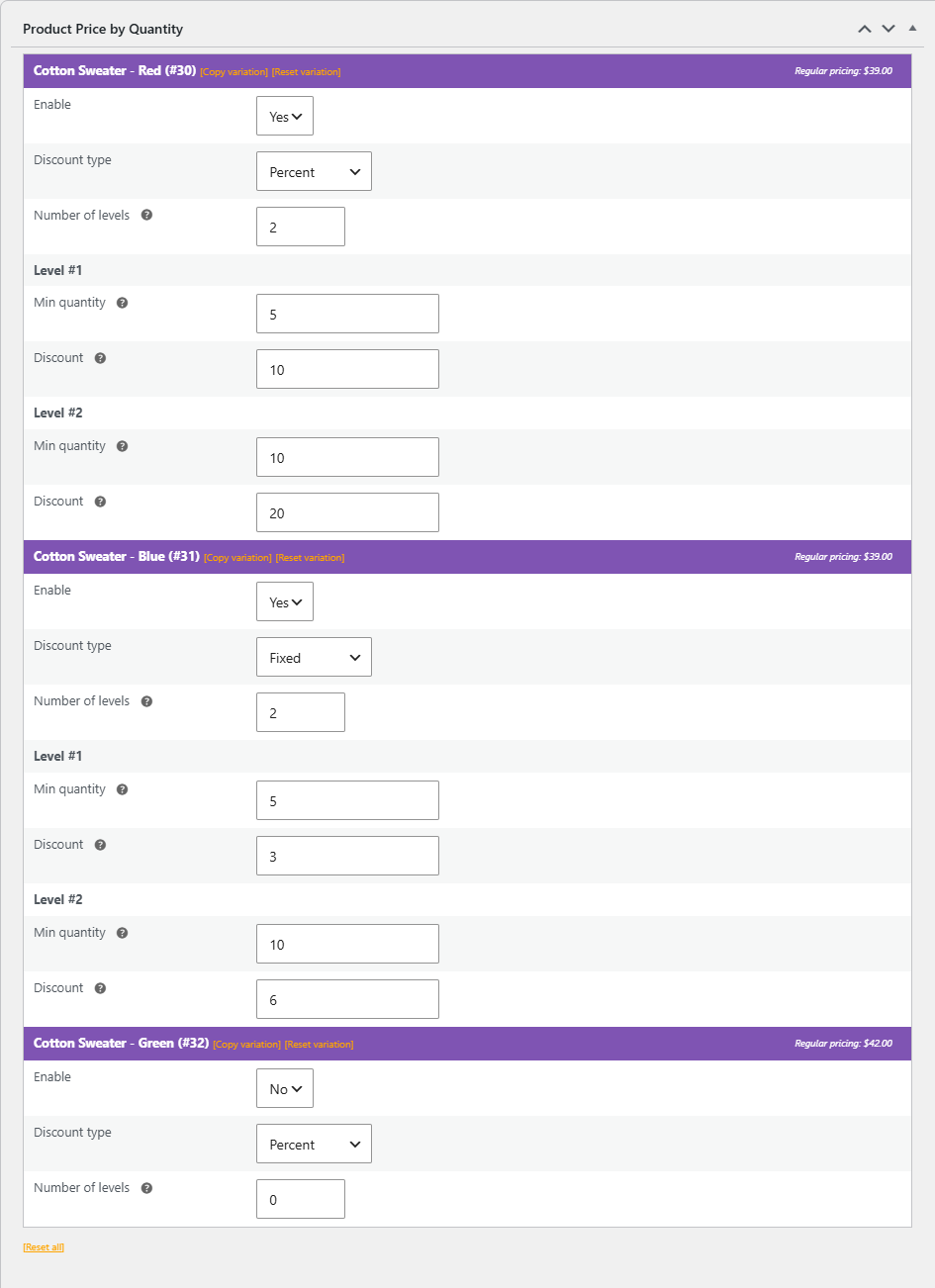
- Edit the variable product and scroll to the Product Price by Quantity box under the product data. It lists one block per variation, headed with the variation name and ID. The fields are not in the Variations tab.
- In a variation’s block, set Enable to Yes, choose a Discount type, and enter the Number of levels.
- Click Update. The Level #1, Level #2 and further rows appear with Min quantity and Discount fields.
- Fill in each level, click Update again, and repeat for the other variations. Variations left on No keep their normal price.
Important behavior #
Note: when Per variation is on, the parent variable product no longer uses a per-product rule. Set the levels on each variation. Cart quantities are then read from the specific variation.
Use cases #
- Give larger sizes a steeper bulk discount than smaller ones.
- Run per-color pricing on a single variable product.
Troubleshooting #
- Discount not applying to a variable product’s parent? That is expected with Per variation on; configure each variation.
- Want one rule for the whole product instead? Turn Per variation off and use a per-product, category, or store-wide rule.
Ready to set this up? #
Per-variation pricing is a Pro feature of Price by Quantity. Get Price by Quantity Pro.