To set quantity discounts by category or tag with Price by Quantity & Bulk Quantity Discounts for WooCommerce Pro, enable Per product category or Per product tag at WPFactory > Product Price by Quantity > General. Then edit the term under Products > Categories or Products > Tags, set Enable to Yes, and add the levels.
Before you start #
- Price by Quantity Pro, activated.
- Enable the level at WPFactory > Product Price by Quantity > General (also reachable at WooCommerce > Settings > Product Price by Quantity).
| Setting | Option ID | Default | Free/Pro |
|---|---|---|---|
| Per product category | alg_wc_wholesale_pricing_per_product_cat_enabled |
No | Pro |
| Per product tag | alg_wc_wholesale_pricing_per_product_tag_enabled |
No | Pro |
Step-by-step #
- Enable Per product category or Per product tag on the General tab and save.
- Go to Products > Categories (or Products > Tags) and edit the term you want to price.
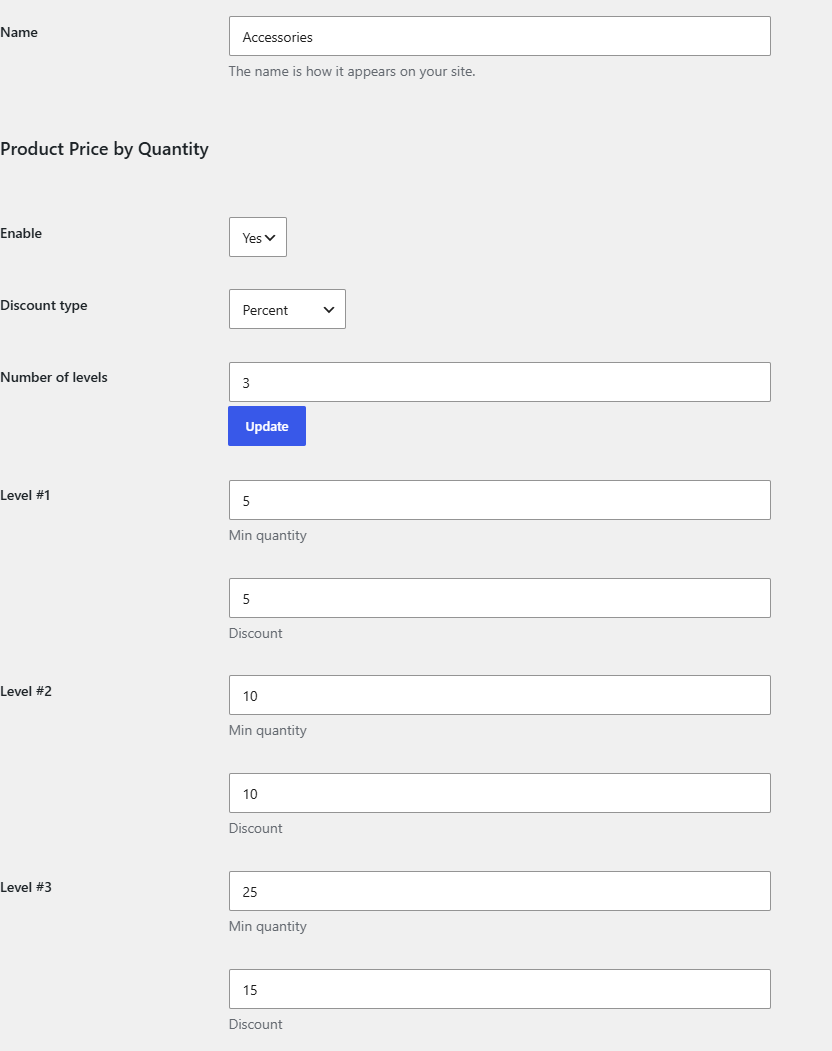
- In the Product Price by Quantity section, set Enable to Yes and choose a Discount type.
- Set Number of levels, click Update, then fill in each level’s Min quantity and Discount.
- Save the term.
How it resolves #
When a product has no per-product rule, Price by Quantity looks for an enabled category or tag rule (checking categories first, then tags) before falling back to the store-wide rule. The stored meta key on the term is _alg_wc_wholesale_pricing_per_term_enabled along with the level keys.
Use cases #
- Offer bulk pricing across an entire “Wholesale” category.
- Run a tag-based promotion, such as tiered pricing for everything tagged “Clearance”.
Troubleshooting #
- Fields missing on the term page? Confirm the matching level is enabled on the General tab and saved.
- Rule not applying? Make sure the product has no per-product rule overriding it, and that the term is assigned to the product.
Ready to set this up? #
Category and tag pricing is a Pro feature of Price by Quantity. If you are on the free version, upgrading unlocks this along with per-variation pricing and the quantity dropdown. Get Price by Quantity Pro.