To notify customers when you reply to their WooCommerce review, tick Review authors at WooCommerce > Settings > Review replies > Email in Easy Replies to WooCommerce Reviews. The reviewer is then added to the WordPress new comment email, so they hear about your answer without checking back.
Before you start #
Easy Replies does not send its own email. It adds the reviewer to WordPress’s standard “new comment” notification, so that notification must be switched on:
- Go to Settings > Discussion.
- Under Email me whenever, tick Anyone posts a comment.
- Click Save Changes.
The Email section links straight to this setting.
Turn on reply emails for review authors #
- Go to WooCommerce > Settings > Review replies and open the Email section.
- Tick Review authors (“Send new comment email to review authors if they receive replies”). It is off by default.
- Leave Email text ticked (the default). It removes the IP address, the “In reply to:” line and the “Trash it”, “Spam it” and “Delete it” links from notifications about reviews.
- Click Save changes.
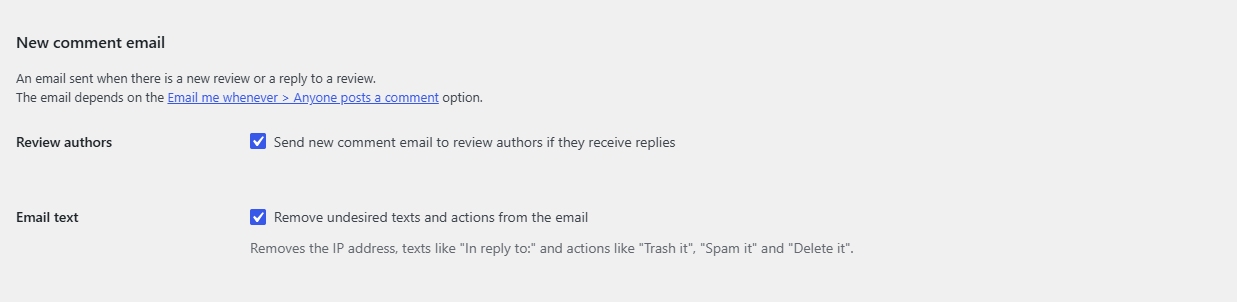
What the reviewer receives #
When a reply to their review is published, the reviewer receives the WordPress new comment email at the address they entered with their review, alongside the usual recipients such as the product’s author. With Email text on, the admin-only details are stripped, so the email is suitable for customers.
Note: replies posted with Reply using popup are saved directly and do not trigger the WordPress new comment email, so no one is notified about them. Use the standard reply form if review authors should be emailed.
FAQ #
Why did the customer not get an email? #
Check that Settings > Discussion > Anyone posts a comment and Review authors are both on, that the reply was posted with the standard form rather than the pop-up, and that the reply is approved. Also confirm your site can send email at all.
Can I customize the email content? #
Easy Replies only offers the Email text clean-up. The rest of the message is the standard WordPress new comment email.
Are reviewers emailed about other people’s reviews? #
No. A reviewer is only added when the new comment is a direct reply to their own review.
Does the Email text option affect blog comment emails? #
No. It only changes notifications about product reviews and their replies.
Need a hand? Our team answers every ticket on the Easy Replies support forum.