The free and Pro versions of Conditional Payment Methods for WooCommerce have the same 14 conditions and settings at WPFactory > Conditional Payment Gateways. The difference is which payment gateways you can control: free covers the four built-in WooCommerce gateways, Pro covers every gateway installed on your store.
What each version covers #
| Feature | Free | Pro |
|---|---|---|
| All 14 conditions (Date/Time, Customer IP, User, User Role, Cart Total, Currency, Country, Product, Product Category, Product Tag, Product Shipping Class, Product Taxonomy, Product Title, Language) | Yes | Yes |
| Additional notices, notice styling, debug log, Leave at least one gateway, section reset | Yes | Yes |
| Shortcodes in values and notices | Yes | Yes |
Conditions for Direct bank transfer (bacs), Check payments (cheque), Cash on delivery (cod) and PayPal Standard (paypal) |
Yes | Yes |
| Conditions for any other gateway, such as Stripe, PayPal Payments, Square, buy-now-pay-later or custom gateways | No | Yes |
How the limit shows in the free version #
Every condition section lists all installed gateways. In the free version, the fields for gateways other than the four listed above are read-only (text fields) or disabled (dropdowns), with the message You will need Conditional Payment Gateways for WooCommerce Pro plugin to set conditions for this payment gateway. At checkout, the free version checks only those four gateways and leaves all others untouched.
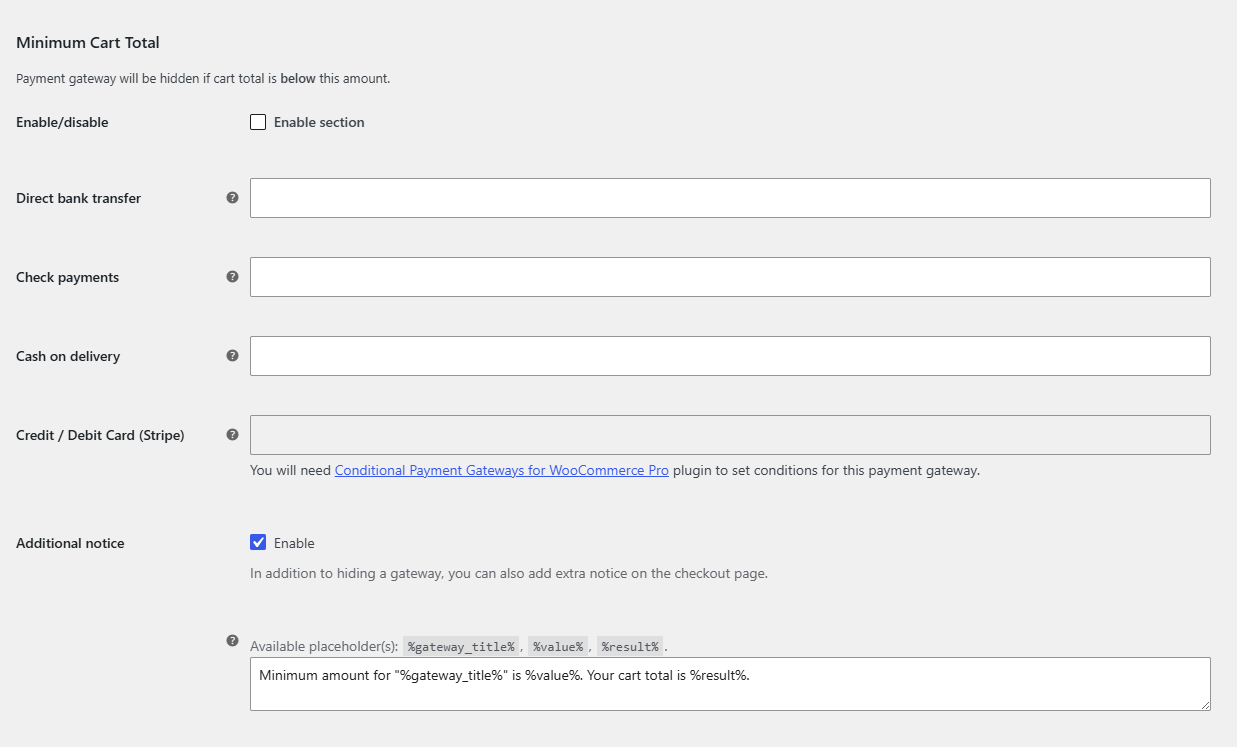
To check a gateway’s key, hover the help icon next to its field: the tooltip reads Payment gateway key. Gateways from payment plugins use their own keys, so even a PayPal plugin’s gateway needs Pro if its key is not paypal.
Upgrading from free to Pro #
- Download the Pro zip from your WPFactory account.
- Go to Plugins > Add New Plugin > Upload Plugin, upload it and click Activate.
- Open WPFactory > Conditional Payment Gateways. Your existing rules are kept, and the fields for all other gateways are now editable.
FAQ #
Do I need to deactivate the free version after installing Pro? #
No. When Pro is active, the free copy detects it and stops loading, so there is no conflict. You can delete the free version afterwards.
Will my free settings carry over? #
Yes. Both versions store settings under the same option names, so your conditions, notices and general options stay in place.
Is PayPal covered in the free version? #
The free version covers the WooCommerce gateway with the key paypal (PayPal Standard). Gateways added by separate PayPal plugins have different keys and need Pro.
Ready to set this up? #
Controlling third-party gateways is a Pro feature of Conditional Payment Methods. If you are still on the free version, upgrading takes a couple of minutes and your rules stay as they are. Get Conditional Payment Methods Pro.
Need a hand? Our team answers every ticket on the Conditional Payment Methods support forum.