To restrict payment methods by currency or language in WooCommerce, use Conditional Payment Methods for WooCommerce: go to WPFactory > Conditional Payment Gateways, open the Currency or Language section, enable a Require or Exclude block, select currencies or languages next to each gateway and save.
These conditions are made for multi-currency and multilingual stores: for example, offer bank transfer only when the shopper pays in your local currency, or show a regional gateway only on one language version of the site.
Before you start #
- Conditional Payment Methods installed and active.
- Free version: these rules work for Direct bank transfer, Check payments, Cash on delivery and PayPal Standard. Other gateways need Pro.
- Currency rules need a currency switcher that changes WooCommerce’s active currency. Language rules need WPML or Polylang.
Restrict payment methods by currency #
- Go to WPFactory > Conditional Payment Gateways (also reachable at WooCommerce > Settings > Conditional Payment Gateways) and open the Currency section.
- Tick Enable section under Require Currency to offer a gateway only in selected currencies, or under Exclude Currency to hide it in selected currencies.
- Select the currencies next to each gateway. The list includes every currency WooCommerce knows.
- Optionally edit the Additional notice. The default reads
"%gateway_title%" is not available for the current currency. - Click Save changes.
The rule compares the currency WooCommerce reports as active during checkout. Without a currency switcher this is always your store currency, so the condition has no effect.
Restrict payment methods by language #
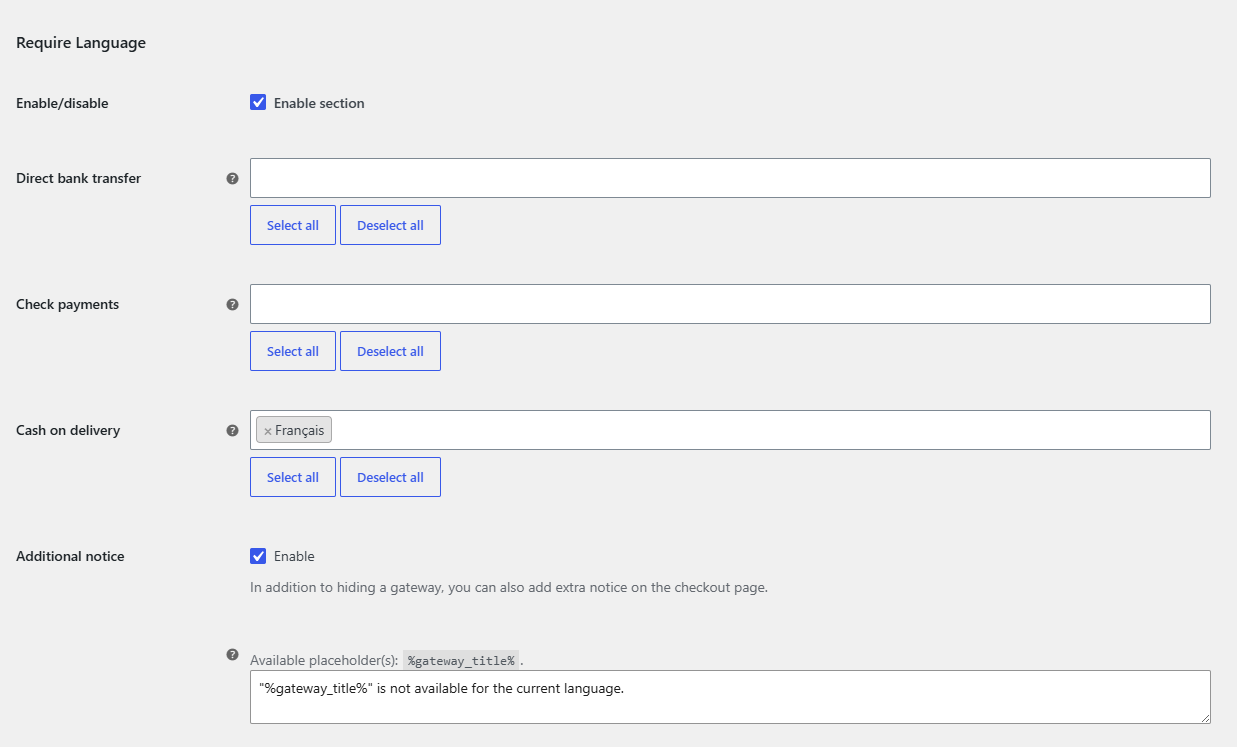
- Open the Language section. Its description tells you whether WPML or Polylang is detected (hover the plugin links).
- Tick Enable section under Require Language or Exclude Language.
- Select the languages next to each gateway. The list shows the languages configured in WPML or Polylang.
- Optionally edit the Additional notice. The default reads
"%gateway_title%" is not available for the current language. - Click Save changes.
FAQ #
The language list is empty. What is wrong? #
The list is filled from WPML or Polylang. If neither is active, it stays empty and a Require Language rule would hide the gateway for everyone. Activate your multilingual plugin and reload the section.
Can I translate the Additional notice? #
Yes. Notices accept shortcodes, so you can wrap text per language with [alg_wc_cpg_translate lang="EN,DE" lang_text="..." not_lang_text="..."]. See the shortcodes reference.
Can I combine currency with a cart total limit? #
Yes. All enabled conditions must pass, so you can, for example, require EUR and a minimum cart total for the same gateway. See hide a payment method based on cart total.
Get more control #
Currency and language rules are free for the four built-in WooCommerce gateways. Conditional Payment Methods for WooCommerce Pro applies them to any payment gateway. See what Pro unlocks.
Need a hand? Our team answers every ticket on the Conditional Payment Methods support forum.