To hide a payment method based on cart total in WooCommerce, use Conditional Payment Methods for WooCommerce: go to WPFactory > Conditional Payment Gateways > Cart Total, enable Minimum Cart Total or Maximum Cart Total, enter an amount next to the gateway and save. The gateway disappears when the cart is below the minimum or above the maximum.
Typical uses: allow Cash on delivery only for orders up to a set amount, require a minimum order before bank transfer appears, or keep a gateway with high fees for larger orders only.
Before you start #
- Conditional Payment Methods installed and active (see Getting started).
- Free version: the rule works for Direct bank transfer, Check payments, Cash on delivery and PayPal Standard. Other gateways need Pro.
Set a minimum or maximum cart total #
- Go to WPFactory > Conditional Payment Gateways (also reachable at WooCommerce > Settings > Conditional Payment Gateways) and open the Cart Total section.
- In the Minimum Cart Total block, tick Enable/disable: Enable section.
- Enter the minimum amount next to each gateway you want to limit, for example
50next to Direct bank transfer. Use a dot for decimals (49.99). - To cap a gateway, tick Enable section in the Maximum Cart Total block and enter the maximum next to the gateway, for example
300next to Cash on delivery. - Leave a field empty or set it to
0to ignore that gateway. - Optionally edit the Additional notice for each block (see below).
- Click Save changes.
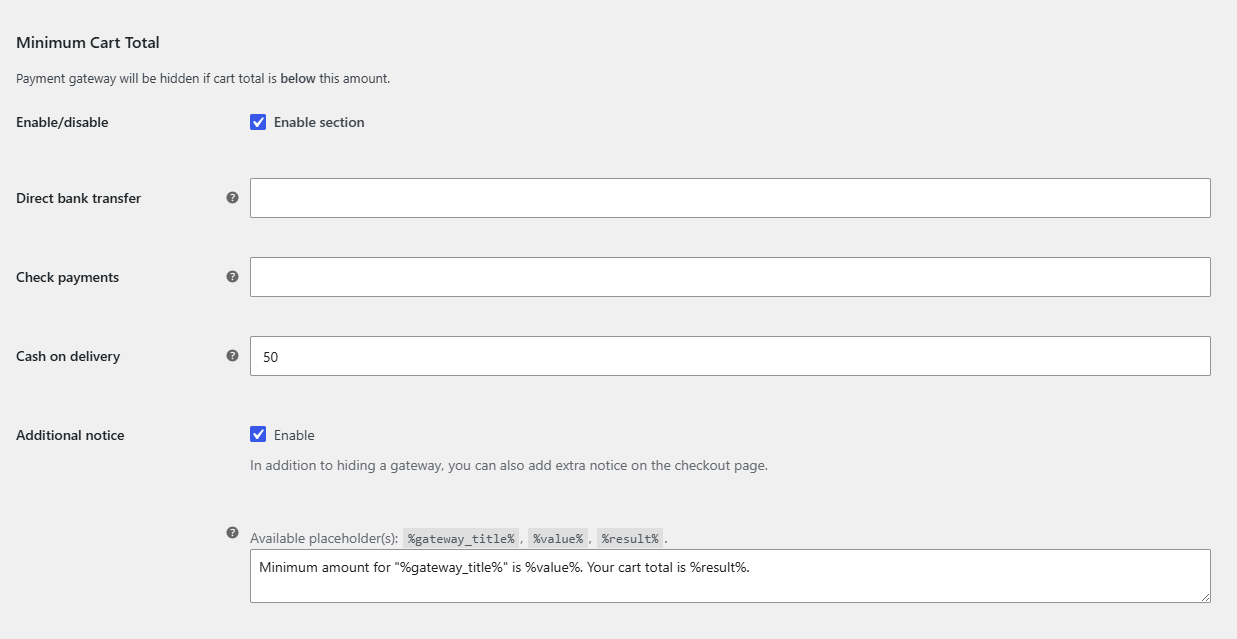
Choose how the cart total is calculated #
At the bottom of the Cart Total section, Cart Total Calculation > Cart total sets the number that is compared with your limits. It holds a shortcode, and the default is:
[alg_wc_cpg_cart_total exclude_taxes="yes" exclude_shipping="no" exclude_discounts="no"]By default the total is the order total after coupons, including shipping, without taxes. Change the attributes to suit your rule:
| Attribute | Default | What yes does |
|---|---|---|
exclude_taxes |
yes |
Subtracts all taxes from the total. |
exclude_shipping |
no |
Subtracts the shipping cost (and shipping tax when taxes are included). |
exclude_discounts |
no |
Adds coupon discounts back, so the limit is checked against the total before discounts. |
Example: to compare products only, before coupons and without shipping or tax, use [alg_wc_cpg_cart_total exclude_taxes="yes" exclude_shipping="yes" exclude_discounts="yes"].
Show customers why a gateway is missing #
Each block has an Additional notice option, enabled by default. When the gateway is hidden, the notice is added on the checkout page. The defaults are:
- Minimum:
Minimum amount for "%gateway_title%" is %value%. Your cart total is %result%. - Maximum:
Maximum amount for "%gateway_title%" is %value%. Your cart total is %result%.
%gateway_title% is the gateway name, %value% is your limit and %result% is the current cart total, both formatted as prices. HTML and shortcodes are allowed. The notice style (Notice, Error or Success) is set once in General > Notice styling.
FAQ #
Is the gateway hidden when the cart total equals the limit? #
No. A total exactly equal to the minimum or maximum keeps the gateway. It is hidden only when the total is below the minimum or above the maximum.
Can I set both a minimum and a maximum for the same gateway? #
Yes. Enable both blocks and enter a value for the gateway in each. The gateway then shows only when the total is within the range.
Does the limit use the store currency? #
The amount is compared with WooCommerce’s cart total as calculated at checkout. If you run a currency switcher, check that your limits make sense for every currency, or combine the rule with the Currency condition.
Why does the notice not appear on my checkout? #
The notice is added when the classic checkout refreshes its order review. On the block-based Checkout the gateway is still hidden, but the extra notice may not display. See troubleshooting.
Get more control #
Cart total rules are free for the four built-in WooCommerce gateways. Conditional Payment Methods for WooCommerce Pro applies them to any payment gateway, such as Stripe or other card processors. See what Pro unlocks.
Need a hand? Our team answers every ticket on the Conditional Payment Methods support forum.