To show payment methods by country in WooCommerce, use Conditional Payment Methods for WooCommerce: go to WPFactory > Conditional Payment Gateways > Country, enable Require Country or Exclude Country, pick countries for each gateway, choose how the country is detected and save.
Use Require Country to offer a gateway only in certain countries (for example, bank transfer for domestic customers only) and Exclude Country to hide it in specific countries (for example, no Cash on delivery for international orders).
Before you start #
- Conditional Payment Methods installed and active.
- Free version: country rules work for Direct bank transfer, Check payments, Cash on delivery and PayPal Standard. Other gateways need Pro.
- If you plan to detect the country by IP, WooCommerce geolocation must be working (MaxMind Geolocation set up at WooCommerce > Settings > Integration).
Restrict payment methods by country #
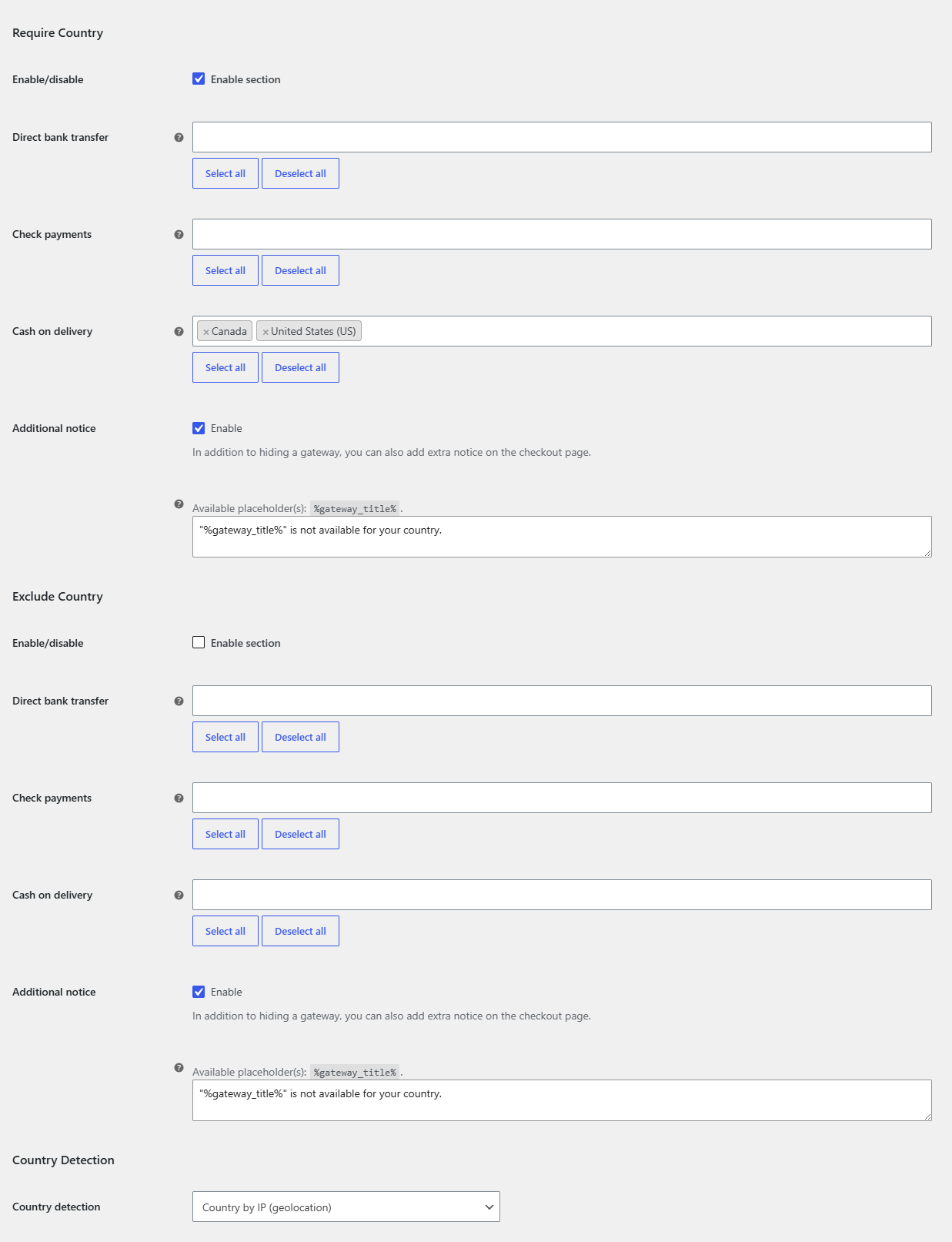
- Go to WPFactory > Conditional Payment Gateways (also reachable at WooCommerce > Settings > Conditional Payment Gateways) and open the Country section.
- In the Require Country block, tick Enable/disable: Enable section and select the allowed countries next to each gateway. Use Select all or Deselect all to speed things up.
- In the Exclude Country block, tick Enable section and select the countries where each gateway should be hidden.
- Scroll to Country Detection and choose Country detection: Country by IP (geolocation), Billing country or Shipping country.
- Optionally edit the Additional notice. The default reads
"%gateway_title%" is not available for your country. - Click Save changes.
Which country detection to choose #
| Option | Uses | Best for |
|---|---|---|
| Country by IP (geolocation) (default) | The visitor’s IP address, looked up by WooCommerce geolocation. | Rules about where the shopper is, regardless of the address they type. |
| Billing country | The billing country on the checkout form. | Payment rules tied to the card or account holder’s address. |
| Shipping country | The shipping country on the checkout form. | Rules tied to the delivery destination, such as Cash on delivery. |
The default is Country by IP. If most of your rules are about the address the customer enters, switch to Billing country or Shipping country, so the gateways update when the customer changes the country field.
Need states, cities or postcodes, or per-product rules? #
This condition works at country level only. To restrict gateways by state, city or postcode, use Conditional Payment Methods by Location for WooCommerce, see restrict payment methods by state and restrict payment methods by postcode. To assign allowed gateways on each product’s edit page instead of from one settings screen, Payment Methods by Product & Country for WooCommerce is the better fit, see assign payment gateways to individual products.
FAQ #
What happens if the country cannot be detected? #
If geolocation returns no country (or the customer has not entered one yet), there is nothing to match. A Require Country rule then hides the gateway, and an Exclude Country rule leaves it visible.
Can I use Require and Exclude together? #
Yes. Both are checked, and the gateway must pass both. In practice, one of them per gateway is usually enough.
Does the country rule update when the customer changes their address? #
With Billing country or Shipping country, yes: the rule is checked each time WooCommerce refreshes the payment methods after an address change. With Country by IP, the address fields do not affect the result.
Can I test country rules without a VPN? #
Set Country detection to Billing country while testing and change the billing country at checkout. Turn on General > Debug to log each check to WooCommerce > Status > Logs.
Get more control #
Country rules are free for the four built-in WooCommerce gateways. Conditional Payment Methods for WooCommerce Pro applies them to any payment gateway. See what Pro unlocks.
Need a hand? Our team answers every ticket on the Conditional Payment Methods support forum.