To restrict payment methods by state in WooCommerce, use Conditional Payment Methods by Location for WooCommerce: go to WPFactory > Payment Gateways by Customer Location > States, select states in Include states or Exclude states for each gateway, choose billing or shipping state in General and save.
Examples: offer Cash on delivery only in the states you deliver to yourself, or hide a gateway in a state where it is not licensed.
Before you start #
- Payment Methods by Location installed and active.
- The state lists show the states of your store’s base country only (set at WooCommerce > Settings > General > Store Address). The section notes this as Base country states only.
Restrict payment methods by state #
- Go to WPFactory > Payment Gateways by Customer Location (also reachable at WooCommerce > Settings > Payment Gateways by Customer Location) and open General.
- Set Detect state by to Billing state (default) or Shipping state, and save.
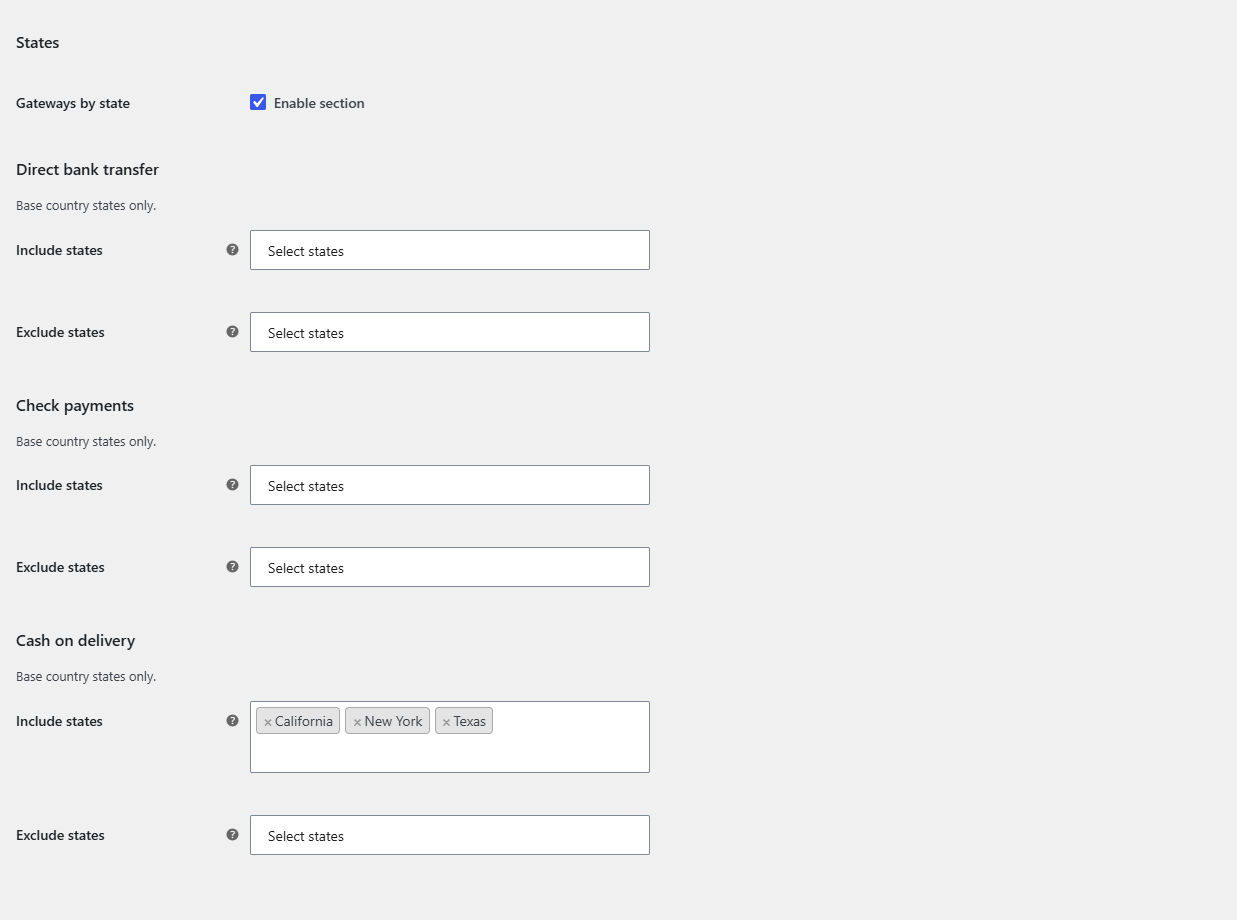
- Open the States section and make sure Gateways by state: Enable section is ticked.
- For each gateway, select states in Include states (gateway shows ONLY there) or Exclude states (gateway is hidden there).
- Click Save changes.
Customers from other countries #
State rules compare state codes only. Keep these cases in mind:
- A customer from another country who enters a state or province is not in your Include list, so a gateway with Include states is hidden for them.
- A customer from a country without states (empty state field) skips the state rule, so the gateway stays visible unless another rule hides it.
- To be explicit, pair a state rule with a country rule for the same gateway, see show payment methods by country.
FAQ #
Why are there no states in the list? #
Your store’s base country has no predefined states in WooCommerce, or the base country is not the one you expected. Check WooCommerce > Settings > General.
The payment methods do not change when the customer picks a state. #
WooCommerce normally refreshes the checkout when a state dropdown changes. If your theme or checkout uses a free-text state field that does not refresh, add it under General > Advanced Options > Force JavaScript checkout update. See troubleshooting.
Can I restrict by postcode instead? #
Yes, postcodes give finer control and support wildcards and ranges. See restrict payment methods by postcode.
Get Payment Methods by Location #
All location rules in this guide work with any payment gateway, including third-party and custom gateways. See Conditional Payment Methods by Location for WooCommerce.
Need a hand? Our team answers every ticket on the Payment Methods by Location support forum.