To restrict payment methods by city in WooCommerce, use Conditional Payment Methods by Location for WooCommerce: go to WPFactory > Payment Gateways by Customer Location > Cities, type city names, one per line, in Include cities or Exclude cities for each gateway, choose billing or shipping city in General and save.
A typical use is offering Cash on delivery or in-person payment only in the cities where you run your own delivery.
Before you start #
- Payment Methods by Location installed and active.
- City rules read the city from the classic checkout form. Use the classic checkout (the
[woocommerce_checkout]shortcode) for city rules, see troubleshooting for the block checkout.
Restrict payment methods by city #
- Go to WPFactory > Payment Gateways by Customer Location (also reachable at WooCommerce > Settings > Payment Gateways by Customer Location) and open General.
- Set Detect city by to Billing city (default) or Shipping city, and save.
- Open the Cities section and make sure Gateways by city: Enable section is ticked.
- For each gateway, type city names in Include cities (gateway shows ONLY there) or Exclude cities (gateway is hidden there), one city per line.
- Click Save changes.
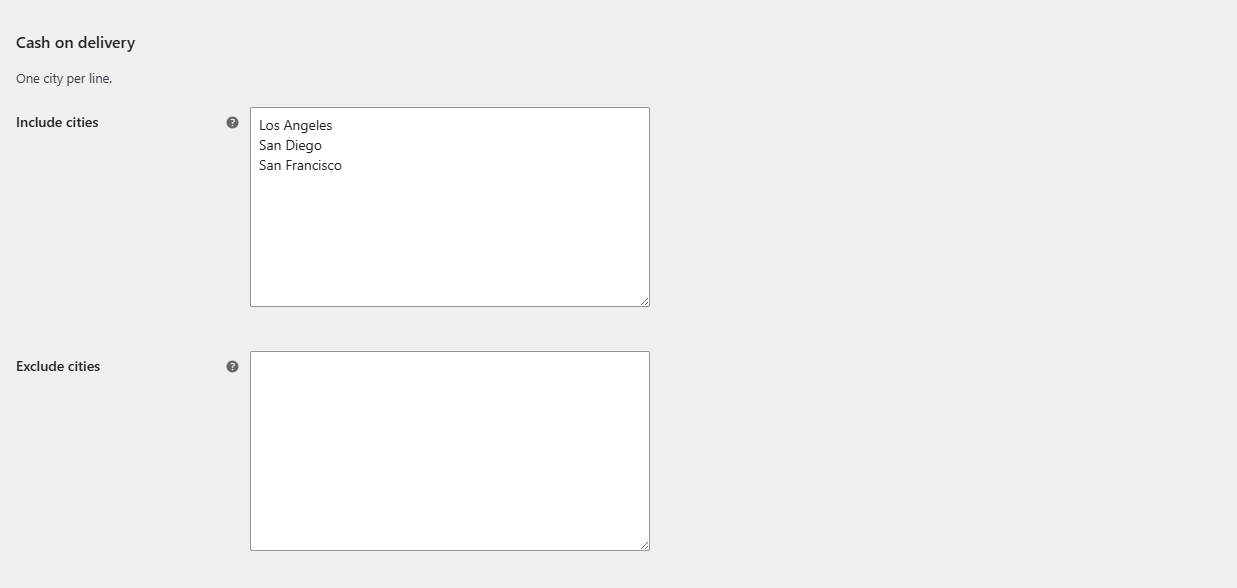
How city names are matched #
- Matching is exact but not case-sensitive:
berlinmatchesBerlinandBERLIN. - Spelling, spaces and accents must match what customers type. Add common variants on separate lines, for example
MunichandMünchen. - Until the customer has entered a city, the plugin uses your store’s city from WooCommerce > Settings > General.
FAQ #
Can I use wildcards in city names? #
No. Wildcards and ranges work in the Postcodes section only. If city names are too varied, use postcode rules instead.
The gateway list does not update while the customer types the city. #
Add Billing city or Shipping city under General > Advanced Options > Force JavaScript checkout update. The checkout then refreshes as the customer types in that field.
Why does a city rule affect customers who have not typed a city? #
Because the store city is used as the fallback. If your store city is in an Exclude list, the gateway stays hidden until the customer enters their own city.
Get Payment Methods by Location #
All location rules in this guide work with any payment gateway, including third-party and custom gateways. See Conditional Payment Methods by Location for WooCommerce.
Need a hand? Our team answers every ticket on the Payment Methods by Location support forum.