To show payment methods by country in WooCommerce, use Conditional Payment Methods by Location for WooCommerce: go to WPFactory > Payment Gateways by Customer Location > Countries, select countries in Include countries or Exclude countries for each gateway, set Detect country by in General and save.
Examples: offer bank transfer only to domestic customers, hide Cash on delivery outside your delivery countries, or show a regional wallet only in the countries it supports.
Before you start #
- Payment Methods by Location installed and active (see Getting started).
- To detect the country by IP, WooCommerce geolocation should be available. The General section links straight to the Geolocation settings at WooCommerce > Settings > Integration.
Restrict payment methods by country #
- Go to WPFactory > Payment Gateways by Customer Location (also reachable at WooCommerce > Settings > Payment Gateways by Customer Location) and open General.
- Set Detect country by to Billing country (default), Shipping country or Country by IP, and save.
- Open the Countries section and make sure Gateways by country: Enable section is ticked.
- Find the gateway by its admin name. In Include countries, select the only countries where it should appear, or in Exclude countries, select countries where it should be hidden.
- Click Save changes.
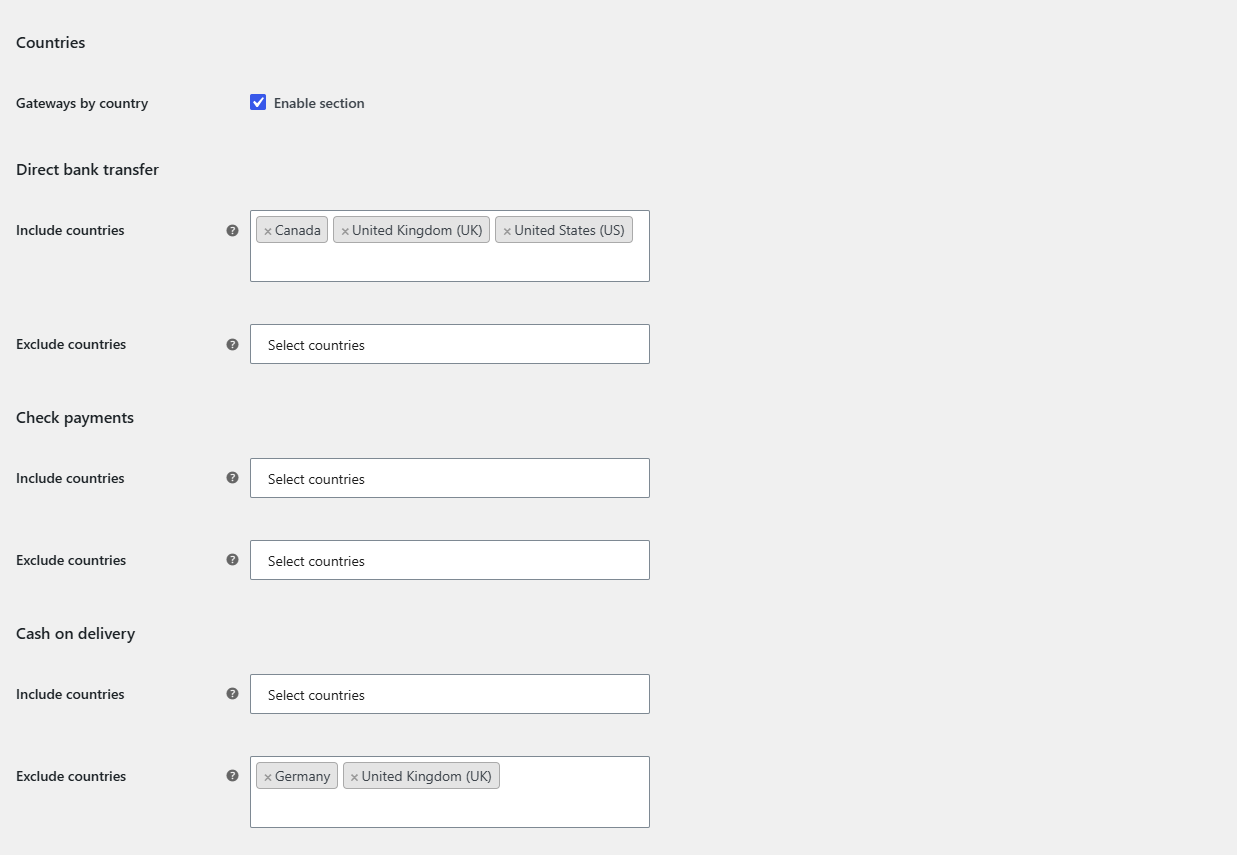
Which country detection to choose #
| Option | Uses | Notes |
|---|---|---|
| Billing country (default) | The billing country on the checkout form. | Updates when the customer changes the billing country. |
| Shipping country | The shipping country on the checkout form. | Best for delivery-related gateways such as Cash on delivery. |
| Country by IP | WooCommerce geolocation of the visitor’s IP. | If no country is found, your store’s default customer location country is used. |
Select all EU countries at once #
The country list includes a European Union entry. Selecting it matches all EU member states in one step. Note that the plugin’s EU list also contains the United Kingdom (GB), so if you do not want the UK included, select the countries individually. The list also includes Netherlands Antilles.
FAQ #
What happens before the customer picks a country? #
If the detected country is empty, the country rule is skipped and the gateway stays visible. WooCommerce usually pre-fills the country from the customer account or your default customer location, so the rule normally applies from the first page load.
Can I use Include and Exclude for the same gateway? #
Yes, both are checked. Usually one of them is enough: Include for a short list of allowed countries, Exclude for a short list of blocked ones.
Can I restrict by country and state together? #
Yes. Every section with a value for the gateway must pass. See restrict payment methods by state.
How is this different from Payment Methods by Product & Country? #
Payment Methods by Product & Country for WooCommerce ties gateways to the products in the cart, while Payment Methods by Location decides only by where the customer is. See restrict payment gateways by billing country in that plugin’s docs.
Get Payment Methods by Location #
All location rules in this guide work with any payment gateway, including third-party and custom gateways. See Conditional Payment Methods by Location for WooCommerce.
Need a hand? Our team answers every ticket on the Payment Methods by Location support forum.